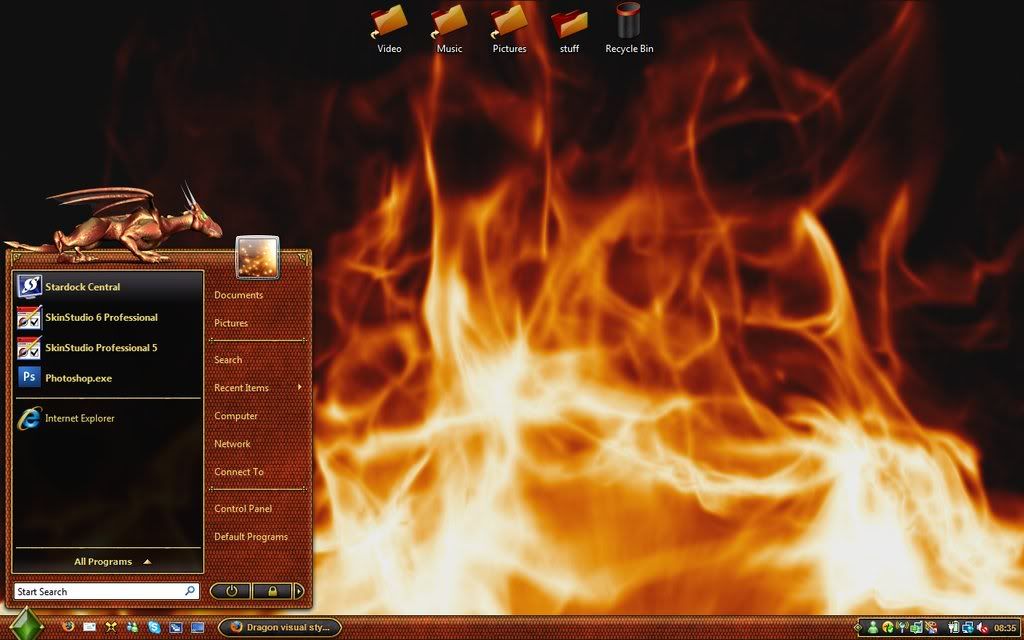
Dragon visual style shows off the power of WindowBlinds

The new Dragon visual style from Stardock Design doesn't just look great, it's fast. For most users, Dragon makes Windows faster than the default look of either Windows XP and especially Windows Vista. On top of that, it has stunning animation on the Start menu at full 30fps. And did we mention it does this without slowing down your PC?  This is what happens when you develop a technology that integrates seamlessly into the native Windows display engine while taking advantage of advances in video drivers (both ATI and nVidia).

Designed by Stardock Design's Mike Bryant and Chaninja, Dragon delivers a complete visual make over to both Windows XP and Windows Vista users that is consistent, reliable, and beautiful.

Dragon-vista-ss
Dragon on Windows Vista


Dragon-xp-ss
Dragon on Windows XP

If you don't have WindowBlinds you can get it at http://www.windowblinds.net. You can download Dragon from WinCustomize.com.  Stardock Design also has a page at deviantART. If you have an account there, stop by and say hi!

21,921 views 17 replies
Reply #1 Top
That is one beautiful skin!

What wall is that?  It's perfect.
That would make an awesome dream if the clouds were moving.
Reply #2 Top
Stupendous job guys! I like how you decided to use the much underutilized start menu animation. The colors are spot on (great choices). Attention to detail, as a skinner, is sometimes overlooked... but ALWAYS pays off with the end result. Be proud of your work. Thank you.
Reply #3 Top
I'm using it now and I love it! :CONGRAT:

My icon recommendation: Zippo By Pixtudio :CONGRAT: :CONGRAT: :CONGRAT: :CONGRAT:
Reply #5 Top
utterly fantastic skin. The best in a long time and it's FREE!
Reply #6 Top
Its Great. I have some other works of the two artists and they are both superb. :CONGRAT:
Reply #7 Top
Simply brilliant! :HOT: 
Reply #8 Top
When I press the start button I see the dragon over the search area minus his head, if I move the mouse to the shutdown buttons I see the tail end over them and if I move the mouse back to the search he appears back there. Sometimes I see a bit of him near the system tray and others I see his feet by the top left of the screen.

Running Vista Ultimate with the vista version of dragon and a fully patched up windowblinds.

Any ideas how to fix as this skin is very nice otherwise.
Reply #9 Top
Post your WB system info.

64bit Vista?
Reply #10 Top
Your computer has a Windows Experience Index base score of 5.4
Your Windows Graphics Experience score is 5.9

WindowBlinds version : WindowBlinds 6.1 (build 89 x86 - Vista Edition) - 64 bit OS

WindowBlinds is installed correctly on this PC
WindowBlinds appears to be activated on this PC
(Generic PnP Monitor) 1 is attached to NVIDIA GeForce 8600 GT

Wblind.dll 2008/03/08 18:30:20
Wblind64.dll 2008/03/08 18:30:05
Wbsrv.dll 2008/02/13 16:15:22
Wbconfig.exe 2008/02/20 13:52:33
Wbload.exe 2008/02/14 11:05:14
Wbhelp.dll 2007/08/27 10:54:07
Tray.dll 2007/09/12 16:58:21
Wbload.dll 2007/09/26 11:53:28
Screen.exe 2008/02/13 16:15:18


Also if it helps I am running SP1 of Vista
Reply #11 Top
I think its the newest beta that fixes the issue with Catalyst 8.3, something got b0rked on x64..
Reply #12 Top

Great skin and thanks! One questoin I can't seem to get an answer for though. With this skin and some other skins I get a crack between my taskbar and whatever app I have fully opened. I can see my desktop wall through the crack. This little crack spans the entire taskbar.

http://img505.imageshack.us/my.php?image=dragonspaceku8.jpg

winxp/pro/sp2/wb6 newest beta

Reply #14 Top
Beautiful HG! :CONGRAT:
Skinhit's icons a perfect for your recolored version of the blind!

My current setup (vista)
Dream: WS Engulf Orange By WS76


Reply #15 Top
That looks hot .. literally.. :LOL:  :LOL:  :HOT: 
Reply #16 Top
This goes great with Vlad's new Dragon Wall.
Reply #17 Top
i have fallen in love with this skin........beautifully executed..... :)