An AllProgs Arrow trick fix.

Merry Christmas skinners.

  EDIT...what I thought was a sure fix isnt as effective as first thought...it does help but isnt foolproof...you can still learn about how the left negative content margin works tho. ;p 


Almost all skinners(and many users)are aware of the problems with using the allprogs arrow to cover the allprogs text area.NonEnglish systems damn near always get it misaligned because those systems have more text there.

Even substyles can be a pain because even a normal setup for this spot can get pushed around a bit.

I think I have the solution.It,s only been tested on Slider XP,and only on Hungarian and French languages.(thank you Bilbo and Quentin)

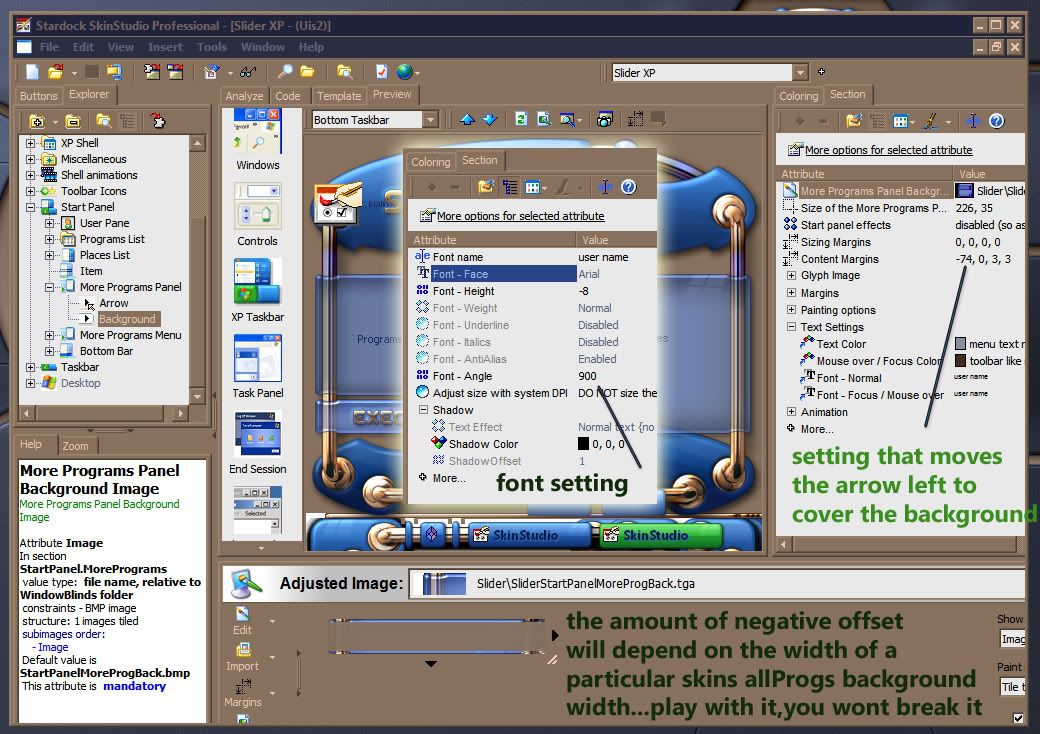
It's SUPER easy.Just assign a standard windows system font(arial 8) and set the font angle to 900.This will point the font straight up...then it wont matter how long it gets.

Arrow graphic must cover the background precisely or you will see classic mouseover color in places.
24,111 views 40 replies
Reply #1 Top
Cool!
Reply #2 Top
And it only took me 4 years to figure it out. :LOL: 
Reply #3 Top
thanks for sharing that with us Mick......its always been a mongrel of an area to deal with sometimes..........
Reply #4 Top
If you go to Maxstyles,you can now get the demo wb with the 'trick' being used. :HOT: 
Reply #5 Top
 :CONGRAT: 
Reply #7 Top
:CONGRAT: :CONGRAT: :CONGRAT:
Reply #8 Top
Wow...that really a cool solution but any idea why it need to be 900? instead as just 90 degree? Never tried it yet but just curious.. :) Thanks for sharing this tip.... :)

Reply #9 Top
just the way SKS is setup basj, no rhyme or reason.  :NOTSURE: 
Reply #10 Top
Thanks Micheal :)
Reply #12 Top
Wow...that really a cool solution but any idea why it need to be 900? instead as just 90 degree? Never tried it yet but just curious.. Thanks for sharing this tip....

End of quote


For some reason 900 IS 90 degrees...1800 will turn the text completely backwards and invisible. ;) (but then it would still affect the alignment)I use 1800 to hide user name text. ;) 
Reply #13 Top
As a test,I wonder if somebody on a non english system would download Neutronium DM and apply this to the default style...and tell me if it re-aligns the allprogs. :) (while using large icons in the start menu...if the skin hasnt been tweaked properly,it will be off anyway...I didnt notice this until I did one skin after NeutroniumDM)
Reply #14 Top
bump
Reply #15 Top
I am on english system, so me cant help..sorry... :NOTSURE:
Reply #16 Top
hmm.. Neutronium work fine for me, on ur default settings. ;)
Of course im trying that many other skin like: Plasmartron, Not of This Earth, Knot veesta english sub etc.. Im just added new font on moreprog bg section and set that like on your pic. All skin work fine on my Hungarian xp! so thanks that Michael! :CONGRAT: :HOT:
Reply #17 Top
Woohoo! :D 
Reply #18 Top
So far,not a single report of an issue with Slider from a non english system. :D 
Reply #19 Top
Is this possible in SKS6? If so, how?
Reply #20 Top
It will work...I just dont know where the settings are in SKS6.

Now Vista is a whole nother thing...havnt a clue. ;p 
Reply #21 Top
It helps to find a setting that works with large AND small icons.(the negative offset)

I've seen it look fine with one size but not the other til I tweaked it some more...then it worked for both. :) 
Reply #22 Top

so I can find this post
Reply #24 Top
Ditto
End of quote


Reply #25 Top
Well after more testing...seems not all languages are fixed by this...Slider worked fine in French...No Load limit does not.

Couldnt find a sweet spot that satisfied French AND english.

-73 worked on English and hingarian...had to use -90 on French. X-( (for NLL)

And I really thought I had it nailed with this. :(