
Backing Up Outlook
Simple way to backkup your important Outlook data
 WinCustomize Forums
If you are like me, Microsoft Outlook 2003 is something that you rely on everyday for e-mail, calendar, and contacts. I have Outlook setup for both personal and work e-mails, and a bunch of rules and folders to sort all the different types of mail I receive. I really don't want to count how many e-mails I have saved in various folders, but I know people that will easily have thousands spanning several years.
That's just e-mails alone, and many of us use Outlook to manage our schedules with it's integrated calendar. Let's not forget to mention all the contacts we have stored also. Names, phones numbers, e-mail address.....the list goes on and on. Now let me ask you, how many of you have lost this data before? Well I have, and in many cases there is no way you recover your lost data.
I regularly backup all my important data, but Outlook is something I also backup separately just because it's so important to me. While there is a couple of ways to backup Outlook data, I wanted to show you the way I do it, which I found is the easiest. Microsoft offers a free add-in for Outlook 2002/2003 which backups your Personal Folders files (.PST). Outlook stores all of your Outlook folders, Calendar, and Contacts in a .PST file.
Note: Depending on your Outlook setup, you could have multiple .PST files. This backup add-on gives the ability to backup all your .PST files.
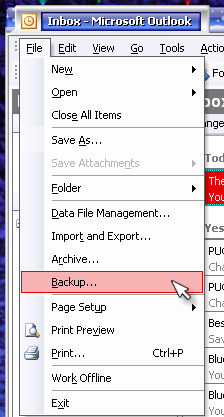
Once installed you will have a "backup" option in the file menu of Outlook.
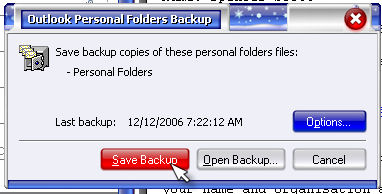
When you select open the backup utility you will have the option to select which .PST files to backup, and where to back them up to.
You can also schedule backups and load previous saved ones as well. This small utility has become vital in my usual backup routines, and I highly recommend it. Be sure to read more information on the download page, and you will need to validate your Microsoft Office to download.

