AltTabby Open Beta Feedback
With the AltTabby Open Beta release today, we are creating this thread so that users can report any observed issues.
Thank you for your interest and any time you put into making AltTabby a better product.
With the AltTabby Open Beta release today, we are creating this thread so that users can report any observed issues.
Object Desktop members can get the release from within Object Desktop Manager
Individual purchases (as well as Object Desktop Members) can also be obtained from your account page: https://store.stardock.com/myaccount/products
For guest check-out purchase (no account), from this link: http://www.stardock.com/support/productkeyretrieval
Please include the following for anything found:
Exact Windows version \ build (winver.exe)
Detailed steps to recreate the issue seen
Screenshots and videos are very helpful. Videos can be uploaded to a cloud drive service (GoogleDrive, DropBox, OneDrive, YouTube), with a shared link included in your post. Images can be copied and pasted directly into a post.
If there are specific apps that the app does not work (well) with, please note what apps and their exact versions. If any app is not common, a link to a trial version would be appreciated.
Thank you for your interest and any time you put into making AltTabby a better product.
Following up, this seems related to my previous post. If I have an app with two windows open, once Alt-Tabby shows that app, it just toggles between those windows. Group windows of the same app was turned on, with it turned off the widows behaved normally. That might explain some of the behaviour I reported above.
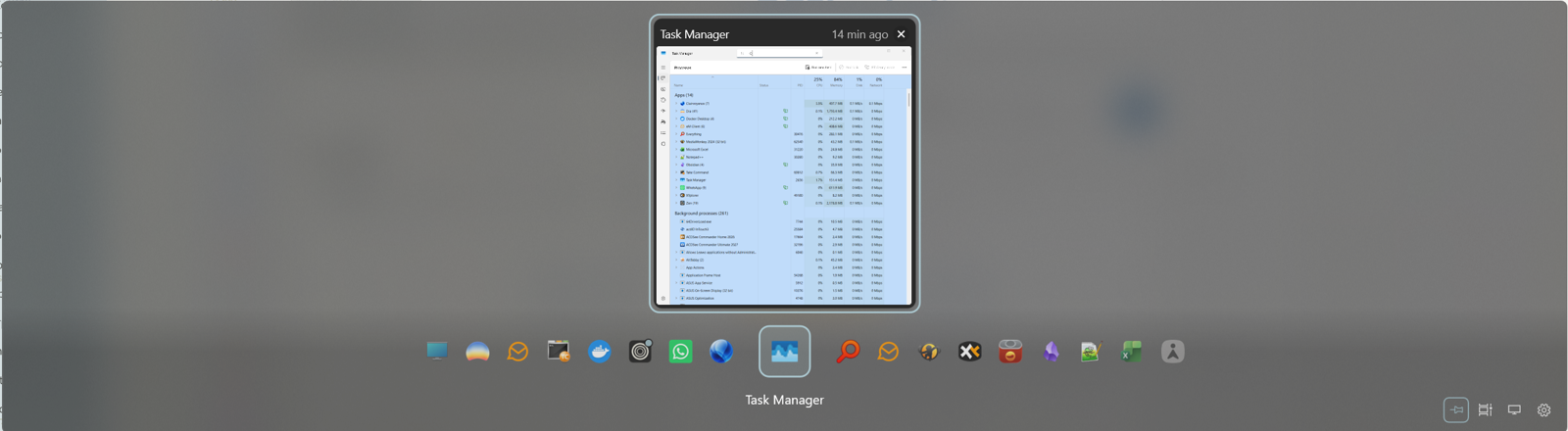
Not sure when it happened, but I'm not seeing the carousel, just the current window and icons below it.
The 0.9 release is useless on my system. It doesn't stay on top.
Do you mean it closes when you release alt tab or something else?
Which mode is it set to for staying open?
The 0.9 release is useless on my system. It doesn't stay on top.
Do you mean it closes when you release alt tab or something else?
Which mode is it set to for staying open?
My issue noted is basically the same. If I select "When keys are held for longer" v0.9 will disappear as soon as I try to swap apps. It's disappears so fast I'm not sure I could select another window except the next. Of course I'm holding down alt but it still switches and disappears.
The only way I can use is by selecting "Always pinned", but I lose the ability to "quick switch".
The 0.9 release is useless on my system. It doesn't stay on top.
Do you mean it closes when you release alt tab or something else?
Which mode is it set to for staying open?
My issue noted is basically the same. If I select "When keys are held for longer" v0.9 will disappear as soon as I try to swap apps. It's disappears so fast I'm not sure I could select another window except the next. Of course I'm holding down alt but it still switches and disappears.
The only way I can use is by selecting "Always pinned", but I lose the apply to "quick switch".
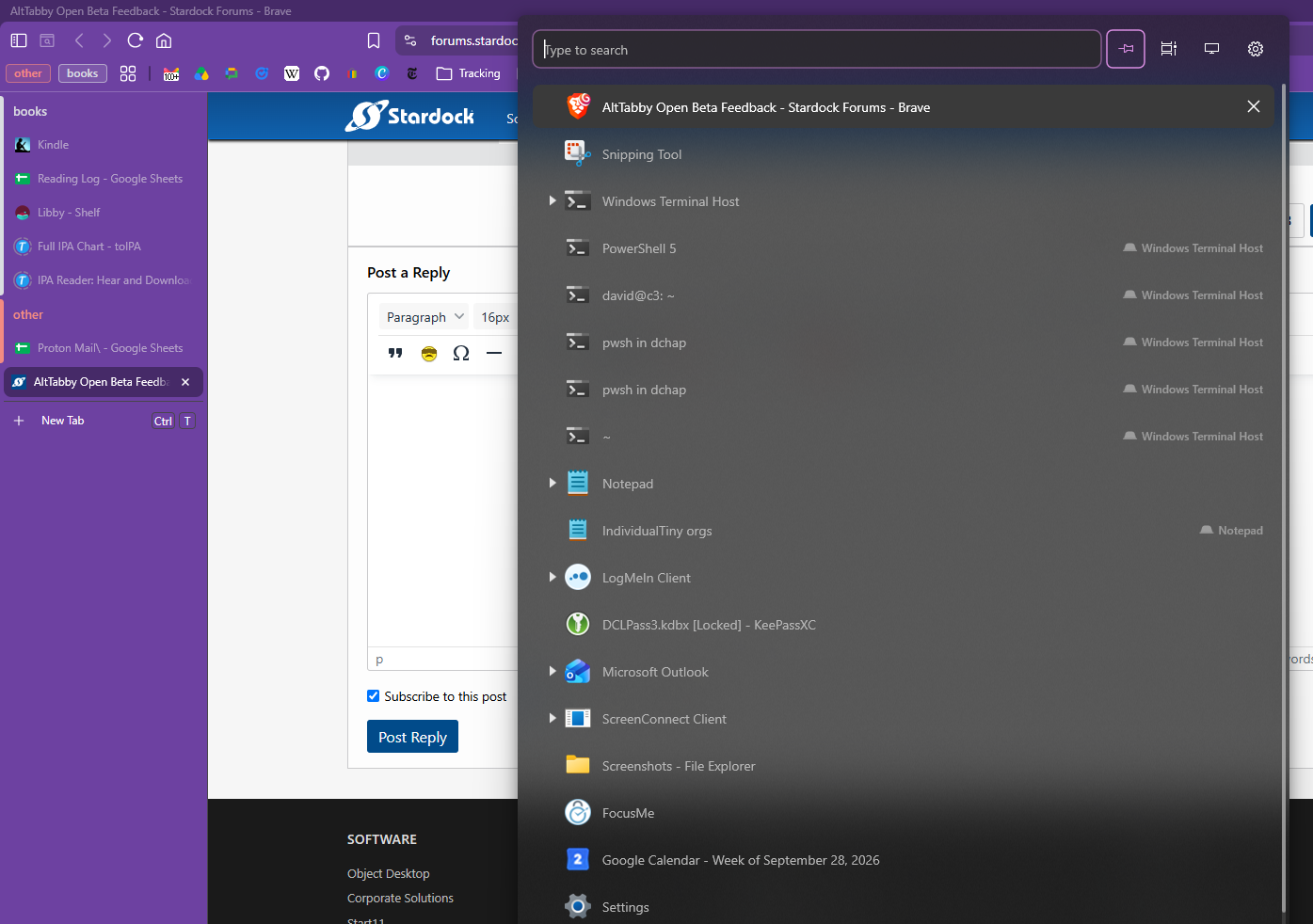
I'm seeing the same. I see one window in the display, with icons below. I can use arrow keys to navigate, and then <Enter> or mouse-click on the window to select.
The 0.9 release is useless on my system. It doesn't stay on top.
Do you mean it closes when you release alt tab or something else?
Which mode is it set to for staying open?
My issue noted is basically the same. If I select "When keys are held for longer" v0.9 will disappear as soon as I try to swap apps. It's disappears so fast I'm not sure I could select another window except the next. Of course I'm holding down alt but it still switches and disappears.
The only way I can use is by selecting "Always pinned", but I lose the apply to "quick switch".
I'm seeing the same. I see one window in the display, with icons below. I can use arrow keys to navigate, and then <Enter> or mouse-click on the window to select.
That sounds different?
Could you post a screenshot of what you are seeing?
Unless I select Always pinned it flashes and disappears when I press Alt-Tab.
Appreciate the fix for pinned profile windows. Any update on brave tab support?
Brave tabs should be working the same as Chrome / Edge ones. Just make sure you have the option enabled in Alt Tabby to show tabs and promote them to top level (if wanted)
Still not working for me. I have the options enabled. I see tabs when I use Edge. I don't see them when I use Brave (which is what I use most). I'd attach a screenshot but I can't seem to capture one that includes the AltTabby display!
You need to click on the cog top right of the carousel option in the AltTabby settings and pick "Wheel continues into next app"
Ah, I must have turned that off while trying to sort out other issues. I think I assumed it referred to the mouse wheel.
I can still only use it with "Always pinned" set. Either of the other settings just moves to the "next" window.
Ah, I must have turned that off while trying to sort out other issues. I think I assumed it referred to the mouse wheel.
I can still only use it with "Always pinned" set. Either of the other settings just moves to the "next" window.
What country are you in? Wondering if this is linked to keyboard layouts.
UK, using UK keyboard
Hello all,
We've now updated AltTabby to version 0.95 (file version 0.9.5.0). Update includes:
Addresses using Alt+Tab from full screen exclusive games.
Resolves issue with changing favicon settings.
Resolves some spacing issues in thumbnail view when very few apps are open.
Thank you again for your feedback and support in making AltTabby a better product.
Best regards,
Adam McGuinness
Stardock Support Specialist
Hey, the new version solves my screenshot problem! But not my Brave tab problem.
As you can see in the attached, I have 7 tabs open in one brave Window. AltTabby is just showing me the main window. (I usually have a few Brave windows open, including some app windows, but I simplified the case for this report, and it still isn't working).
I would really love to see this resolved-- my muscle memory is to use alt-tab when task-switching, which works when the two tasks are in different apps, but not when they are in two tabs of the same browser. The tab feature is exactly what I need-- and I know this because it works great in Windows Terminal. And it works as I hope when I very occasionally use Edge.
I've reported this several times and the response is always "that should be working!"
It is not working.


Hey, the new version solves my screenshot problem! But not my Brave tab problem.
As you can see in the attached, I have 7 tabs open in one brave Window. AltTabby is just showing me the main window. (I usually have a few Brave windows open, including some app windows, but I simplified the case for this report, and it still isn't working).
I would really love to see this resolved-- my muscle memory is to use alt-tab when task-switching, which works when the two tasks are in different apps, but not when they are in two tabs of the same browser. The tab feature is exactly what I need-- and I know this because it works great in Windows Terminal. And it works as I hope when I very occasionally use Edge.
I've reported this several times and the response is always "that should be working!"
It is not working.


If you set your tabs to horizontal instead of vertical in Brave does it work then?
Oh wow, it sure does. I'd still love to see vertical tab support for Brave, but I can live with that work-around for now. Thanks!
0.95 seems to have fixed my issues, I can now use it with "Never" and I've got the Carousel back
I have a feature request.
Would be great to have a shortcut to enable/disable the current monitor filter.
This is handy for multi monitor setups where you have multiple windows opened.
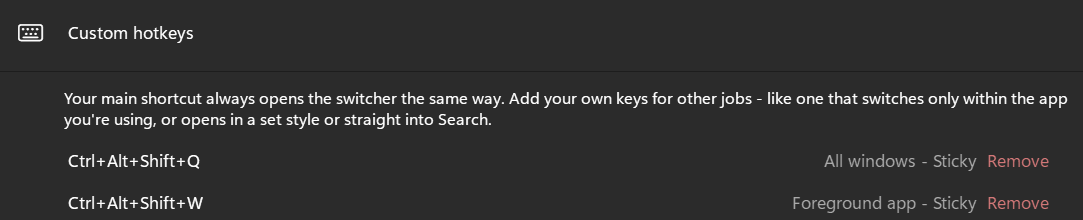
Also, when defining custom hotkeys, it would be great to have also the "current monitor/all monitors" and "current virtual desktop/all virtual desktops" options.
For example, I'd like to have other hotkeys to switch "All windows" but in current monitor, or "Foreground app" but only on current monitor, or in current virtual desktop.

I really wish that I could release the hotkey and have the task switch take place.
Again, muscle memory. I'm used to just hitting Alt-Tab to switch. If I'm just switching back and forth between two windows, native Windows behavior is perfect: alt-tab, release, brings up the previous Window and I don't have to think about it or look at the UI that pops up.
What I was hoping was that AltTabby would let me just extend this behavior to tabs when appropriate, and indeed AltTabby does seem to reliably pick the right window or tab. But I have to hit alt-tab, and then I have to click or hit enter or something. I don't love that extra piece of friction.
I really wish that I could release the hotkey and have the task switch take place.
Again, muscle memory. I'm used to just hitting Alt-Tab to switch. If I'm just switching back and forth between two windows, native Windows behavior is perfect: alt-tab, release, brings up the previous Window and I don't have to think about it or look at the UI that pops up.
What I was hoping was that AltTabby would let me just extend this behavior to tabs when appropriate, and indeed AltTabby does seem to reliably pick the right window or tab. But I have to hit alt-tab, and then I have to click or hit enter or something. I don't love that extra piece of friction.
I think you have it configured incorrectly.
You have it in pinned mode I think which is why it isn't going away for you. This is the setting at the bottom of the first page in the config window.
I also think the latest version has solved my problems which is good news - great work.
One feature request (I couldn't see an option): In thumbnail mode when I select a app which has tabs like Brave - I see the tabs under the thumbnail but when I move around the sub list the image in the thumbnail doesn't change to match the tab. Is that possible? I also notice when I set "Show Tabs at top level" only the front most tab shows an image.
Welcome Guest! Please take the time to register with us.
Select a reason for giving karma:
You're about to visit an external site:
Sign up here to get the latest news, updates, and special offers delivered directly to your inbox.