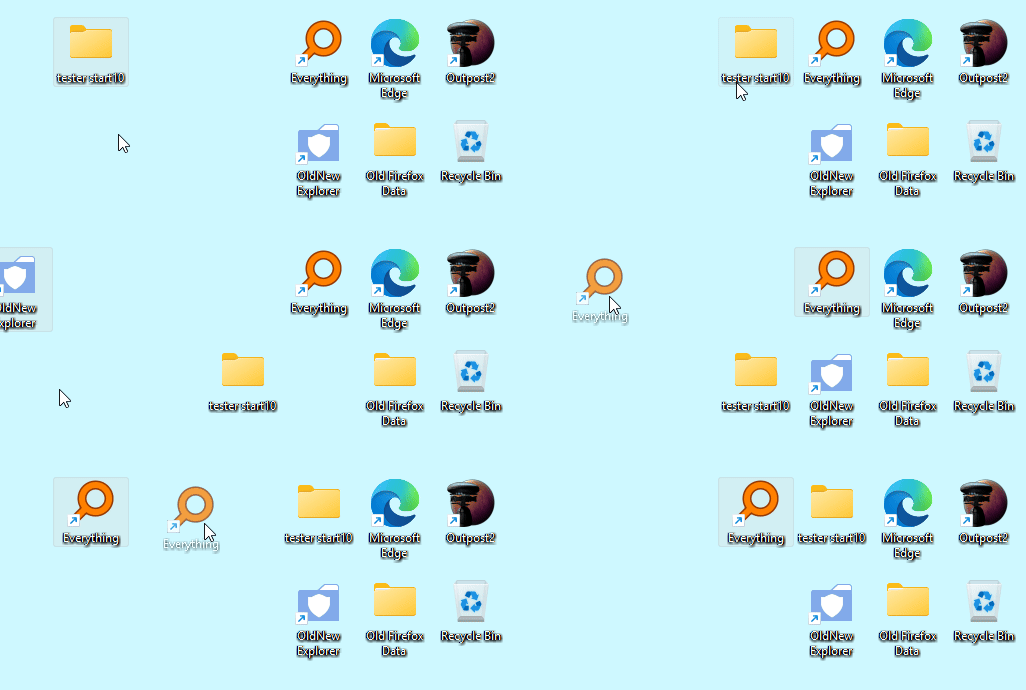
Desktop Icon Behaviour


I installed the latest version of Start11 and it is having a negative effect on my desktop icons

I have the taskbar positioned at the top of the screen, and I'm using the modern Windows 7 start menu, no other changes have been made

I cannot place icons on the lower half of my desktop

When I try to move desktop icons to a different location, they don't go where I am placing them, the icon moves other icons and lands somewhere else

Has anyone experienced this? Does anyone have a solution?

Thank you


277 views 10 replies
Reply #1 Top

Hello,

Sorry to hear you’re experiencing issues. Please try the following steps first:

  1. Uninstall Start11.

  2. Reboot your system immediately (this step is important).

  3. Download the latest version from your account product download page: https://store.stardock.com/myaccount/products.

  4. Install it, then reboot immediately again.

  5. Retest the issue and let us know the results.

If the problem persists, we’ll need more details to investigate further:

  • Your full Windows 10 or 11 version and OS Build number (run Winver.exe to check).

  • The Start11 version currently installed.

  • A short video showing the issue, which may help us understand it better.

Thank you,

Basj,

Stardock Community  Assistant.

Reply #2 Top

I followed your guidance and the problem persists, I will put together the additional information you are requesting and post them here when ready, thank you

Reply #3 Top

Just curious. Do you by any chance have "Auto arrange icons" checked in the desktop view settings?

Reply #5 Top

Thank you for the information and video. From the video I can see that you having issue to put the icon near the bottom of your screen, around the area where the taskbar used to be, yes? I have forwarded your problem/question to Stardock Support Team for their assistance. Please keep an eye on this thread for any updates. We appreciate your feedback and patience. Thank you.

Basj,

Stardock Community  Assistant

Reply #6 Top

It's actually not exactly where the taskbar used to be, it's the row above the old taskbar position

If I uninstall Start11, I'm able to use that area of the desktop for icons

The other issue, which is not part of the video, but related, is when you try to place an icon near another icon, it somehow swaps places with the neighbouring icon when you let go of the mouse

Same as the first problem, if I uninstall Start11, moving icons around the desktop is effortless

Thanks for helping, hopefully it's a quick fix

Reply #7 Top
Quoting ross47, reply 3995186

The other issue, which is not part of the video, but related, is when you try to place an icon near another icon, it somehow swaps places with the neighbouring icon when you let go of the mouse

End of ross47's quote

This one, I can't reproduced. Refer to my short video below. 

Note: The taskbar still at the top on this one too.

Do you have any other application running on your system which also add or control how your desktop work?

Thank you,

Basj,

Stardock Community  Assistant

Reply #8 Top

I have no other applications that extend Windows, I try to keep minimal software of this computer

I will keep an eye on this thread, thanks again

Reply #9 Top

Hi ross47,

Thank you for posting.  

Quoting ross47, reply 3995186

It's actually not exactly where the taskbar used to be, it's the row above the old taskbar position

If I uninstall Start11, I'm able to use that area of the desktop for icons

The other issue, which is not part of the video, but related, is when you try to place an icon near another icon, it somehow swaps places with the neighbouring icon when you let go of the mouse

Same as the first problem, if I uninstall Start11, moving icons around the desktop is effortless

Thanks for helping, hopefully it's a quick fix

End of ross47's quote

Can you confirm if the issue(s) remain with our latest released update (2.73)?  

If so, some more specific details might be helpful for us to try reproducing exactly what you are.  This would include: 

  1. How many monitors you are using and their display configuration (screenshot of display settings).
  2. Icon size (Right-click the desktop -> View).
  3. If possible, a video of the entire desktop area showing both issues.  From your description, it seems like icon location, including the presence of other icons may be affecting their movement.  
  4. Any information regarding if anything at all changes the behavior for you (restarting Windows explorer, resorting the icons, etc). 

This information could help to recreate your conditions as closely as possible to test further.

Best regards,

Adam McGuinness
Stardock Support Specialist

Reply #10 Top

Yes, both problems seem to be resolved after upgrading to the latest version, thank you

In fact, there was a third issue (that surfaced after posting this), and it also seems to be resolved, when I rebooted, my desktop icons got scattered

Appreciate the quick solution