Start11 Taskbar Bug

Notification area unclickable with Windows 11 10.0.26220

Since updating to Windows 11 Version 10.0.26220 Build 26220, the taskbar notification area (right side) is no longer clickable and the tray cannot be expanded. I have tried changing the taskbar touch mode detection settings, but this did not resolve the issue. Everything was working normally before this Windows update. Below is an image of the affected area. None of the icons can be clicked (or right clicked), including the time/date, and the tray cannot be expanded.

273 views 11 replies
Reply #11 Top
Answer

Hi,

My account issues were resolved, and the BETA build fixed my issue.

Thanks for all the help 😀

+1 Loading…
Jump to answer in thread
Reply #1 Top

Hello,

Sorry to hear you are having issues. This is a known issue on latest Windows 11 build. Please install latest Start11v2.73 Beta. Make sure to reboot after the install. You should be able to download it from your account product page. Refer here for more information on it: https://forums.stardock.com/541892

Thank you,

Basj,

Stardock Community  Assistant.

Reply #2 Top

I don't have access to the beta downloads as I am just subscribed to start11 and not the full object suite. How can I get the beta to fix my issue?

Reply #3 Top
Quoting castroGstar, reply 3994995

I don't have access to the beta downloads as I am just subscribed to start11 and not the full object suite. How can I get the beta to fix my issue?

End of castroGstar's quote

If you visit store.stardock.com and find your downloads it should be listed I think?

Reply #4 Top

Hello, I have the same problem. v2.72 does not reseolve it.

I installed v2.72 and the "CHeck Now..." upgrade button does not allow to upgrade to v2.73 Beta.

When will v2.73 released as a stable upgradable version ? Thanks

Reply #5 Top
Quoting f.villon, reply 3995004

Hello, I have the same problem. v2.72 does not reseolve it.

I installed v2.72 and the "CHeck Now..." upgrade button does not allow to upgrade to v2.73 Beta.

When will v2.73 released as a stable upgradable version ? Thanks

End of f.villon's quote

Hello,

Sorry to hear you are having issues. Betas only available in your account product page: https://store.stardock.com/myaccount/products

Thank you,

Basj,

Stardock Community  Assistant.

Reply #6 Top

I have the the problem (25H2 26200.8737)


  After using Start11 (V2.72) on a Windows 11 25H2 system  with all updates, the Settings > Personalization > Taskbar > Other taskbar icons list shows many duplicate entries.

  Several icons that are set to “disabled” in that list do not appear in the taskbar overflow (“Show hidden icons”) menu; conversely, some expected icons are missing from the overflow.

  The issue affects multiple local user accounts on the same PC.

  After the latest Microsoft Preview Update in June, there are additional problems: I cannot open the Show hidden icons menu in the taskbar + the icons, which are shown in the taskbar, do not react (e.g. open a app).

  Uninstalling Start11 resolves the problem immediately; reinstalling or re-enabling Start11 causes the duplicate/missing-list condition to reappear.


Reply #8 Top
Quoting wekri, reply 3995032

I have the the problem (25H2 26200.8737)


  After using Start11 (V2.72) on a Windows 11 25H2 system  with all updates, the Settings > Personalization > Taskbar > Other taskbar icons list shows many duplicate entries.

  Several icons that are set to “disabled” in that list do not appear in the taskbar overflow (“Show hidden icons”) menu; conversely, some expected icons are missing from the overflow.

  The issue affects multiple local user accounts on the same PC.

  After the latest Microsoft Preview Update in June, there are additional problems: I cannot open the Show hidden icons menu in the taskbar + the icons, which are shown in the taskbar, do not react (e.g. open a app).

  Uninstalling Start11 resolves the problem immediately; reinstalling or re-enabling Start11 causes the duplicate/missing-list condition to reappear.

End of wekri's quote

Quoting wekri, reply 3995033

Start11 2.73 Beta seems to solve the problem.

End of wekri's quote

Hello,

Sorry to hear you are having issues. But, glad to hear it get resolved.

Thank you,

Basj,

Stardock Community  Assistant.

Reply #9 Top

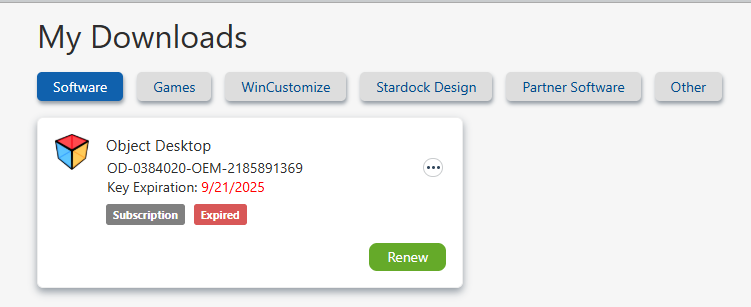
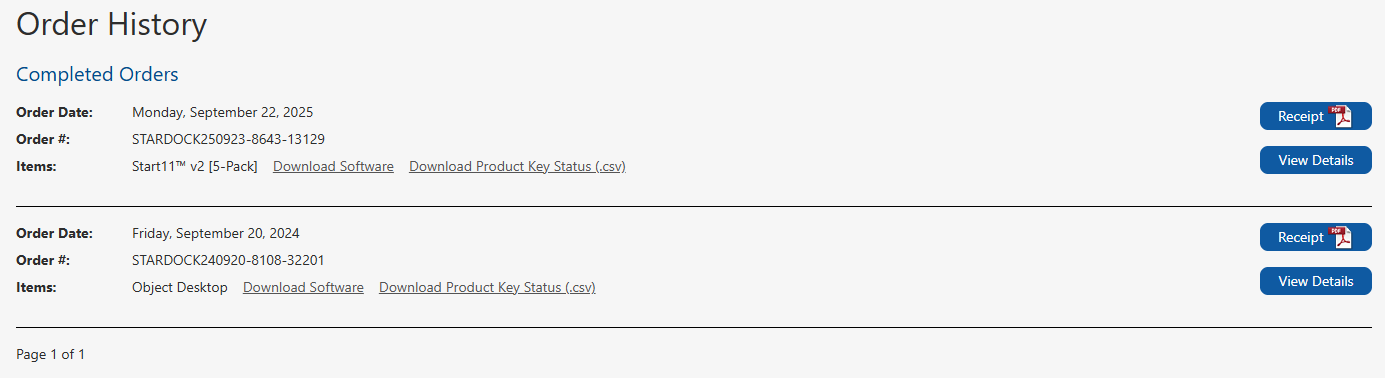
The only thing listed in My Downloads is my expired subscription to Object Dock (all other tabs are empty). My latest subscription to Start11 only shows up in my Order History. If I click download from there, it doesn't download the Beta. Can you please just send me a link to the Beta?

Reply #10 Top
Quoting castroGstar, reply 3995040

The only thing listed in My Downloads is my expired subscription to Object Dock (all other tabs are empty). My latest subscription to Start11 only shows up in my Order History. If I click download from there, it doesn't download the Beta. Can you please just send me a link to the Beta?

End of castroGstar's quote

Look like you have account issue. Please raise support ticket using the link below, use the "Ask a Question" option. Include all information details. Remember to record down the ticket number for future reference if needed. Do not raise multiple ticket, that will make your ticket back to the end of the line. Send once and wait. Ticket will be answer by the order they send in.

https://stardock.atlassian.net/servicedesk/customer/portal/4/group/13


Thanks
Basj,
Stardock Community Assistant

Reply #11 Top
Answer

Hi,

My account issues were resolved, and the BETA build fixed my issue.

Thanks for all the help 😀

+1 Loading…