Start11 v2.72 Beta Feedback
With the Start11 v2 2.72 beta release today, we are creating this thread so that users can report any observed issues.
05/18/2026
UI: 2.72
File Version: 2.7.2.0
- Addresses the issue with icons on secondary displays when to the left of the primary monitor and autohide is enabled (or taskbar on left/right/top is in use)
-fix for desktop icons appearing under the taskbar when in taskbar only hides when something covers it mode and taskbar is at the top / left of the monitor
Windows 11 Pro (25H2) OS Build 26200:8457
S11 Version: 2.72 (Beta) - installed from the Web - Not steam.
I am using three displays, however taskbar only showing on the primary.
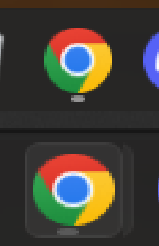
When you're in a full screen application such as a game and press the Windows key to see the Taskbar and Start Menu - the icon for Multiple App instances doesn't show, you need to minimise the application/game you have open and/or click on the desktop to return the functionality shown in the bottom half of the attached image - issue isn't exclusive to Google Chrome, but some apps randomly don't seem to have the issue. (I do have Chrome pinned to the Taskbar).

Windows 11 Pro (25H2) OS Build 26200:8457
S11 Version: 2.72 (Beta) - installed from the Web - Not steam.
I am using three displays, however taskbar only showing on the primary.
When you're in a full screen application such as a game and press the Windows key to see the Taskbar and Start Menu - the icon for Multiple App instances doesn't show, you need to minimise the application/game you have open and/or click on the desktop to return the functionality shown in the bottom half of the attached image - issue isn't exclusive to Google Chrome, but some apps randomly don't seem to have the issue. (I do have Chrome pinned to the Taskbar).
Hello,
Sorry to hear you are having issues. First, please try, uninstall Start11, reboot immediately (important), download latest version available in your account product download page: https://store.stardock.com/myaccount/products. Install it, reboot immediately again. Retest it and report back.
If the issue still appear we need more information on your system.
Thank you
Basj,
Stardock Community Assistant.
Welcome Guest! Please take the time to register with us.