No preview in taskbar--can't switch between windows with taskbar buttons combined.

Windows Version Number: Windows 11, version 25H2 (26200.945)
App Version: 2.8

I cannot (consistently) get the preview for taskbar icons to show up, making it impossible to switch between windows when I have taskbar buttons combined. Whether I hover over the icon or click on the icon for a program with multiple windows, I can't get it to work. Whenever I restart explorer, sometimes, for the first couple times I mouse over an icon on my taskbar (whether it be one window or a group of windows) an extremely cut-off version of the normal preview appears. If I'm able to get the preview to appear multiple times, each time it will be more cut off.

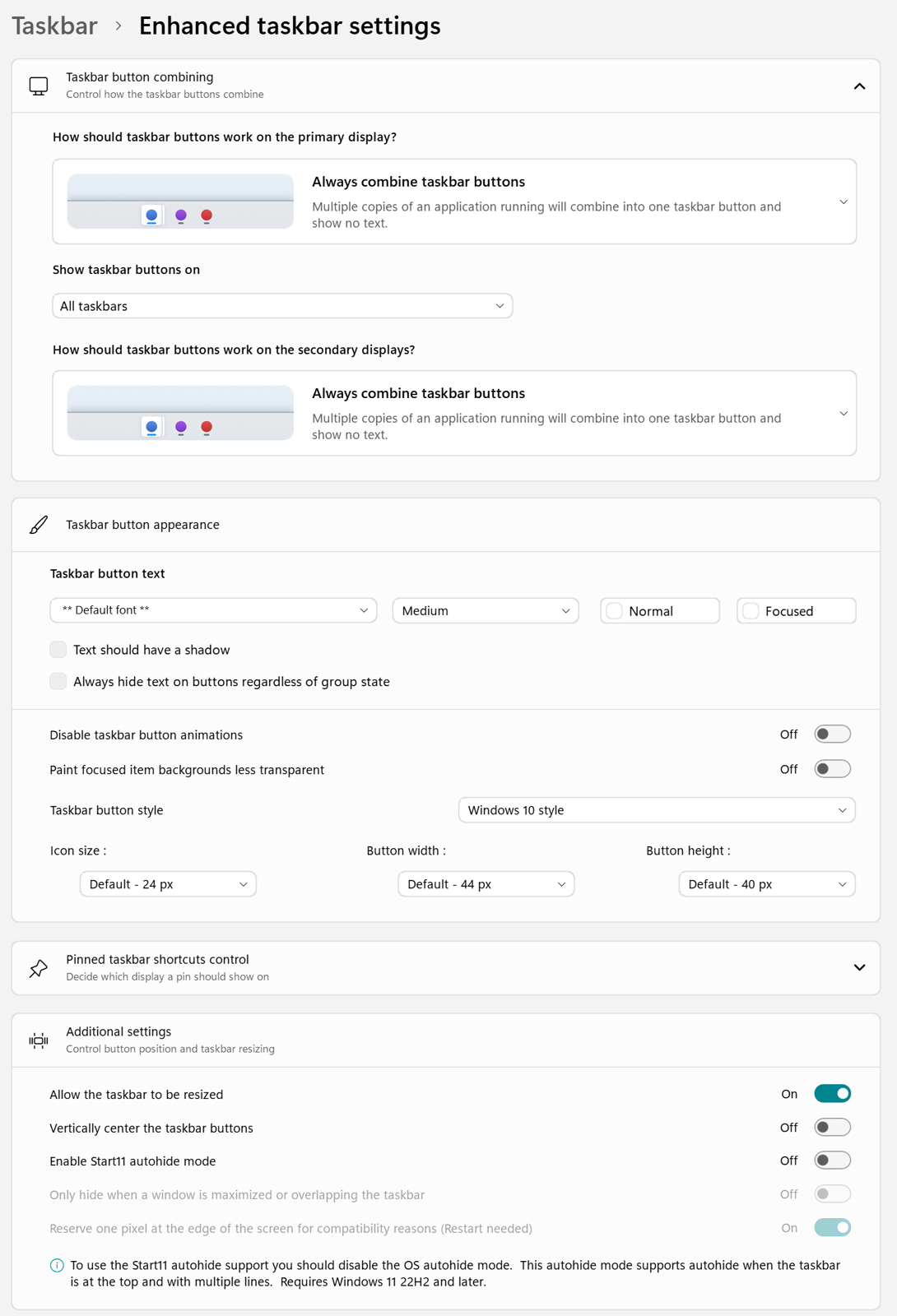
This is with the enhanced taskbar, with basically everything I have control over set to windows 10. This is on Windows 11, version 25H2 (26200.945), as well as prior to the latest security update, on the version of windows 11 I got when I installed it yesterday. My computer is a Surface pro-7.
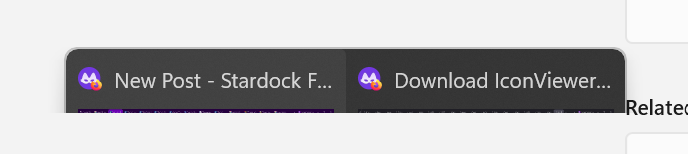
This was the second time I viewed the preview after last restarting explorer. The time before that more was visible of the preview window, but still less than half. At another point the first and only time I was able to view a preview, it looked more or less like this.
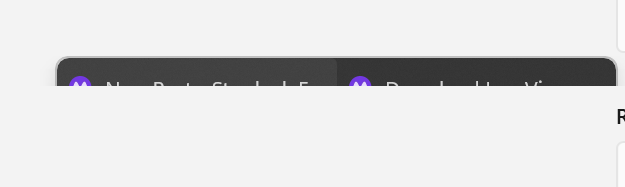
This occurred the next time I hovered my cursor over the icon. Following this time, whenever I hovered over it I would see nothing.
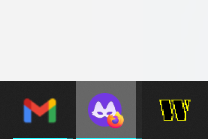
This is what it looks like whenever I'm hovering over a tab window(the screenshot program does not capture the cursor, but my cursor was, at this moment, hovering over the incognito firefox icon. It's a little hard to see, but there were two windows here.

Whenever I click on the icon for the combined windows, no preview appears either. generally it either takes me to the most recently used window of that program (which is useless considering how often I'm still on that page--it essentially does nothing), or the following appears:
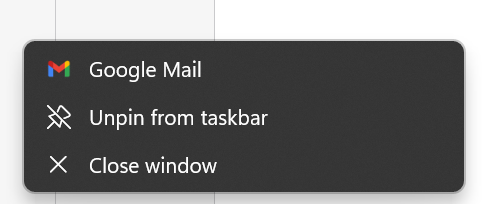
This happens typically the second time I click on the firefox icon, and is the same as a right-click on the gmail icon, so I'm assuming the double click is read as equivalent to a right click, just with a separate bug that shifts it over one. When I double click on the gmail icon (if I have multiple windows open) it does the same thing but with the windows explorer options (windows explorer being to the left of gmail). When I right-click on firefox incognito it is correct.

Needless to say this is incredibly frustrating and makes the whole program basically unusable, at least the way I'd like to use it. I've tried to find a solution to this, to no avail. I have found multiple people with similar problems, but no solutions whatsoever. I've tried uninstalling, I've reinstalled. I tried the beta release, and had the same problem. I've rebooted my computer so many times, I'm quite frankly sick of it. There are many things I like about start11, even if there's still plenty more it can't help me with in getting 11 to look like 10, and I'd be frustrated to have to give them up, and go back to the ugly windows 11 taskbar, but at this point I'm not exactly sure what I can do. Unless I want to disable the combining of taskbar button groups, I really can't do anything.

497 views 7 replies
Reply #1 Top

Hello,
Sorry to hear you are having issues. Please try, uninstall Start11, reboot immediately (important), download latest version (V2.81 Beta) available in your account product download page: https://store.stardock.com/myaccount/products. Install it, reboot immediately again. Retest it and report back.

Thank you,
Basj,
Stardock Community Assistant.

Reply #2 Top

Hi,

I tried rebooting after uninstalling then again after installing, which did not help. I have the exact same problem I had before. I should note that, as I mentioned in my original post, I had already tried both the 2.8 version and the 2.8.1 version, then back to the 2.8, although I only rebooted after installing at that point. But again, after uninstalling, rebooting, installing (2.8.1), then rebooting, I have the exact same problem. I had also tried just restarting several times as well. At this point, I have rebooted far too many times, and it's getting pretty tiring.

Reply #3 Top

Perhaps something else at fault.

Next, please check your Windows system. 

Please try the following:

-For Win11 Users: Open the Start Screen, and type 'cmd'. Right-click on the search result and select 'Run as administrator' from below.

-Type: sfc /scannow

-Wait for the scan to complete (this can take several minutes)

Some help on how this looks should you need it:

https://support.microsoft.com/en-us/help/929833/use-the-system-file-checker-tool-to-repair-missing-or-corrupted-system

If the SFC finds errors, but cannot fix them, please also run the following command in the same command prompt window:

dism.exe /online /Cleanup-Image /RestoreHealth

Some help on how this looks should you need it:

https://www.windowscentral.com/how-use-dism-command-line-utility-repair-windows-10-image

The above command should assist with replacing any damaged or problematic system files. Please note, however, since it may require restoring certain files, this process can take some time and you will need to be patient until it has completed.

Please let me know whether this resolves your problem or if you have any additional questions.

Thank you,

Basj,
Stardock Community Assistant


Reply #4 Top

I have the exact same issue. This is a Start11 problem, not a Windows problem. Basj if you don't mind, could you please help us investigate the issue, help us gather some logs or evidence for the developers, or provide troubleshooting steps and not just tell us to reinstall the product and reboot our computers. Please.

I'll give some additional details from my experience:

1) I have two displays, and the problem only occurs on my
Primary display. On the secondary display the hover over "peek" feature works correctly.

2) If I restart explorer.exe, for a moment while Start11 is still loading, when the Windows 11 native taskbar icons are displayed, the hover/peek is working properly. Then when Start11 first loads and the Windows10 style icons load, first there is 1 correct peek, then the next peek is slightly cut off, then the next peek is very cut off, then the next peek is invisible, and all the peeks after that are invisible. 

I have attached my settings. I made a video of the behavior but I can't seem to post it here. Please contact me and provide a location to upload it so that can prove the behavior the we are seeing. Thank you. 


Reply #5 Top

Hello,
I have forwarded your problem/question to Stardock Support Team for their assistance. Please keep an eye on this thread for any updates. We appreciate your feedback and patience. Thank you.

Basj,
Stardock Community Assistant

Reply #6 Top

Would you please provide me with a box, folder, or location where I can upload my videos or any other support logs that you would like me to gather to help diagnose the issue? It's extremely annoying, a real productivity killer. 

Due to the nature of the problem only happening when hovering over icons, and it happens 1,2,3 times then can't be seen visually without a process restart, it's extremely hard to get screenshots of the problem. And would be hard to understand what the screenshots are showing. Much like the screens from the original post  Daugavpilled sent... I am impressed he was able to get them. But it's hard to even understand what they show unless you've seen it happening in real time. 

My video shows the problem clearly and I would like to provide it.

Thank you. 

Reply #7 Top

You could upload your video to any video sharing site such as Youtube and post its link here. Just make sure to set it to be public so we can view it. Or you can upload your video to file sharing site and post it link here.

Thank you,
Basj,
Stardock Community Assistant