Unable to drop shortcuts into tabbed dock

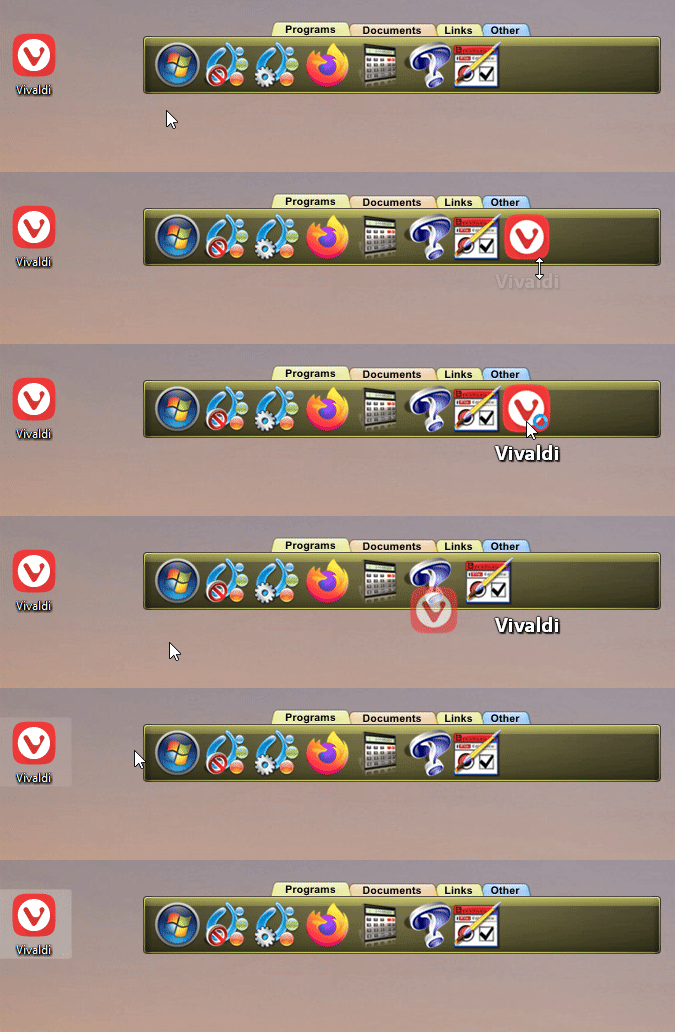
Unable to drag shortcuts for programs to a tabbed objectdock. (Get red no drop circle with diagonal line.)

Creating new blank shortcuts in the tabbed dock and copying information from WIN 11 Home 25H2 (x64) shortcut properties works: except for one program, Maxon Autograph, that only runs in admin mode from objectdock and won't work in that mode (error message). It does work in the regular shortcut and is not marked to run as admin.

 

480 views 13 replies
Reply #1 Top

Hello,
Sorry to hear you are having issues. Need more details.

  1. Need to know your Windows 11 25H2 OS Build number. Please use Winver.exe to get this.
  2. Object Dock full version number installed.
  3. The issue only with Maxon Autograph?

Thank you,
Basj,
Stardock Community Assistant.

Reply #2 Top
  1. Version 25H2 (OS Build 26200.8246)
  2. ObjectDock version 3.01
  3. Unable to drop shortcut applies to all. Problem running as admin only with Maxon Autograph.

Thank you.


Reply #3 Top

Quoting Jim352, reply 2

Unable to drop shortcut applies to all

Shortcut located in your Desktop? or in a Folder? Drag and drop from desktop or from File Explorer?

Thank you,

Basj,
Stardock Community Assistant

Reply #4 Top

shortcut located on desktop doesn't work.

exe file in file explorer doesn't work.

Shortcut from folder doesn't work.

Reply #5 Top

Is this a new installed or new issue? Has it ever worked before? If it was working before, what changed? New software installed? New updates etc.

Thank you,

Basj,
Stardock Community Assistant

Reply #6 Top

Is this a new installed or new issue? Has it ever worked before? If it was working before, what changed? New software installed? New updates etc.

I don't really remember. I've had ObjectDock since April, 2024. That was a long time ago. I've just recently added six new programs, and that's when I noticed the problem. I may have had the problem before, but I don't remember.

The system was built in January of 2024 with WIN 11. It was just at the end of the I9-13900K period (just before I9-14900) and the earliest PCIe 5 mainboards. It has a RTX 4070 Super that came out just before the RTX 5000 series. The BIOS date is 9/27/24, but it may have been updated.


Reply #7 Top

Perhaps something went wrong while installing it. Please try, uninstall ObjectDock, reboot immediately (important), download latest version available in your account product download page: https://store.stardock.com/myaccount/products. Install it, reboot immediately again. Retest it and report back.

Thank you,

Basj,
Stardock Community Assistant

Reply #8 Top

Uninstalled.

Rebooted.

Downloaded.

Installed.

Rebooted.

Tested.

Same result. Still unable to add shortcut by dragging to tabbed dock.

Thank you.


Reply #9 Top

Perhaps something is blocking OD from working properly in your system. If you have Windows Pro version, do a Sandbox test: refer here for steps: https://support.stardock.com/space/SHC/1416560645/Testing+Fences+in+Sandbox 

Note: The Steps, is for Fences, but I do believe it also work for ObjectDock.

Please try the Sandbox test and report back.

Thank you,

Basj,
Stardock Community Assistant


Reply #10 Top

I have Windows Home, not Pro. I can send you copies of the objectdock .ini files, but I don't see any way to attach files to these messages. I can copy and paste them if that would help. 

I have AppImages.ini, CurrentTheme.ini, Settings.ini (all dated yesterday or today), and Recent.ini dated 3/2024.

I have looked at the files, but I don't see anything obvious other than the link to the executable for each icon. 

Reply #11 Top

Just to be clear, your drag and drop issue only on Tabbed dock, yes? It is working for those normal dock, yes? Have you tried different tabbed dock design/style? 

Thank you,

Basj,
Stardock Community Assistant

Reply #12 Top

Just to be clear, your drag and drop issue only on Tabbed dock, yes? It is working for those normal dock, yes? Have you tried different tabbed dock design/style? 

Same problem on quick launch dock. Same problem on new 4 tab dock. Same problem on 4 tab dock with three tabs removed so it is only a one tab dock.

Same problem with different dock design/style.

Same problem with roll-up dock (at top of screen) and fixed dock (non-rollup in center of screen).

Not sure what else to try.

Thank you.


Reply #13 Top

Please try the following steps to help isolate the issue:

  1. Create a new Admin account Follow the guide here: Create a local user account in Windows 10.

  2. Test under the new account Log in with the new admin account and check if the issue persists.

    • If the issue does not appear under the new account, you don’t need to continue with the Clean Boot steps. This usually indicates that your original admin account is corrupted.

  3. Perform a Clean Boot (only if the issue still appears under the new account) Refer to this guide: How to perform a Clean Boot in Windows.

    • At Step 7, after rebooting into the Clean Boot environment, run ObjectDock and see if the issue still appears.

    • If the issue does not appear, re‑enable the disabled services one at a time, rebooting after each, until you identify the service causing the problem.

  4. Reset to normal startup Once troubleshooting is complete, remember to restore your system to start normally by undoing the Clean Boot changes.

Please try these steps and report back with the results.

Thank you,

Basj,
Stardock Community Assistant