Fences 6 and windows 11

Fences is not working

I have used Fences for over 5 years and love it.

I upgraded to a Windows 11 notebook from a Windows 10 NB.

It is Windows 25H2 build 26200.8246

It is Product: Fences 6, version 6.2.0.1

It installs and if I choose to let it set fences they are created, but if i do it as custom they are not created.

I have installed and uninstalled several times and have run the purge bat several times as well to no avail.

I have turned off my firewall and antivirus for some of the installs.

The config fences option was not even available either from the Fence header or from windows right click.

I merged the reg key for locking. (I have rebooted each time I made a change).

I locked and unlocked the Fences.  I still cannot move any files or folders from the default fences or to them or create new ones.

The configure fences option now shows both in the fences header and the windows right click menu, but I just get an activity circle for a few seconds and then nothing.

I have not been asked for a product key nor have any way to add it.

What am I missing?  I really need to get this working.

Thank you,

John 

Moved to Fences area

 

715 views 16 replies
Reply #1 Top

Hello,
Sorry to hear you are having issues. Perhaps something is conflicting with Fences. Please try clean boot: https://support.stardock.com/space/SHC/1332445272/Fences+Clean+Boot. Do note that clean boot need to be done with care. Try it and report back. 

If the issue still appear we need more information.

It installs and if I choose to let it set fences they are created, but if i do it as custom they are not created.

What do you mean by this. Please elaborate.

Thank you,
Basj,
Stardock Community Assistant.

Reply #2 Top

I will try the boot, but is there a way to add the license number manually through the registry or command if that could be the issue?

When your installation ends, it asks if you want to customize your fences (start without any fences on the screen) or if you want to use the default fences set up (i.e. files, programs, files, etc.).  It sets up the default fences (although you cannot add or move anything in or out) and if you customize, you cannot create any fences.

Until I added the reg mod for locking, I did not even see the config option, I only had the remove fence option from the fence header.  I don't understand why there are so many issue in using this product with Win 11.


Reply #3 Top

This similar issue was reported by someone before. Do you have 360 Total security installed or something similar which also have their own desktop organizer that blocking Fences from working properly. Refer to this thread: https://forums.stardock.com/494957 or you have previously locked your Fences. You just need to unlock it. If unlock don't appear on your system, please refer to this guide: https://support.stardock.com/space/SHC/1621360668/Show+%22Lock+Fences%22+in+Fences+5+and+6.

Thank you,

Basj,
Stardock Community Assistant


Reply #4 Top

I uninstalled and ran purge and did a clean boot install and the results are the same.

I have spent way too much time (over 2 days to get this to work as It helped me a lot, but now it is a burden and i will need to find another way to manage my desktop.

For 1 last shot there were these errors in the set up log:

[04/24/2026 10:52:13] Error Script: On Startup, Line 668 (1605)

[04/24/2026 10:52:14] Info Deleting C:\Users\JLAPAG~1\AppData\Local\Temp\_ir_sf_temp_3\GetMachineSID.tmp

[04/24/2026 10:52:14] Error Script: On Startup, Line 439 (2502)

[04/24/2026 10:52:14] Info Deleting C:\Users\JLAPAG~1\AppData\Local\Temp\sdWebResults.xml

[04/24/2026 10:52:14] Error Script: On Startup, Line 450 (37000)

[04/24/2026 10:52:14] Error noXML - Error parsing sdWebResults.xml. Check Internet Explorer proxy server settings.


Reply #6 Top

Few questions.

  1. Did any error popup while you installing the product? If yes, what error was it?
  2. Please check if Fences get Start up properly: https://support.stardock.com/space/SHC/1331232868/Fences+is+not+starting+after+boot.
  3. Much appreciate if you can verify my questions in Reply#3.

Thank you.

Reply #7 Top

Sorry, I missed that response.


I do not have 360 Total security.

I do have Comodo Anti-virus/FW. I tried to install with it turned off.

I have Startallback installed.  I had Startisback on my Win 10 NB, and there was no problem.  I turned StartAllback off, and no difference.

I have Explorer patcher installed.

I added the reg hack to enable locking and unlocking and have done that many times.

I have run the purge bat several times as well.

I have installed under a clean boot

I have never had a Fences crash or install error message.

When I first log in, I do not even see the configure Fences option on right clock, but after I try to create a Fence and nothing happens, the option appears on right click.

There are 2 instances of Fences in Startup

There is no Fences nor any Stardock process running in processes.

In my Win 10 NB, there is a fences process running.

When I manually start Fences in the Program (86) directory, it shows in processes for a few seconds and then goes away.  I do not know how to track what happens to it and why it does not stay in processes.

I did send the error messages that the log file showed in Reply 4.


I don't know what else to do.

Reply #8 Top

Hello,
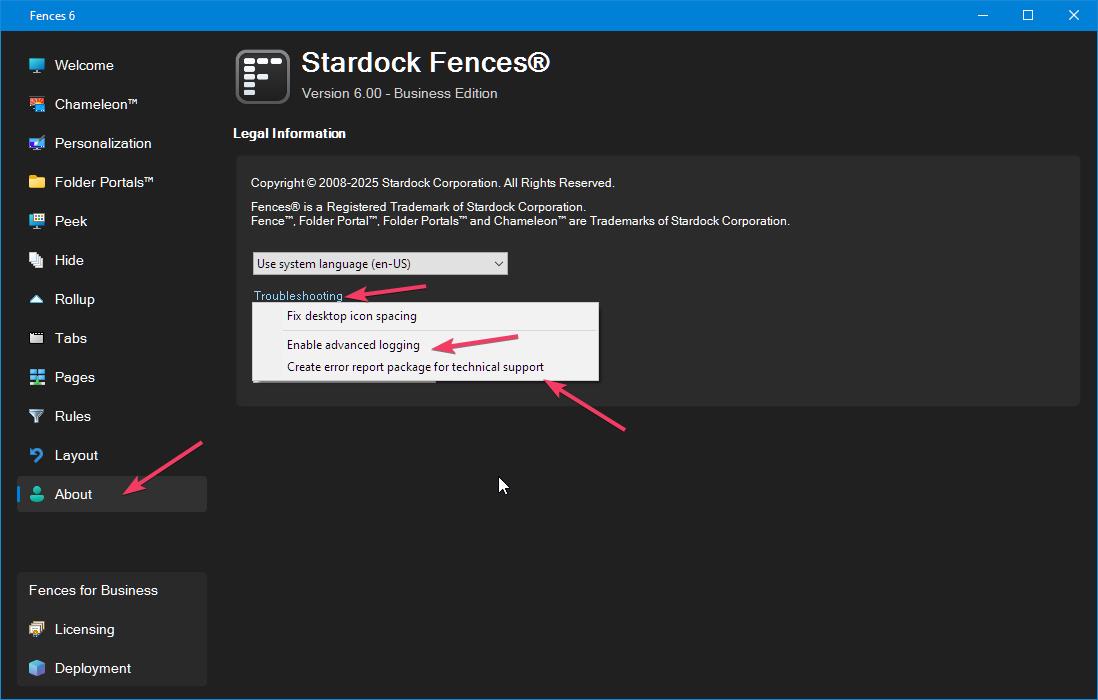
Please turn on Enable Advance logging and than send in the error report package. Refer screenshot below. Let me know once that is done.

Thank you,

Basj,
Stardock Community Assistant

Reply #9 Top

That is my problem.  I cannot get the menu to open.  I uninstalled Comodo Internet Security and turned off Windows Defender (I was not connected to a network) and reinstalled Fences6, and still when I try to create a fence or open the config menu, fences and sometimes fences settings appear in the task manager processes for a few seconds and then go away like something is killing the process(es).


Because of this I cannot give you the detailed logging file.


Is there a way to create the log file without going through the menu as it will not run?


Any ideas?


Reply #10 Top

Quoting jlapaglia, reply 4

I uninstalled and ran purge and did a clean boot install and the results are the same.

Not really sure on this one, what do mean by Clean boot install? The Clean boot is step where you don't need to install a new things. Just follow the steps mentioned in that link I provided above. With new admin account etc. Please try that.

Thank you,

Basj,
Stardock Community Assistant

Reply #11 Top

I uninstalled Fences. then went into a clean boot and reinstalled 
Fences and got the same response.


I will try again.


Did the error messages I sent to you make any sense?

Reply #12 Top

This is clean boot steps I mentioned and link above:-> https://support.stardock.com/space/SHC/1332445272/Fences+Clean+Boot. It did not ask you to reinstall, you just need to Create a new Windows Admin account. Than, follow the Windows Clean Boot Documentation.

Thank you,

Basj,
Stardock Community Assistant


Reply #13 Top

I had to reinstall it as I had uninstalled it.

with a clean admin account I get the same results except that it asks for a reg key or a 30 day trial.

I put in my key as well as the 30 day trial and it says that it cannot reach the authorization server.  Yes I can access any page on the net.  

Since my clean version cannot reach the server, could that be the same cause on my normal account, except the request to get a key does not show?  Fences are there, and I can move things inside the fence and rename it, but I cannot change the shape or configure it.

Can I enter the key manually or is there a way to get the screen to open?

I do have the log from a process monitor and the log is in the process monitor format as well as a cst format.  I can send them to you if you think that might help.  If so, how can I upload it?

Reply #15 Top

I logged back into my extra admin account and was able to use the activation server, and Fences worked for that user.  I logged out and then logged into my normal account and it is now working.  I am using the 30 day trial, so I will input my license later.  Hopefully, nothing changes. 

So apparently, something was blocking the activation screen from opening in my normal account which kept Fences from working, but now that it is activated, it seems to be working normally. 

I was not able to figure out what was keeping the activation screen from opening in my normal account.  It could be something with Win 11, Windows Defender, Comodo Internet Security, or BitDefender or some combination thereof.  I installed, uninstalled, turned off and turned on each of them several different times.  Creating the extra account allowed me to finish working through this and getting Fences to work.

By the way, the only time that Fences shows up in Task Manager is if the configuration menu is open.  Not knowing that normally will not show there, added some extra uncertainty to the process.

I just did a restart to make sure it still worked and it does.  I will let you know if anything changes.


Thank you.

Reply #16 Top

Great, really glad to hear that. Yes, please report back if your issue reappear.

Thank you,

Basj,
Stardock Community Assistant