Feedback & Feature Requests for Stardock Fences

1. Adjustable Delay for "Roll Up" Fences

I would like to see an option to set a custom delay for when a folder (Fence) rolls back up after the mouse leaves the area. Currently, if the cursor accidentally slips past the edge of an expanded Fence, it collapses instantly. Adding a "Retraction Delay" (e.g., 500ms or 1s) would prevent the frustration of having to hover over the title bar repeatedly to reopen it.

2. Improved Access to Hidden Fences

I’d love a more intuitive way to interact with Fences that are buried behind open windows.

  • Edge Integration: Perhaps a thin, interactive strip could remain visible at the edge of the screen (or even tucked under the Taskbar) to trigger the Fence.

  • Shortcut Access: Alternatively, adding a "Bring Fences to Front" command via a Middle-Mouse Click on the desktop or a specific hotkey would greatly improve workflow efficiency.

3. Single-Click Execution & Modified Selection

I would like an option to enable Single-Click to launch applications within a Fence. To avoid accidental selections, the logic could be adjusted so that:

  • A Long Press of the Left Mouse Button selects the file.

  • Or, selection requires holding Ctrl + Left Click, while a standard single click remains dedicated to opening the file/app.

4. Compact Title Bars (Adjustable Thickness)

I would like an option to reduce the height of the Fence title bars. Currently, they can feel a bit bulky. Having a "Thin Mode" or a slider to adjust the vertical padding would allow for a much cleaner, more compact look, especially for users who want to maximize their desktop space.
339 views 5 replies
Reply #1 Top

These are all very good suggestions! Added them to dev team notes. I’m sure they’ll get some of these in. Very much appreciate.

Btw if any mockups of this compact titlebar style you’re looking for, please feel free to post.

+1 Loading…
Reply #2 Top

Quoting Dr, reply 1

Btw if any mockups of this compact titlebar style you’re looking for, please feel free to post.
End of Dr's quote

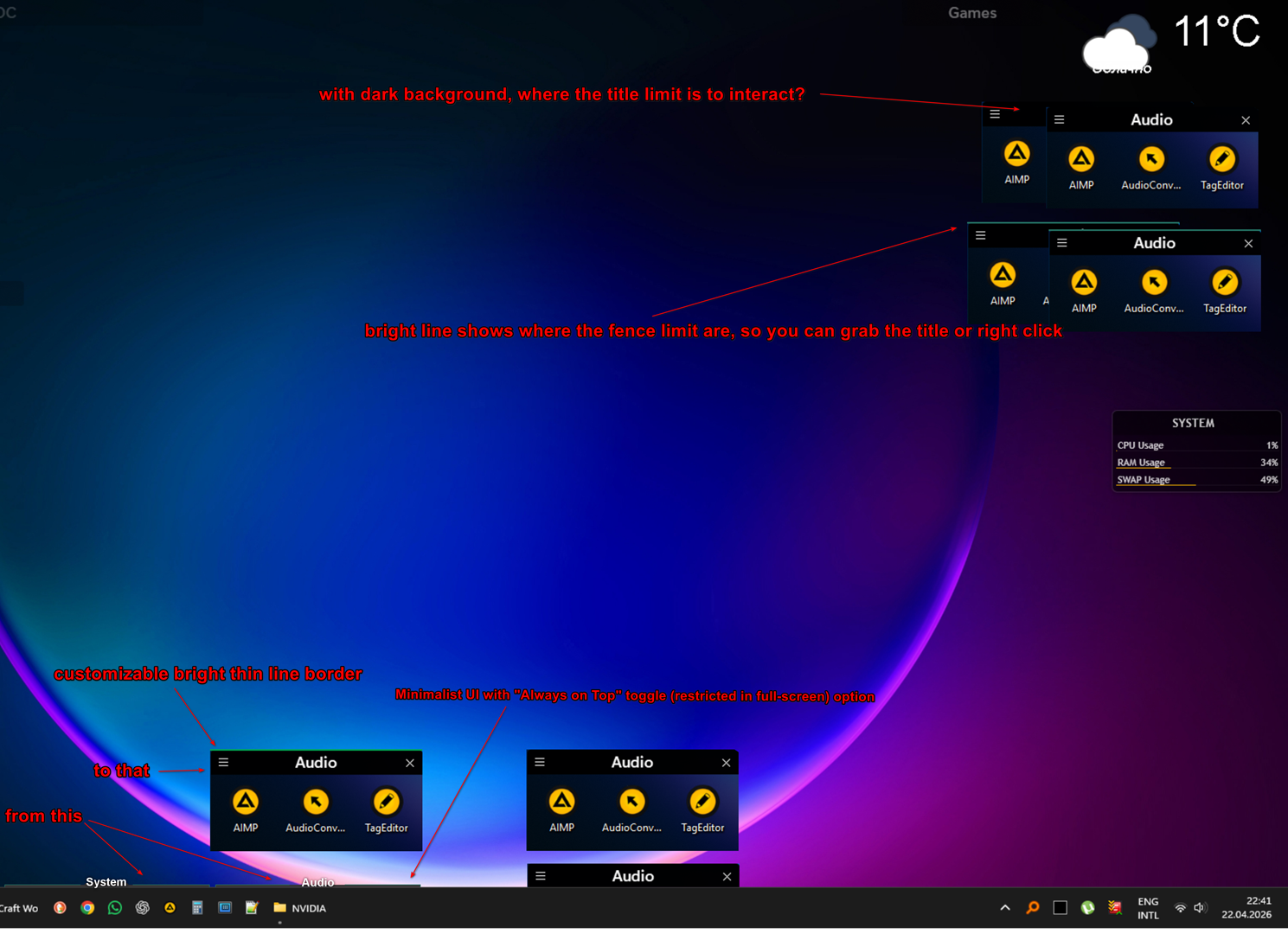
Hi again! As requested, I’ve prepared a mockup to illustrate the Minimalist UI and how the thin line borders would work.

[Attached]

In addition to the visual style, I would like to propose a specific logic for the 'Always on Top' mode to ensure it doesn't interfere with daily workflow:

  1. Activation Delay (Hover-to-Show): When a Fence is in 'Always on Top' mode, there should be a short delay before it activates/expands upon hovering. This prevents the Fence from popping up accidentally when the mouse is simply passing through its area to reach another UI element.

  2. Retraction Logic:

    • Keep-Open Delay: Once expanded, the Fence should stay open for a couple of seconds even if the mouse leaves the area (to prevent accidental collapsing).

    • Instant Collapse on Action: However, the Fence should collapse immediately as soon as an application is launched (via single or double click). This ensures the workspace stays clean once the user has made their choice.

I believe these refinements, combined with the adjustable title bar thickness and the bright border visibility, would make Fences much more powerful for power users. Looking forward to your thoughts!

One more important detail for the Minimalist UI from my example: I would like to see an option to change the font or, at the very least, reduce the font size for Fence titles.

Crucially, the Title Bar height should scale dynamically based on the chosen font size. If a user selects a smaller font, the title bar should automatically become thinner to match, allowing for a truly compact and sleek look.


Reply #4 Top

Hi mirok, interesting concept. Text without a background i.e. the skinny bar is not terribly practical unfortunately from a hit-testing perspetive and breaks a number of UX norms, so I don't see that coming. The border, team had made note for future considerations to help with contrast. Likewise reducing font size at large, which it does today but mostly only for scaling up.


Always On Top mode is something that's been discussed but likewise, the desktop is the desktop, which is on bottom. Major workarounds have to be done to bring it on top for Peek. So, the team is continuing to investigate long term.

Reply #5 Top

Quoting Dr, reply 4

Hi mirok, interesting concept. Text without a background i.e. the skinny bar is not terribly practical unfortunately from a hit-testing perspetive and breaks a number of UX norms, so I don't see that coming. The border, team had made note for future considerations to help with contrast. Likewise reducing font size at large, which it does today but mostly only for scaling up.

Always On Top mode is something that's been discussed but likewise, the desktop is the desktop, which is on bottom. Major workarounds have to be done to bring it on top for Peek. So, the team is continuing to investigate long term.
End of Dr's quote

Thank you for the detailed feedback! I understand the concerns regarding hit-testing and UX norms. However, I believe there are ways to implement these ideas without compromising usability. Here are some further thoughts:

1. Transparent Title Bars (The 'Invisible' Hitbox)

Regarding the 'skinny bar' concern: the hitbox (activation zone) for the title can actually remain the same size it is now. The only difference is making the background transparent and disabling the hover/highlight effect. This way, the target remains large enough for easy clicking (hit-testing), but visually it looks minimalist and clean.

2. Smart Hover & Retraction Logic

  • Activation: To prevent accidental popping, the Fence should only expand if the cursor pauses over the invisible title zone (the delay you already have). It should ignore the cursor if it’s just passing through.

  • Retraction: Once expanded, the Fence shouldn't collapse instantly if the mouse slips outside for the moment. Instead, it should collapse immediately only when:

    • An application is launched.

    • The cursor moves to activate another Fence (that expand without delay).

  • Quick-Switching: While one Fence is expanded, moving the cursor to other Fences should trigger them instantly without the hover delay. This would make navigating multiple categories much faster. The delay rule should be ignored if Fences are brought to the front via hotkeys or the monitor bottom-right corner click.

3. Custom Hotkeys & Middle-Mouse Support

It would be amazing to have the ability to bind a custom hotkey or a specific mouse button (like the Middle-Mouse Button, Long pressing right-mouse button, pressing 2 mouse buttons instantly or programmable G-keys) to bring Fences to the front. This would allow for instant access without having to minimize all active windows.

4. Font & Visual Transparency

If global font size reduction is possible, I would love the ability to reduce the title bar height or/and its background opacity independently. Specifically, being able to set the title background to 100-0% (transparent) while keeping the text itself at 0-100% opacity would achieve the look I'm aiming for without losing clarity.

Thank you again for considering these suggestions!