Groupy 2.31 Beta Feedback
With the Groupy 2.31 beta release today, we are creating this thread so that users can report any observed issues.
Thank you for your interest and any time you put into making Groupy 2 a better product.
With the Groupy 2.31 beta release today, we are creating this thread so that users can report any observed issues.
Object Desktop members can get beta and Insider builds from within Object Desktop Manager with 'Enable Object Desktop Insider builds' enabled:
Or via their download page in the ‘Object Desktop Insider’ section
If a beta was released, Object Desktop Members would see it in the ‘Object Desktop’ section.
Individual purchases would see it on their registration of the product under their download page.
Right-click the Product in Steam
Properties
Betas
Select the beta branch at the top right (there is no password)
Example
https://cdn.stardock.us/support/uploads/steamwebhelper_2024-02-19_17-44-35.png
Please include the following for anything found:
Exact Windows version \ build (winver.exe)
Detailed steps to recreate the issue seen
Screenshots and videos are very helpful. Videos can be uploaded to a cloud drive service (GoogleDrive, DropBox, OneDrive, YouTube), with a shared link included in your post. Images can be copied and pasted directly into a post.
If there are specific apps that the app does not work (well) with, please note what apps and their exact versions. If any app is not common, a link to a trial version would be appreciated.
Thank you for your interest and any time you put into making Groupy 2 a better product.
03/25/2026
UI: 2.31
File Version: 2.3.1.1
Resolved issue with VBA editor in Excel, deleting spaces when typing
Added an option so you can use the old behaviour in Groupy for rules and make a rule that can match everything
Fixed a painting issue on tabs when in tab style and not extended tab bar height
Updated ARM support
Known issues
While we appreciate all feedback, please remember that we offer no official support for beta \ preview \ developer channel versions of Windows. If you report issues while in any of those early release channels, you should not expect them to be addressed unless it still exists in a retail version of Windows.
with the latest build.. i am having these problems.. not catching all the tabs.. and forgot to add that, i have to launch one chrome profile, then the group will run properly.
https://share.zight.com/4guqYy6J
1st, is this the beta or an earlier version?
2nd, its a little difficult to follow, even after watching the video; however, your issue seems to be from saved groups, yes?
If so, if you create a simple one, opens notepad and calc together, does it work as expected?
If you expand the test to include other items in the saved group, when does it fail?
What we would want if it does fail is the saved group file itself. You would have to ensure it only contains apps that you would expect us to have (Chrome, Edge, Calc, etc). You can upload the save file to a cloud service of your choice (OneDrive, GoogleDrive, etc) and PM us \ me a shared link or paste it here in a reply. What we would also want, but labeled appropriately, is the one that fails. Again, however, it needs to only contain apps that you would expect us to have.
Sean Drohan
Product Lifecycle Manager
Hello,
I would like to suggest a few improvements for Group:
Flexible tab behavior for Microsoft Office
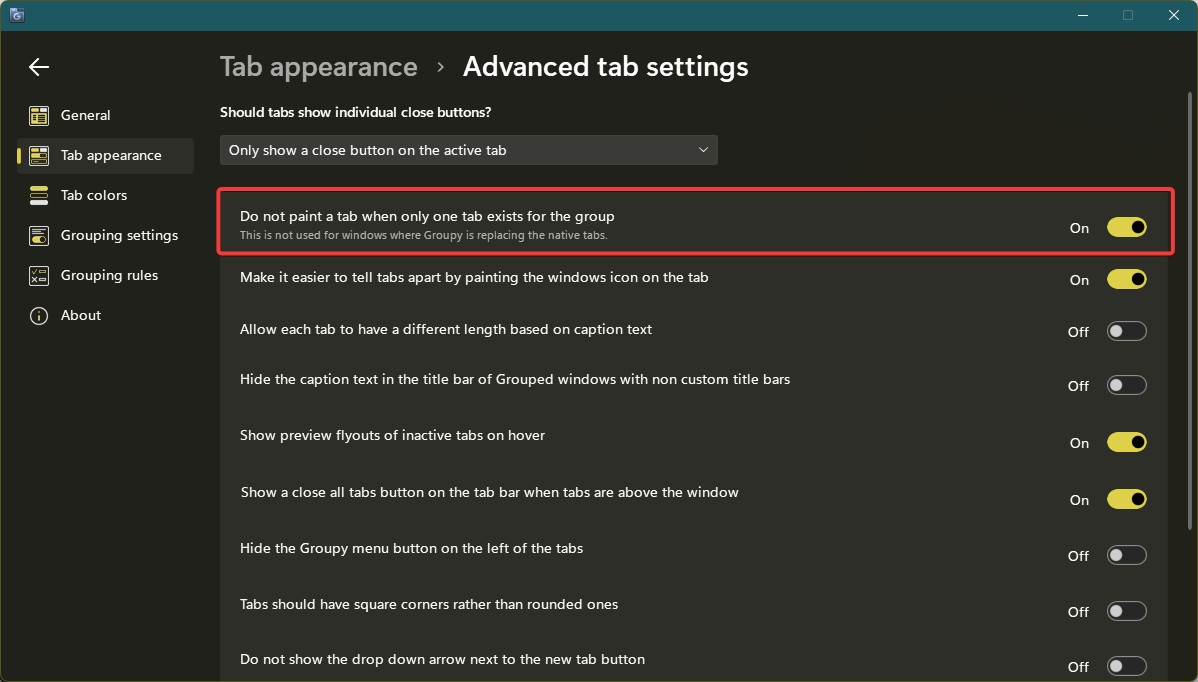
It would be very useful to have an option like “do not create a tab when only one document is open.” Currently, having a tab for a single file feels unnecessary and can be distracting.
Compatibility with Office Tab
At the moment, there seems to be a conflict with the Office Tab plugin. It would be great to have a setting where Group only handles duplicate/opened multiple files (e.g., Excel or Word), while single documents remain without tabs. This would allow both tools to be used comfortably together.
Quick enable/disable option
A quick way to enable or disable the program is really missing:
via a hotkey
or through a system tray icon (near Wi-Fi, volume, etc.)
Compact panel mode for Office apps
It would be great to have a compact panel with rounded corners that appears in a defined area of the screen when using Microsoft Office applications. This could:
save screen space
reduce interface clutter
provide quick access to tabs in a more minimalistic way
Thank you for the great app! I hope these ideas can help make it even more convenient for everyday use.
Moderator: Duplicate post removed.
Hello,
Sorry to hear you are having issues. Have you try this option?

Thank you,
Basj,
Stardock Community Assistant.
All,
Groupy 2.31 has been released. For details, please see:
https://forums.stardock.com/541152/groupy-231-release-feedback
As always, thank you for your time, feedback, and support.
Sean Drohan
Product Lifecycle Manager
Welcome Guest! Please take the time to register with us.
Select a reason for giving karma:
You're about to visit an external site:
Sign up here to get the latest news, updates, and special offers delivered directly to your inbox.