Fences 6.20 - Folder Portal sorting issue – folders always listed last when sorting by “Date Modified”

Hello,

I am experiencing an issue with Fences 6.20 when using Folder Portals.

Description

When I create a Folder Portal on a directory and sort its contents by Date Modified, all folders are always displayed at the bottom, even when their modification date is more recent than some files.

This behavior differs from Windows File Explorer, where folders and files are correctly interleaved according to their modification date.

Expected behavior

Folders and files should be sorted together purely based on the selected criterion (Date Modified), regardless of their type.

Actual behavior

  • Files are listed first

  • All folders are listed last

  • Folder modification dates are ignored for ordering purposes

Environment

  • Fences version: 6.20

  • OS: Windows 11 (see screenshots)

  • Folder Portal view

  • Sorting: Date Modified

Attachments

  • Screenshot 1: Same directory in Windows File Explorer (correct ordering)

  • Screenshot 2: Folder Portal – beginning of list
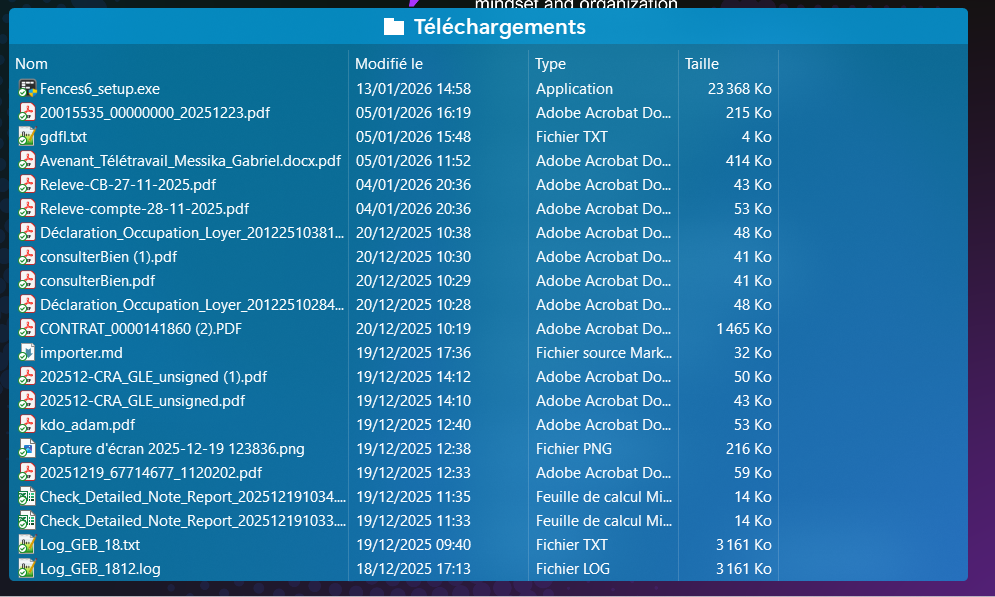
  • Screenshot 3: Folder Portal – end of list (folders shown last despite newer dates)

Please let me know if this is a known limitation or a bug, and whether a fix or workaround exists.


Thank you.

5,514 views 5 replies
Reply #1 Top

File Explorer does not sort this way without OneDrive. If a folder is not on OneDrive, folders will always be at the bottom or top, depending on whether Ascending or Descending is selected.

Evidently when Fences creates the shortcuts for the Folder Portal, they are not located on OneDrive anymore. This is why you see folders either at the top or bottom of the Fence.

Also why do your files show modified dates that have not occurred yet?

Reply #2 Top

Hello,
Sorry to hear you are having issues. This is what I get on my Fences portal vs Explorer on the same folder with the same date modifies sort. Its the same order as the explorer list with folder at the bottom. Perhaps you saw the difference on your explorer since you use the Explorer "Group by" list function. From what I know Fences don't have that option in it. Try set the group by none and see the list again.


Thank you,
Basj,
Stardock Community Assistant.

Reply #3 Top

Quoting basj, reply 2

This is what I get on my Fences portal vs Explorer on the same folder with the same date modifies sort. Its the same order as the explorer list with folder at the bottom.
End of basj's quote

It's a OneDrive thing Basj.

Reply #4 Top

yes, it is a OneDrive folder.
Dates are in French format (DD/MM/YYYY), they are not in the future.

So I understand there is no way to get a strict sorting by date (files or folders) for OneDrive folders ?

Reply #5 Top

Quoting gabriel, reply 4

yes, it is a OneDrive folder.
Dates are in French format (DD/MM/YYYY), they are not in the future.

So I understand there is no way to get a strict sorting by date (files or folders) for OneDrive folders ?
End of gabriel's quote

Now I get the dates. Thanks for clarifying the format.

Take a look at this folder on you C: Drive. "C:\Program Files (x86)\Stardock\Fences" and play around with the viewing and sorting options. This is the normal behavior of Windows Explorer. For some reason OneDrive uses a different logic for folder/file organization.

You gotta love Microsoft! ;)
