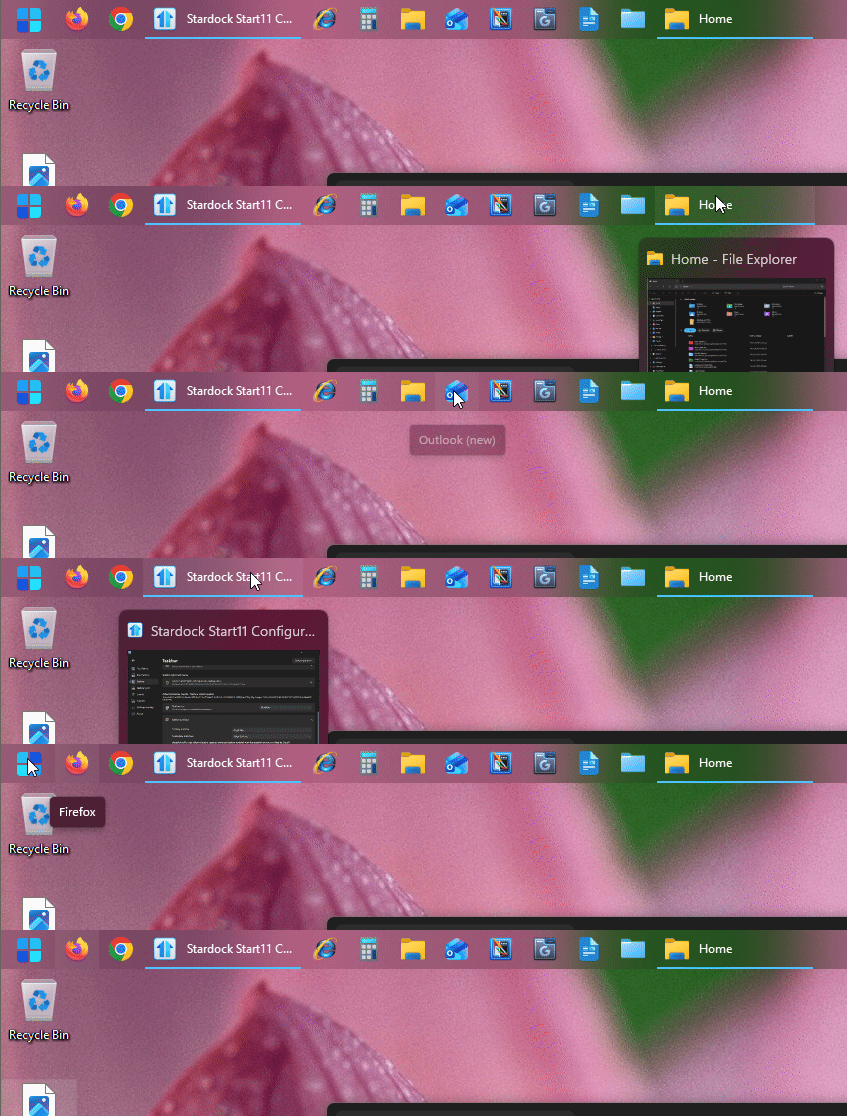
Task bar icons get covered up when hovering to select
Texy dispaly for icons cover button, can't click.
 Stardock Forums
Hi there
When I hover over the taskbar icons at the top of the screen, the text description covers the button. It's like being at the gun range and trying to hit the center of the target and every time you aim, something covers the target. It's a crap shoot whether or not you're going to hit it. 
Ideas? Thanks!
Philster
https://gyazo.com/ab3f82b19eb58776a36f2d93a527a346
Using Modern Style, Enhanced Taskbar is off (That cause more trouble than I needed)
Start 11 Version 2.56
Operating System
Windows 11 Home 64-bit
CPU
AMD Ryzen 7 7700X 44 °C
Raphael 5nm Technology
RAM
32.0GB Dual-Channel Unknown @ 2992MHz (48-48-48-96)
Motherboard
Gigabyte Technology Co., Ltd. B650 UD AX-Y1 (AM5) 28 °C
Graphics
DELL SE2417HG (1920x1080@60Hz)
Sceptre F22 (1920x1080@59Hz)
4014MB NVIDIA GeForce RTX 5070 Ti (Gigabyte) 36 °C
512MB ATI AMD Radeon Graphics (Gigabyte)
SLI Disabled
CrossFire Disabled
Storage
931GB KINGSTON SNV2S1000G (SATA-2 (SSD))
1863GB Samsung SSD 990 PRO 2TB SCSI Disk Device (USB (ATA) (SSD))
7452GB Seagate One Touch Hub SCSI Disk Device (USB (SATA) ) 47 °C
Optical Drives
No optical disk drives detected
Audio
AMD High Definition Audio Device
Operating System
Windows 11 Home 64-bit
Computer type: Desktop
Installation Date: 5/15/2025 5:12:13 PM