
Can't delete Shortcuts list item & edited shortcut name not showing using Windows 10 style
Windows 10 Style shortcut list
 Stardock Forums
I have the latest Start11v2 and am using the "Windows 10 style".
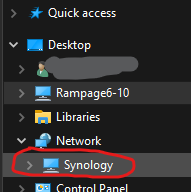
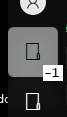
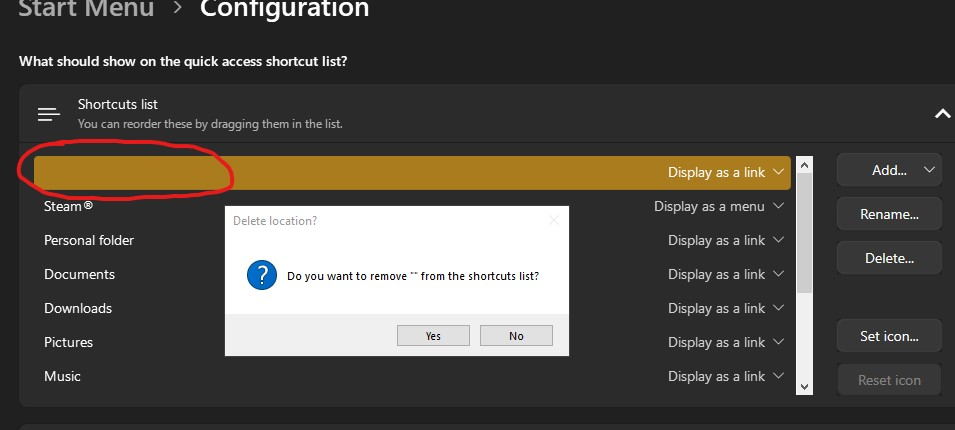
I added a "custom location" item to my shortcuts list and it ended up with a blank name. The item added was a network location "\\Synology" within file explorer - left side (#1 below). When I hovered over the actual item in the actual menu it showed "-1" (#2-A below). I tried, without success, to delete it a few times (#3 below). When I tried renaming the item (as "Testing") it ended up showing twice (named "Testing") in the configuration window (#4 below) and it showed up twice in the actual menu on the left side (named "-1"). It doesn't matter which instance I delete it goes back to having a single instance with no name and a single instance in the actual menu on the left side. After the last deletion attempt, I rebooted and it has gone from the list when looking at the actual menu on the left side, BUT it still shows up in the Start Menu > Configuration > Shortcuts list.
Is there a way to manually delete it from some folder or file; or perhaps somehow "reset" the list ?
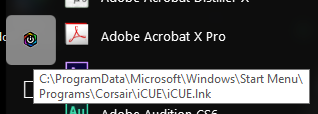
*** NOTE: The "hover text" showing up in the actual menu as "-1" is a SEPARATE issue on it's on which need to be addressed. ANY "Add custom location" shortcut created ends up with a number instead of the given name (#2-A below). ANY "Add link to shortcut" shortcut created ends up with the full pathname instead of the given name (#2-B below). This is while using the "Windows 10 style".
I know you guys are having issues because you have mixed the older Win 7 menu hovering "tooltip" style with this Win 10 style menu (according to another post (see reply #14) from Neil Banfield - https://forums.stardock.com/515927/get;3981616 ). That's why you can't get the "edited" name to show. That's the other issue which needs to be "fixed" for the Win 10 style menu in Start11v2.
Thanks
AW
PS - If you want to hook me up with beta code for this issue I am willing to test using one of my VM's (Win 10 or 11). And , NO, I was not using a VM when I ran into these issues. My normal system is Win 10 22H2 (with extended security updates).
(#1)
(#2-A) (using "Add custom location" actual name should show (blank or) "Testing")
(#2-B) (using "Add link to shortcut" - actual name should show just "iCue")
(#3)
(#4)
