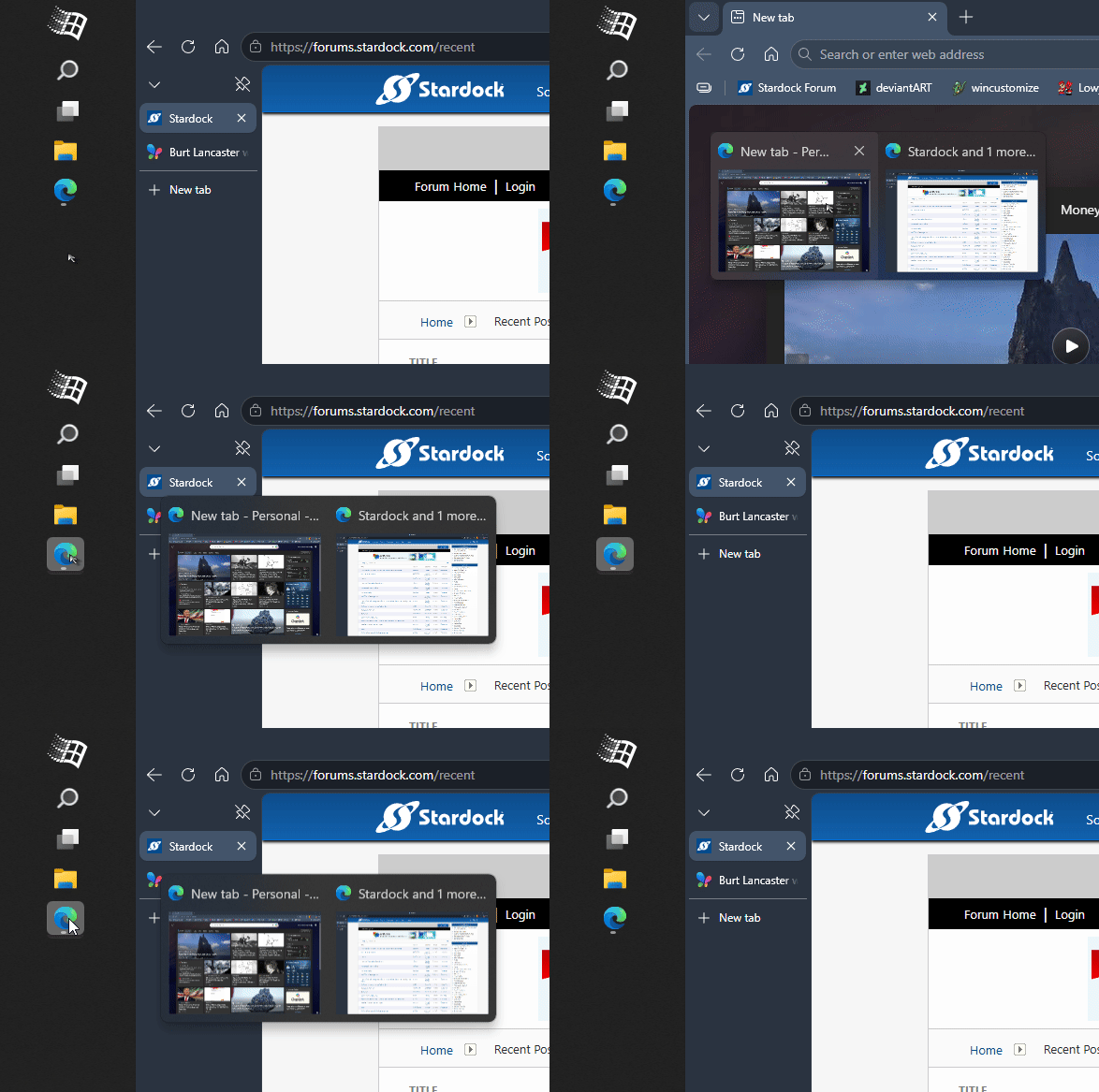
Is start11 no longer being supported or will problem with taskbar icons getting corrupt ever be fixed? - Resolved.


I posted about this before a couple times at least and also even responded with videos when requested to do so. That was months ago. I thought that would do the trick with regard to getting the bug addressed. However, the bug still exists and is extremely aggravating. So much so that it has me considering ditching Start11 entirely. I'm not doing anything fancy with my taskbar, all I use start11 for is to give me a Windows 7 style start menu.

The problem is simple: various of the icons showing for certain of the apps on my taskbar come to no longer reflect the corresponding app. Sometimes there are two of the same icons showing on the same taskbar. Essentially, the taskbar becomes corrupt and unusable.

The easiest way to fix this is to restart explorer.exe in Task Manager. This has the unpleasant side effects of closing all my current File Explorer windows. I usually have several of these open at least. So it's a really inconvenience. Besides, I paid for the software and kind of expected that reported bugs would be fixed. In a timely manner. This bug is aggravating enough and I imagine it affects enough people so that it could get priority.

Can somebody tell me what the status on this bug is please? And should I ever expect for it to be fixed? Thank you very much.


Moved to Start Menu Products area

13,316 views 33 replies
Reply #1 Top


I posted about this before a couple times at least and also even responded with videos when requested to do so. That was months ago.

End of quote

I’m not sure how you have posted this a couple of times before when you just became a member today.

Reply #2 Top

It's because when I came in to make this post, my account was no longer there. I have no idea how or why. I've never done anything on this form to have my account deleted or suspended or whatever. Thanks for your sarcastic post. I'm looking for real answers not this kind of crap!

Reply #3 Top

Sorry about that. We discovered that your account was lost when the servers crashed last month. We have been looking for those posts you refer to, but haven't been unable to find them. If you still have the video on one of your drives, if you could post it again, that would be great.

Also, please include your full Windows version number, and full Start11 version number.

Thanks, and sorry about the confusion with your account.

pelaird

Reply #4 Top

Quoting farrellts, reply 2

It's because when I came in to make this post, my account was no longer there. I have no idea how or why. I've never done anything on this form to have my account deleted or suspended or whatever. Thanks for your sarcastic post. I'm looking for real answers not this kind of crap!
End of farrellts's quote

Can you let us know what your original account nick was so we can coordinate responses.

Stardock's sites went dark for around a month and were totally offline until restored from offsite backups so some user accounts were lost.

It's unlikely to have been anything you had done prior to the crash.

Your bug experience is certainly not common as I do not recall anyone posting similar.  I would expect it is a system conflict with another application installed.

I thought I had found what might have been your previous post and subsequently lost it again.

Reply #5 Top

Well I'm not sure about a nickname but my login was (and is again) "farrellts". Where else should I look for a nickname?

Meanwhile, I have a suspicion about what may be amiss with the taskbar on my laptop and it may be that the culprit is "kitty" , which I'm sure you know is an improvement on "putty", and which I used to access Linux hosts by command line and Xwindows. I've made some adjustments based on my suspicions and will let you know what the outcome is.

Reply #6 Top

Quoting farrellts, reply 5

Well I'm not sure about a nickname but my login was (and is again) "farrellts".
End of farrellts's quote

Ah...so I see... second use of the same 'nick'...2 separate account IDs... same email.

I suspect you must have been one whose activity/history was lost in the crash.

If you have a third party [and uncommon] program installed then I'd be seriously taking a closer look at that as the cause of the issues you are seeing...;)

Reply #7 Top

In my experiment, I moved the shortcut to "Kitty" from the taskbar to the start menu and watched for a couple weeks. The result is that the problem with shortcuts getting misaligned and reassigned no longer reoccurred with the taskbar and it never occurred with the start menu at all. So it looks like the mystery is solved and I have a stopgap solution.

I don't know why it is that Start11 does not support absolutely ANY shortcut for the taskbar that the windows taskbar would, and I would encourage you folks to modify it so that it does reflect exactly what the Windows 11 taskbar does. In my opinion, ANY executable should be acceptable on the Start11 taskbar, whether or not it is a standalone executable like Kitty or a fully fledged, installed application with Registry entries and whatnot.

But for now, I am content to have both my ssh terminal client and my XWindows server accessible through the start menu. Thank you for your help in resolving the issue thus far. 

Reply #8 Top

Uh-Oh! I have to take back what I said before. The issue is NOT resolved. I have nothing in my Start11 taskbar besides installed executables. Two of these belong to Windows. The rest are applications software. And yet I'm having certain of my apps still mapped to the wrong icons. Really not sure to how to proceed at this point. I can do a complete uninstall and reinstall of Start11, but I've done it so many times. Are there Start11 files stored in temp storage that I can delete as well? How can you suggest for me proceed?

Reply #9 Top

Quoting farrellts, reply 8

Really not sure to how to proceed at this point. I can do a complete uninstall and reinstall of Start11, but I've done it so many times.
End of farrellts's quote

Perhaps there's a purge tool for Start11v1? Uninstall might not remove all that needs removing.

Reply #10 Top

That's kind of what I was thinking/hoping. Since this bug is not one that is found in other people, 's setup, uninstall and reinstall seems to be the only viable approach here.

Reply #13 Top

If you are only using Start11 for the Win7 start menu, then I assume you have the enhanced taskbar option in Start11 disabled?

I ask as if that is disabled then Start11 has nothing to do with the taskbar icon painting and you would be experiencing icon cache issues which Windows is somewhat prone to.

Reply #15 Top

Would you suggest that turning "Enhanced "Taskbar" back on might eradicate my problem?

Reply #16 Top

Yes, please try turn on Enhance taskbar option in Start11 also, try the latest Start11v2.7.

Thank you,

Basj,
Stardock Community Assistant

Reply #17 Top

Thank you for your reply. I did turn on Enhanced Taskbar and like it -- except that I have it configured to hide the taskbar when not in use and, unfortunately, the taskbar often will not appear when I move the mouse cursor to the bottom of the screen. So I have to hit the Windows key to get access to the taskbar. I have tried turning the Hide Taskbar feature off and then back on in system settings, but this makes no difference. I never saw such behavior before I turned on Enhanced Taskbar.

Can you suggest what I might do to fix the situation? I do wish to continue having the system set to hide the taskbar when not in use, so turning that off and having the taskbar visible all the time is not a solution for me.

BTW, there is nothing special about my installation of Windows 11. (Except that I did run a script to remove Microsoft's telemetry and bloatware -- but I don't see how that would cause a problem with Start 11.) It's Windows 11 Pro, version 25H2. There are no other apps on the system which might conflict with Start 11.

Thanks for any help you might be able to offer.

Reply #18 Top

Turn the Hide Taskbar off in the Windows settings and turn it on in the Start11 Enhanced taskbar settings. 

Reply #19 Top

Yes, that fixes it. Now it looks and works great. Dumb of me not to have figured this out. Thank you for all your help!

Reply #20 Top

Great, glad to hear that.

Thank you,

Basj,
Stardock Community Assistant

Reply #21 Top

I hate to have to ask another question but I cannot find what I need in the configuration menus. On the enhanced taskbar, unlike the normal one, clicking on an already open app will start new instance of the app (for example, open a blank word document). Normal taskbar just brings up thumbnails of all the open instances -- same as hovering mouse pointer over the app icon. Is there a way to get enhanced taskbar to act like the normal taskbar in this regard? (What Start11 does is actually more logical -- but my fingers don't know that -- they are creatures of habit.) Thanks.

Reply #22 Top

That is strange, I can not reproduce your issue clicking on the button just bring up the preview. Refer my short video below.

Thank you,

Basj,
Stardock Community Assistant

Reply #23 Top

It is indeed strange. I just attempted to create a video demonstrating the issue I reported, using MS Word. But in this case, I was unable to reproduce it. Quite frustrating, because I found myself confounded by unwanted blank documents opening up all day long.

What I'm going to do is wait till it recurs, then create and post a video here. Assuming I can do so, I'm not sure what that would mean. If the phenomenon occurs only sometimes, then the question becomes: what is the trigger condition which turns it on/off?

Thanks for attempting to reproduce. I will be back in touch.

Reply #24 Top

If the issue do reappear, do note the steps to reproduce it, so we can follow it and try to see what is going on. Appreciate your feedback.

Thank you,

Basj,
Stardock Community Assistant

Reply #25 Top

The last issue I reported has not recurred (yet) but something more disturbing is going on. I am finding that one of my taskbar icons is opening the wrong app. And when I unpin the app/icon from the taskbar and then pin it back, it does the same thing. Specifically, when I click "Calculator" I get "File Explorer". I do not find any other app/icons misbehaving this way on the taskbar. This is the Enhanced Taskbar which I was able to configure with your help. I had hoped I had left this kind of icon/app mismatch behind when I started using Start11's taskbar instead of Windows.

The Enhanced Taskbar is otherwise operating perfectly now.

I don't know that you can recreate this, but steps to do so are:

  1. run Calculator from "Search programs and files"
  2. Pin to Taskbar
  3. Close Calculator
  4. then click the Calculator icon on the taskbar.

For me it leads to File Explorer. If File Explorer is already open, clicking the Calculator icon does nothing.  Meanwhile, if I just run Calculator from "Search programs and files" I get the actual Calculator app. As mentioned in first paragraph above, this recurs if I unpin and then repin Calculator to the Taskbar.

Please let me know if I can provide additional information. Link to video demonstrating the problem is below: