
Various Issues/Bugs with Start11 v2.52.3
Multi-monitor, Enhanced Taskbar, Top Taskbar, Autohide
 Stardock Forums
Glad I can finally post again as I've had a lot of trouble with Start11 after migrating from Windows 10 + Start10 (fresh install to be clear). I know as third-party software I cannot expect it to be perfect, but my current experience has been particularly rough. Not sure if there is a better place to report bugs, but these are all of the problems I've run into.
System
- Windows 11 24H2 (26100.3775) Pro
- 2 Monitors
- Primary (1): 3840 x 1600 (On right)
- Secondary (2): 3840 x 2160 (On left)
- RTX 5080 GPU
- Enhanced Taskbar
- Taskbar on top
- Taskbar (Start11) Auto-hide
- Start Menu left aligned
(of course let me know if you need anything else)
1) Desktop Icon Bug
No icons can be placed in the top left corner of my primary monitor, as they will instantly get "shoved" over to the secondary monitor on the left upon releasing left-click. If an icon manages to get into that top-left-most position (e.g. because a program saved a new file and that's the default position, and if you really play with it you can sometimes get one to stay there), as soon as anything causes explorer to refresh (e.g. restart, program install/re-install, driver change, etc) it will get shoved onto the secondary monitor without me having ever tried to move it. An icon in that spot will also instantly be shoved if I drop an icon in the spot below it.
It feels like this might be related to the fact that whenever the desktop/explorer "refreshes" (again from the above causes), all of my icons temporarily get shoved down and then go back up again, as if the auto-hide option was temporarily disabled and then re-enabled.
Also, seems like it might be a regression of:
Resolved an issue with enhanced taskbar autohide when the primary monitor is to the right of the secondary monitor with desktop icon placement
- 11/13/2023
This issue does not occur if I disable auto-hide, but I'll admit I basically require that to be on. This i very frustrating as, like many people, this is where I prefer to keep my Recycle Bin.
Normal Behavior:
Bug Behavior:
2) Taskbar sub-menus/drop-downs prevent interaction with the rest of the taskbar AND taskbar auto-hides when it shouldn't
This issue is very inconsistent, but:
When a taskbar submenu is open, (e.g devices/audio settings drop down, start menu, tray icons, action center, etc.) there are often two problematic states that occur:
- Moving my mouse away from the taskbar keeps it "open" (i.e. not auto-hid) as it should, but the there is an issue where no other taskbar elements can be clicked until that sub menu is closed, which is not how the native taskbar behaves. For example, if I have my tray icons expanded I might not be able to click the clock to pop-out the action center, or click on any of my open program icons, and so-on. This means I end up needing to have a discrete step of clicking on the desktop or another window I can see, or something at random in the sub-menu I have open (even if I don't want to click it) just to get the sub-menu to close before I can do whatever I actually want to do with the taskbar after the fact.
- Moving my mouse away from the taskbar lets it auto-hide even though a submenu is open and it shouldn't. I had this problem sometimes with Start10 also. In this state the other taskbar elements are not blocked, which is good, but the taskbar shouldn't hide in this state of course
Sometimes though both are true at the same time: You can't click anything else, but the taskbar also autohides :/. Just really jank feeling in general.
3) Maximized windows prevent reaching an auto-hid taskbar
Funny enough right now I this issue isn't happening, but for most of my time with this product, having any windows maximized (not fullscreen) would prevent me from pulling down the taskbar by moving my mouse to the top of the screen and I'd have to use the Windows key to get it to appear instead.
4) 1px gap showing the desktop
This one is also intermittent and may be related to the previous issue. Sometimes when windows are maximized that 1px space that's reserved will sometimes not have the backdrop of the maximized window that it's supposed to and instead you can just see clearly above the window to the desktop wallpaper behind it.
5) The Enhanced Taskbar's Star Button does not have enough margin
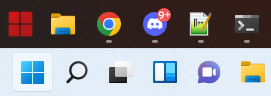
Yes we can change the size of the app buttons, but we cannot influence where the Start Button itself lay, and as you can see compared to the native taskbar, the Start Button does not have enough left margin. On the real thing there is dead space to the left, but with Start11 the start button icon starts at 0,0 basically.
6) Broken invisible panels that prevent interacting with explorer?
This one is hard to describe, but sometimes certain sections of my desktop/taskbar become "permanently" uninterruptable until I restart explorer. I simply cannot click anything that is in the effected region, not even open windows that have nothing to do with Start11. I can click the section of the window that isn't in the affected region but the moment the cursor gets into that section I can't do anything.
The area hasn't be consistent, and although I'm not certain, it almost seems like what might be happening is that the "click area" of some kind of panel (sometimes perhaps even the Start Menu itself), gets stuck open as if that panel was there and so you can no longer click anything "behind" it.
7) Sub-menus off the top taskbar often don't have the right offset
This seems to mainly affect the audio/device command panel and the tray icon panel, but often these panels will open in the incorrect position and do not account for the taskbar position correctly. You can see here it's on top of the taskbar instead of below it.
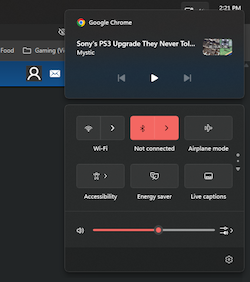
8) Action Center sometimes breaks and gets stuck in the wrong spot
I'm not sure if Start11 is to blame for this one, but just in case: Sometimes when clicking the clock the notification center comes out in a wildly wrong spot. Here it's way to the left of my screen. Only restarting explorer fixes this.

Suggestions/Requests
These are just two requests, not bugs
A) Any hope of inverting the action center/notification panel and moving it to the top when using top taskbar?
I'm sure this is just a technical limitation but are there any plans for having the panel in the above picture better modified for when using the top taskbar option? So that the calendar is on top under the taskbar and the notification section is below that, expanding downwards instead of up?
 Option to have the Windows Pro menu portrait and user text moved down
I really like the Windows Pro Start Menu. It has an option to hide the username and portrait, but I do like seeing them; however, I do like how there is less of a gap between the menu and taskbar when that option is on. Something I figure wouldn't be too difficult to add is an option that is the best of both (IMO) where the icon/username are simply moved down to be totally within the Start Menu boarders like so:
Thanks for the product otherwise... it's just frustrating because while I really enjoy it, there's enough flakiness with these issue that I'm not sure I'd be able to deal with them all on a daily-driver system. If only Windows 11's UI wasn't so irksome in the first place 