Limited search in last Stardock version

Acceleretion key, word search

I have a problem with the last version S11 2.0 with:

- acceleration keys do not work, I mean for example when picking an app I open a window with right click and I want to pick an action by clicking a underlined word but it isn't possible with the latest version

- another issue is that I can't searcho for words anymore, it only searches for files names and is very limited, in the previous version you could even search by word within the files 

I need help please, is it a version problem or is it something with the settings?

Moved to Start Menu Products area.


2,449 views 10 replies
Reply #1 Top

Hello,
Sorry to hear you are having issues. Need more information on your system and issue.

  1. You on Windows 10 or 11, also need to know its full version and OS Build number. Please use Winver.exe
  2. Not sure if you're referring to Start11? If so need its full version number too.
  3. Please elaborate more or post a video on your first issues so we understand it better.
  4. Second issue, do you have "Everything" installed and you have its function turn on (refer screenshot below), if so try this guide: https://www.voidtools.com/forum/viewtopic.php?t=14027

Thank you.
Basj,
Stardock Community Assistant.

Reply #2 Top

Thanks, I already have that option activated

I'll send you a photo of the problem, for example I can't select the "m" for the acceleration key.

I also give you the versions of Windows and Stardock

I hope you can help me, thanks!


Reply #3 Top

Hello,

For the accelerated key don't work on Windows 7/Modern style All Program right click menu item issue, I have forward this issue to Stardock Support Team for their assistance. Please keep an eye on this thread for any updates. We appreciate your feedback and patience.

Thank you.

Basj,
Stardock Community Assistant

Reply #4 Top

Thanks, I'll wait. And for the second issue I have to install another app? Everything? 

But I have a question, would I have to do the search in that other program instead of Stardock? Is that so or did I not understand correctly?

Reply #5 Top

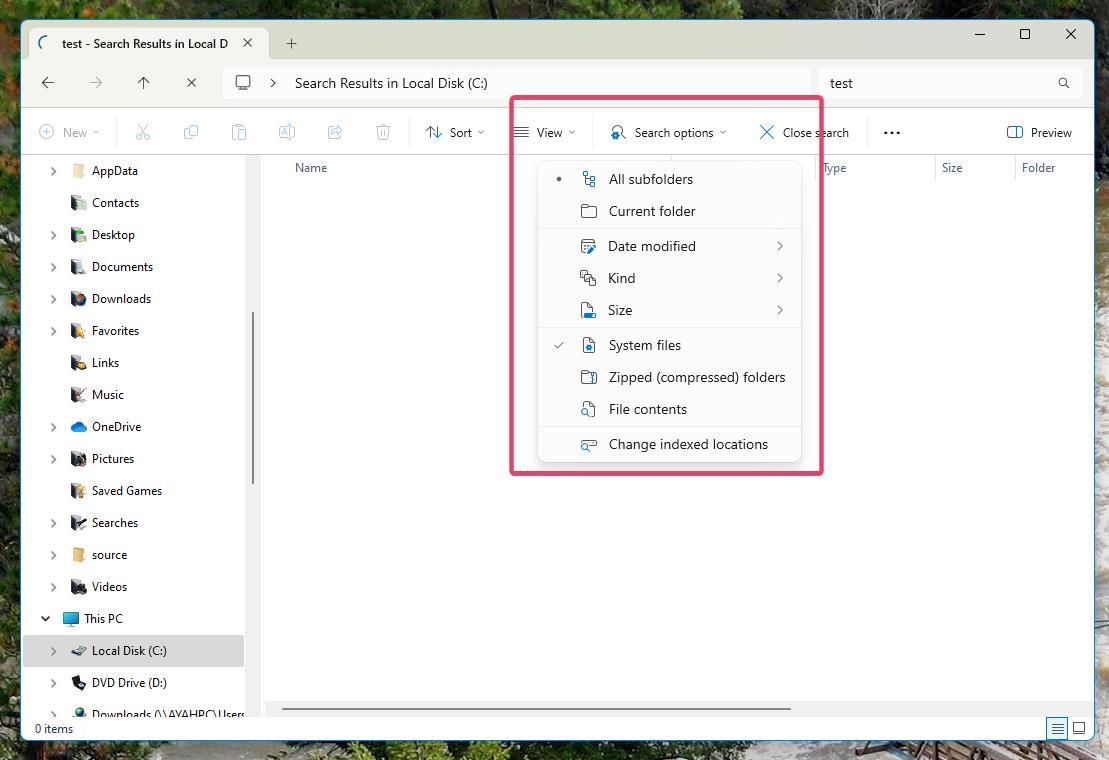
For search issue. You don't need to install Everything for the search to work. Just that with Everything it is much much faster. If you wish not to use Everything, you might need to turn on Windows search to include "File content" in your Search Advance option. And from what I notice and conclude, this might need to take a very long time since it will need to search your entire storage and looking for files content with specific data you looking for.

screenshot below from Windows 10 file explorer.

It is easier if you use Windows explorer where you can include filter to your search: Windows 11 should look like this.

Thank you,

Basj,
Stardock Community Assistant

Reply #6 Top

Thank you, but instead Windows Explorer I actually use Stardock. 

What I mean is that I want to be able to continue doing my searches from Stardock. 

Reply #7 Top

Hello,
I have forwarded your question to Stardock Support Team for their assistance. Please keep an eye on this thread for any updates. We appreciate your feedback and patience.

Basj,
Stardock Community Assistant

Reply #8 Top

Hi DeloresRS, 

Thank you for posting.  We now have these issues logged for internal review.

Internal Refs: ODNT-9116, ODNT-9117

Best regards,

Adam McGuinness
Stardock Customer Support Specialist

Reply #10 Top

Here is a link to a Microsoft Support site which explains Indexing in Windows.

https://support.microsoft.com/en-us/windows/search-indexing-in-windows-faq-da061c83-af6b-095c-0f7a-4dfecda4d15a

What information is indexed?

By default, all the properties of your files are indexed, including file names and full file paths. For files with text, their contents are indexed to allow you to search for words within the files.

Evidently, you will have to use Windows search instead of Start11 search if you want to to search file content.