Tabbet Dock freezes in windows 10

Hello!

I am currently in the trial period of Stardock ObjectDock, and I am disappointed that even after the release of version 3, which was supposed to fix this issue with Windows 10, the problem still persists.

I'm quite frustrated because my trial period is about to end, and I'd like to purchase it. However, every time I think about it, the issue I'm facing comes to mind, and I feel discouraged.


I'm using Windows 10 Pro 22H2 19045.4894.

Laercio

8,422 views 17 replies
Reply #1 Top

Hello,
Sorry to hear you are having issues. Please clarify your issue. Is the issue only on tab dock? No issue on normal quick launch dock? Is the issue happen on empty tab dock? Have you tried uninstall, redownload, reinstall, reboot and retest it?

Thank you.
Basj,
Stardock Community Assistant.

Reply #2 Top

Thank you for your help.

To provide more information:

I have now discovered that there is a long delay (not freezing) when opening "Advanced Tweaks" and after I close the main settings.

The delays (or freezing) occur when I close any windows, including the settings window.

I don't use the Quick Launch dock because I can't hide it (sliding it off the screen). I don't like seeing it, and yes, there is no delay on the Quick Launch dock.

There is no delay (or freezing) on empty tabs (I tested with only one dock). Currently, I am using four docks. Do you see my settings?

Thanks again!

Laercio

Reply #3 Top

Quoting Ljmnunes, reply 2

Currently, I am using four docks.
End of Ljmnunes's quote

If you remove all the docks/icons from your current tab dock, there should be no delay/freeze, yes? If no, than add icons one at a time and test. If you add a simple icons like calculator, does the delay/freeze appear? If not start add another icons until the delay/freeze appear. See which Icons you added causing the issue and report back.

Thank you,

Basj,
Stardock Community Assistant

Reply #4 Top

Hi!

There were no differences when increasing the number of shortcuts, but I noticed some interesting differences when I close these windows:

  • Apps: 6~8s
  • Web (Brave): ~10s
  • Shortcut to folders (Explorer): ~15s

If I wait after these times before pointing to the dock, it opens immediately. So, the freezing happens after closing any windows.

My trial period ends soon. Is there a way to extend it until this problem is fixed?

Thanks!

Reply #5 Top

No, there is no extension offer for trial peroid. For your, issue please try purge and reinstall steps as mention here : [Link]. Just make sure to redownload the trial version installer. Reboot after the purge. Reinstall and reboot again after the installation. Retest and report back here.

Thank you,
Basj,
Stardock Community Assistant.

Reply #6 Top

I did as you told me. Now I have another trial period. That's ok, thanks.


And now, guess what! The freezing delay has increased to ~30 seconds! :-(

Reply #8 Top

Hi!

In the sandbox, it works fine. Again, I purged and reinstalled it, creating one dock and adding all shortcuts one by one. My perception is: the freezing time increased as I created new shortcuts.

I'm almost giving up.

Thanks for your help.

Reply #9 Top

What process are you using to add shortcuts to your dock(s)?

Do you have "Show running applications on my dock" checked to on?

What "Effect" are you using?

Are any of the shortcut targets on a network drive?

Reply #10 Top

Quoting pelaird, reply 9

What process are you using to add shortcuts to your dock(s)?

Do you have "Show running applications on my dock" checked to on?

What "Effect" are you using?

Are any of the shortcut targets on a network drive?
End of pelaird's quote

1) Manually: add->shortcut->link->browse for target.

2) Show indicator under running programs - no

3) The default: Glow.

4) No. Only to executables, to local folders and link to web pages (opening Brave browser)

Thanks!

Reply #11 Top

Just to clarify the issue is not theme related. If you use different Tab dock theme. Does the issue still there?

Thank you,

Basj,
Stardock Community Assistant

Reply #12 Top

Hi Basj,

Thank you for your response! Just to clarify, as far as I know, the Tabbed Dock doesn’t seem to support "themes" in the way you mentioned. Could you explain what you mean by "using a different Tab Dock theme"? I'm a bit confused about how that would apply to the Tabbed Dock.

Thanks in advance for your help!

Reply #13 Top

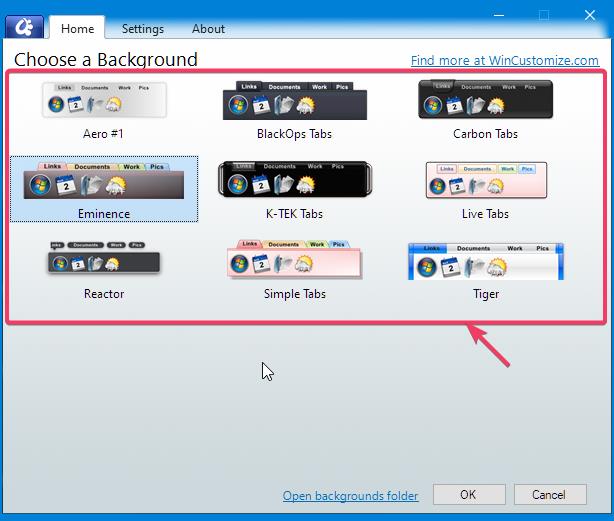
You can change tab dock style by clicking here.

Select tabbed dock style

Thank you,

Basj,
Stardock Community Assistant

Reply #14 Top

Ops, sorry...

Well, I'm using default theme, the "simple tab". If I change it the tabbet dock freezes for more than 3 minutes.

I changed the theme to "Aero #1" and it not helped.


Reply #15 Top

[quote who="Ljmnunes" reply="14" id="3947030"]
Ops, sorry...

Well, I'm using default theme, the "simple tab". If I change it the tabbet dock freezes for more than 3 minutes.

I changed the theme to "Aero #1" and it not helped.

Reply #16 Top

Hello,
I have forwarded your problem/question to Stardock Support Team for their assistance. Please keep an eye on this thread for any updates. We appreciate your feedback and patience.

Also, please post a video of your issue so we see the issue better.

Thank you.

Basj,
Stardock Community Assistant