Always combine taskbar buttons inconsistancy

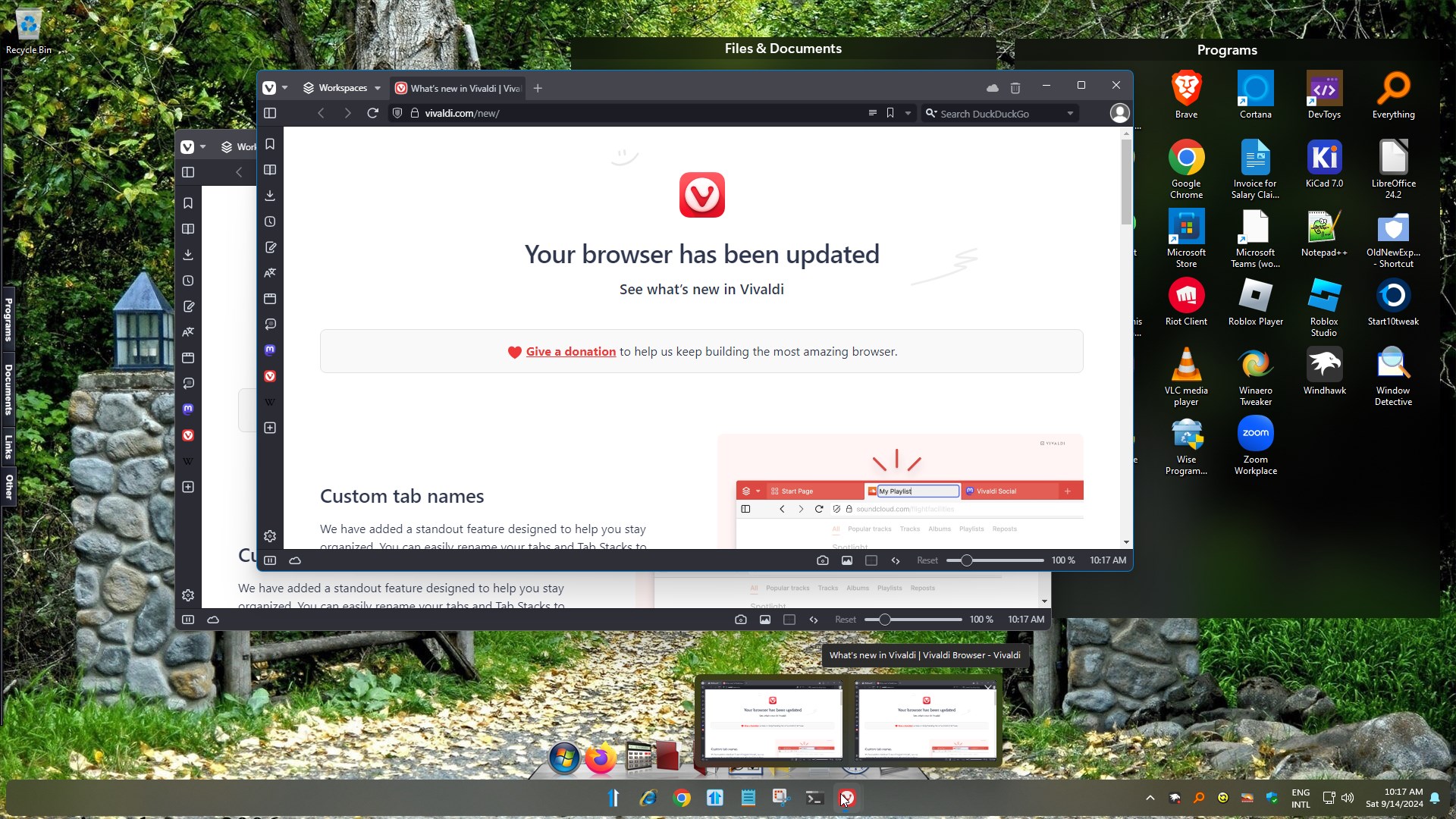
I have two computers, desktop and laptop, with licensed Start11 2.11. Both have the latest Microsoft updates. The desktop is Windows 11 Pro, the laptop is Windows 11 Home. I have set the Taskbar button combining on both to Always combine taskbar buttons. The issue is specific to one application, Vivaldi browser. Both computers are using the exact same version of Vivaldi as well but only the laptop actually combines the button into one instance once I open Vivaldi. Both install settings should be identical since I synced my Vivaldi settings from the desktop.

Anyone have any ideas on where I should look to try to resolve this issue? 
1,817 views 8 replies
Reply #1 Top

Hello,
Sorry to hear you are having issues. I checked your issue on my system. But, I can not reproduce your issue. This is what I saw on my system, with always combine turn on and open two vivaldi windows. This is what you expected it to work, yes?

So this don't happen or never happen in your desktop system. First, try this, uninstall Start11v2. Reboot immediately, after uninstall finished. Re-download Start11 v2.11. Install it, reboot immediately again after installation finished. Retest it and report back.

Thanks
Basj,
Stardock Community Assistant.

Reply #2 Top

Sorry for the delay in getting back to you. So I did everything that you suggested and I still have the same issue on my desktop.

I have included this screenshot of my taskbar. The program icon is in the center and the icon for the opened browser is to the far right of the taskbar.


For clarification sake it is my desktop that has the issue. The laptop does not have this issue. After installing I use the settings on my laptop and mirrored them on the desktop, they are exactly the same.

Thank you for your support.

Reply #3 Top

Hello again,

Need more information on your system.

  1. Windows 11 full version and OS Build numbers. Please use Winver.exe.
  2. Do you have any other application install that change your taskbar and or Explorer behavior, such as ExplorerPatcher, StartAllBack, DisplayFusion etc?

Thank you,

Basj,
Stardock Community Assistant


Reply #4 Top

Edition Windows 11 Pro

Version 23H2

OS build 22631.4249

I do use Display Fusion but the only thing I use it for is the screen saver feature.


Reply #6 Top

Just finished testing in the sandbox and Vivaldi does not open an additional icon on the taskbar. It's still happening on my desktop and I've even uninstalled Display Fusion. The only browsers I have installed are Vivaldi, Firefox and Edge. Only Vivaldi and Firefox exhibit the double taskbar icon.

This isn't a critical issue, I can certainly live with it. I think I'll uninstall Vivaldi and see if that does anything.

Reply #7 Top

Basj,

I have an update. Since I tried a number of different solutions you provided I thought let me try this. So what I did is uninstall Vivaldi and then re-install it. Guess what, that worked to correct the issue. I don't know why I didn't think of that before because it's probably the easiest step to take. So I wonder if it has to do with installation order. When I initially built out my desktop (completely new hardware) last year I installed my preferred browser before any other applications and I probably installed Firefox before installing Start11 also. I haven't re-installed Firefox yet but I expect the same results.

As far as I am concerned you can close this case. I would be interested in hearing your final thoughts on this issue. Thank you for all your help and patience.

Joseph Slive

Reply #8 Top

I don't think that is directly the reason, since I uninstall and reinstall Start11 on my system lots of time for testing and I don't see this issue on my system. And I can't think of anything else right now that might link to the uninstalling and reinstalling Vivaldi resolve the issue. Anyway, I am really glad it resolve your issue. Thank you for reporting this. Might help others that have similar issue in the future.

Thank you,

Basj,
Stardock Community Assistant