.png images as dock icons

Using custom made PNG icons no longer works?

From memory the pre-3.0 versions of ObjDock worked happily with PNGs as dock icons whereas ver 3.01 that I have installed doesn't seems to like them.

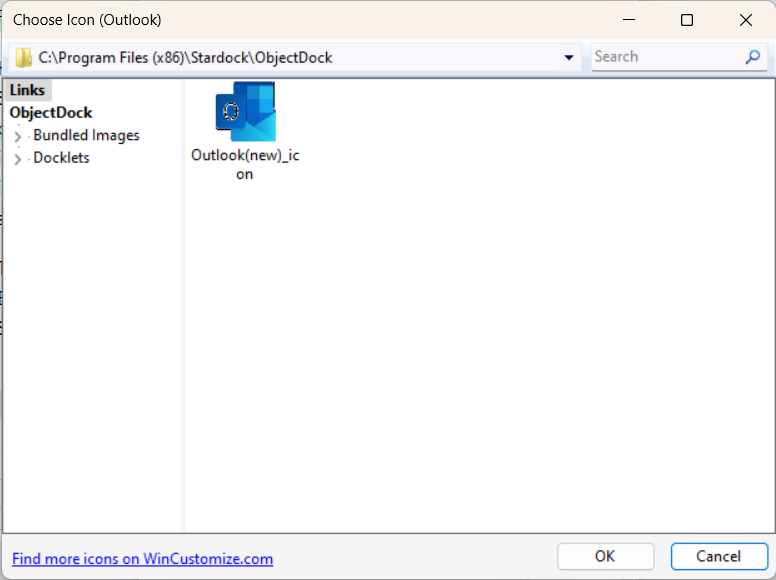
I can browse to where the image is stored in the Choose Icon dialog, but it doesn't appear in the [directoryname] list. When resaved as .ico file it appears in the list but the image is distorted somewhat (ok this could be because the .png form factor was not a standard icon size).

Known issue?

Cheers,

Chris

5,182 views 5 replies
Reply #1 Top

Hello,
Sorry to hear you are having issues. But, I do have Windows 7 running, ObjectDock 2.20 and the part where you browse for Icons is the same, unless you were referring to different section. only icon files appear in the listing. But you can browse and select .png files if you wish to use png as icon. provided the png is at normal icons size such as: 256x256 pixel, down to 16x16 pixel. Irregular size will obviously be compress or expand strangely.

Thanks
Basj,
Stardock Community Assistant.

Reply #2 Top

Hi Basj,

Yes the interface/dialog is the same as the 2.XX versions it's just that with my combination of software (Win11 23H2 build 22631.3593 and ObjectDock version 3.01) after selecting the .png image, only files of type .ico appear in the list - see screenshot below.

There should be 2 files in the list: one of type .ico (which is visible) and one of type .png (which does not display). Both are in the same directory on the PC.

Note also the .ico image is rather corrupted, but this could be some other compatibility issue. It was created from the .png, resized to 256 x 221 x 24BPP and saved as an .ico file using the latest version of irfanView.

Reply #3 Top

Yes, it is, I believe, a known behavior, I saw the same thing on OD v2.2, as I mentioned above. Hopefully it will improve more in the future. As for the icon image corrupted issue, do know for an icon to properly design you will need to design it or make it same size vertically and horizontally, square, so for the 256pixel look good, you will need to manually redesign/resize it to be 256x256pixel.

Thank you,

Basj,
Stardock Community Assistant


Reply #4 Top

I checked this on my system and .png files show in the ObjectDock icon selection window. They are 256x256 .png files. As Basj says above, make sure your .png files are actually 256x256 and they should be available.

Reply #5 Top

I think maybe you are looking in the wrong place, Chris. To browse for icons/pngs, click inside the bar at the top and be sure to browse for the folder you have stored your icons/pngs, and I'm pretty sure they will show up in the list.