
Cannot Access any File with .txt extension, nor notepad.exe

Is the cause of this File Explorer updated by Stardock?

Is StarDock the outfit that keeps updating File Explorer?  I cannot access any file with a *.txt extension.  File explorer can find hardly any file.  In the command prompt window, I go to C:\Windows\System32, and do a dir notepad.exe, and dir can't find the file.  I create a shortcut on the desktop to notepad, and the program is now accessible.  All this trouble with no file with *.txt extension is accessible and notepad cannot be found started after the last File Explorer update.

Why does starDock have to mess with File Explorer?  Just exactly how does one restart File Explorer without rebooting?  Is StarDock a bit too precious (definitions 4. and 5., Random House Webster's Unabridged Dictionary)? 
 

2,923 views 8 replies
Reply #1 Top

Stardock are not the developers of the Windows File Explorer.  That would be Microsoft.  Issues with that product would need to be raised with Microsoft

Your issues do not sound like anything being caused by any Stardock software either.  

Reply #2 Top

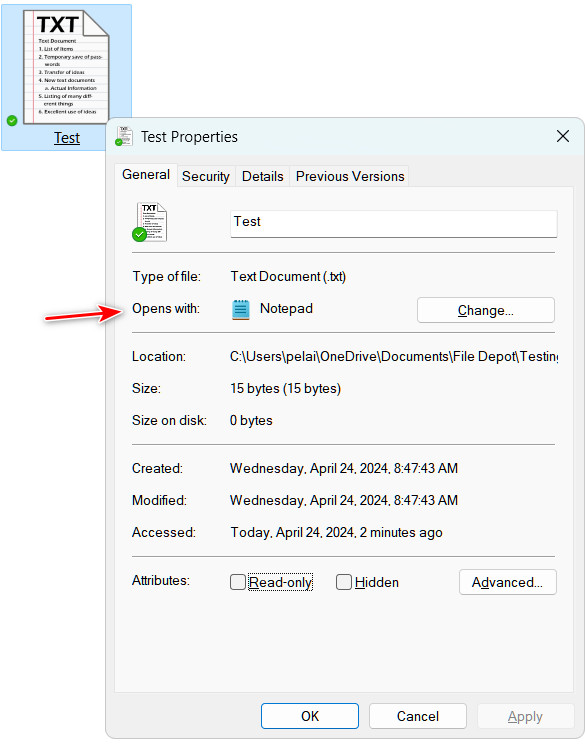
Go to one of your text files and right click it and then select Properties and then check to see what app the "Opens with" is set. If it's not Notepad. click the change button and then select Notepad in the resulting dialog.

Reply #3 Top

Thanks and an 'E' for effort, but Notepad is now and always has been the preferred app for *.txt files.  The problem may have been that File Explorer could not find notepad.exe even though it was where it has always been -- C:\windows\System32.  Somebody from GitHub is patching  File Explorer, and this time he, she, it or they busted it.

Reply #4 Top

Quoting elliottch1, reply 3

Thanks and an 'E' for effort, but Notepad is now and always has been the preferred app for *.txt files.  The problem may have been that File Explorer could not find notepad.exe even though it was where it has always been -- C:\windows\System32.  Somebody from GitHub is patching  File Explorer, and this time he, she, it or they busted it.
End of elliottch1's quote

File explorer is not available on github.  It is entirely Microsoft in house developed.

Reply #5 Top

Quoting Neil, reply 4


Quoting elliottch1,

Thanks and an 'E' for effort, but Notepad is now and always has been the preferred app for *.txt files.  The problem may have been that File Explorer could not find notepad.exe even though it was where it has always been -- C:\windows\System32.  Somebody from GitHub is patching  File Explorer, and this time he, she, it or they busted it.


File explorer is not available on github.  It is entirely Microsoft in house developed.

End of Neil's quote

I think the OP must be referring to Explorer Patcher.

Reply #6 Top

Right, Explorer Patcher is the program that changes File Explorer.  Does anyone know if Explorer Patcher is a Stardock effort?  I think I started receiving updates from it when I bought and installed Start 11, version 1.

Reply #7 Top

Quoting elliottch1, reply 6

Right, Explorer Patcher is the program that changes File Explorer.  Does anyone know if Explorer Patcher is a Stardock effort?  I think I started receiving updates from it when I bought and installed Start 11, version 1.
End of elliottch1's quote

No. Explorer Patcher is not affiliated with Stardock in any way. It is a product by Valentin Radu on GitHub. It has issues with almost every Windows update. It is important to keep it up to date for the best compatibility with Windows 11 and Start11v2.

Reply #8 Top

Quoting elliottch1, reply 6

Right, Explorer Patcher is the program that changes File Explorer.  Does anyone know if Explorer Patcher is a Stardock effort?  I think I started receiving updates from it when I bought and installed Start 11, version 1.
End of elliottch1's quote

Stardock have absolutely nothing to do with Explorer Patcher.

We do not include it with any of our apps, or link to it.

Given your issues with it, I might suggest you uninstall it.