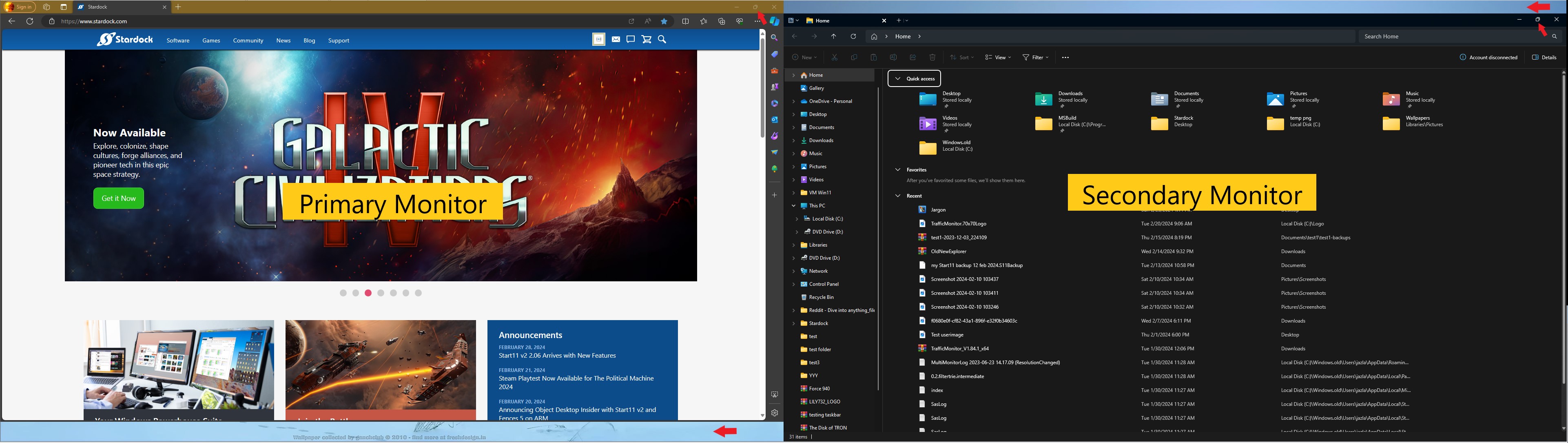
Start V2.06 No Full screen

Howdy;

I just applied the 2.06 update and now my browsers/apps will not go to full screen. I have dual monitors.

TB set to auto-hide

TB set to top of monitor.

What's odd is on my primary monitor the gap is at the bottom while on the secondary monitor the gap is at the top.

I didn't apply any system/hardware updates prior to installing 2.06.

Any ideas?

Thanks

2,940 views 8 replies
Reply #1 Top

Hello,
Sorry to hear you are having issues. Try this, uninstalled Start11, reboot immediately after uninstall finished. Re-download the latest version. Install it, reboot immediately. Retest and report back.

Thanks
Basj,
Stardock Community Assistant.

Reply #2 Top

Thanks for the reply. I did that earlier but was a nogo. If this is of any help; I did leave the settings the same but I moved the TB to the bottom of the monitors and can achieve full screen.

Reply #3 Top

Need to know you on Windows 10 or 11? Also need its full version numbers. Use Winver.exe.

Also, Is need to know more details on your system hardware. For example, tablet type, touch capable, etc.

Thank you,

Basj,
Stardock Community Assistant

Reply #4 Top

I'm using Win 11 Home 64 bit

V 23H2 (OS Build 22631.3155)

My rig is a 3yr old PC Tower

- i9 9 900K (8-Core, 16MB Cache, Over clocked up to 4.7GHz

- 850w PSU

-Monitors Dell 32" and Asus 27" IPS

- 32g RAM

- 2G PCIe NVMe + a few other internal/external drives from 1T to 5 T

- NVIDIA GeForce RTX 2080 Ti OC with 11GB GDDR6


Reply #5 Top

Quoting basj, reply 3

Also, Is need to know more details on your system hardware. For example, tablet type, touch capable, etc.
End of basj's quote

Need this information.

Thank you,

Basj,
Stardock Community Assistant

Reply #6 Top

Thank you, I have forwarded your problem/question to Stardock Support Team for their assistance. Please keep an eye on this thread for any updates. We appreciate your feedback and patience.

Something like screenshot below, yes?

Thanks

Basj,
Stardock Community Assistant

Reply #7 Top

Thanks Basj;

Yes, exactly like your screenshot. Display 1/Left; 32" monitor w/TB set to top, Display 2 = 27" monitor also w/TB set to top. Both autohide.

I'll check in periodically.  Gonna call it a night.

Thanks for your help. Have a good night.

Reply #8 Top

Hello,

Just to inform this issue has been logged internally by Support. Should be look at and hopefully resolve soon. Report number: ODNT-7847. We appreciate your report on the issue.

Thank you,

Basj,
Stardock Community Assistant