New Start Menu 11 Issues

Many Issues

Since installing the latest upgrade I am having several issues that just appear to come from poor testing.

1. My screen is randomly flashing from time to time when clicking on the start button

2. I have a strange blank area at the bottom of all windows like the taskbar is reserving space for a double height taskbar.

3. The win+arrow keys do not work properly and no options will fill the screen completely.

4. And on and on.

This is very unlike Stardock and their products are usually better tested.

4,848 views 15 replies
Reply #1 Top

Hello,
Sorry to hear you are having issues. Those are strange and don't see any report from others that is similar with what you report here. To be sure, please try this, uninstall Start11, do not remove setting, reboot immediately after uninstall. Re-download latest version again from your account product download page: https://store.stardock.com/myaccount/products. Install it, reboot immediately again after installation finished. Retest it and report back.

Thank you.
Basj,
Stardock Community Assistant.

Reply #2 Top

What version did you come from previously?

There is a beta 2.06 update available in your store downloads which has the very latest changes but none of the items you are reporting are known issues which suggests some sort of conflict going on with something else.

Also which version of Windows are you using including full version number?

Reply #3 Top

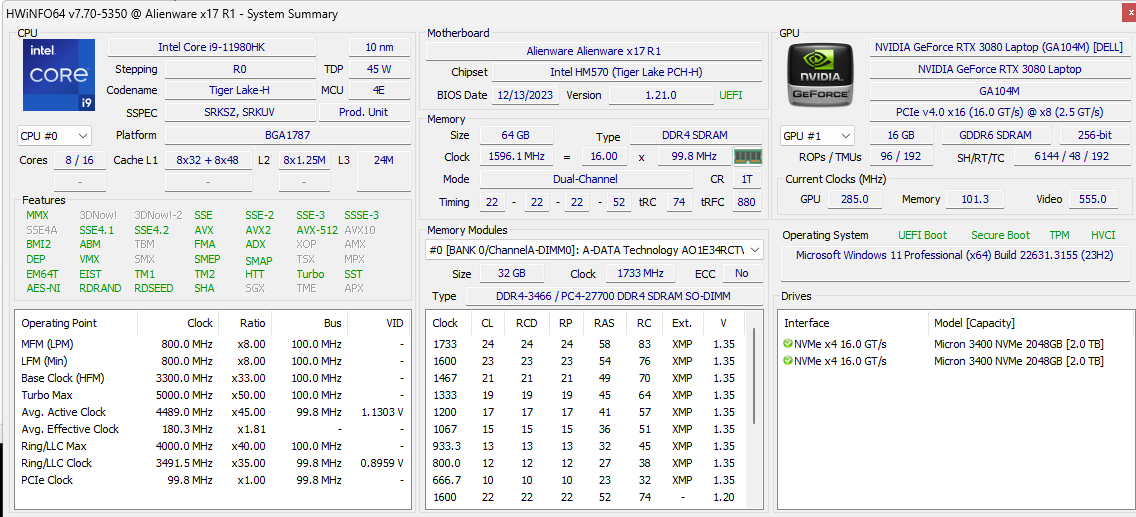
I am going to post a number of things including my internals on the PC.  I actually have two PCs running Start 11 and one does slightly better (desktop).  My laptop seems to have more issues and a lof of it seems to be scaling of the menu.  By the way, I had no problems with the previous version of Start 11, so it is all with the new version.  You can see from this list that I do not have any resource constraints, and I have no scaling or other graphics issues with any other software, and I run a lot.

Reply #4 Top

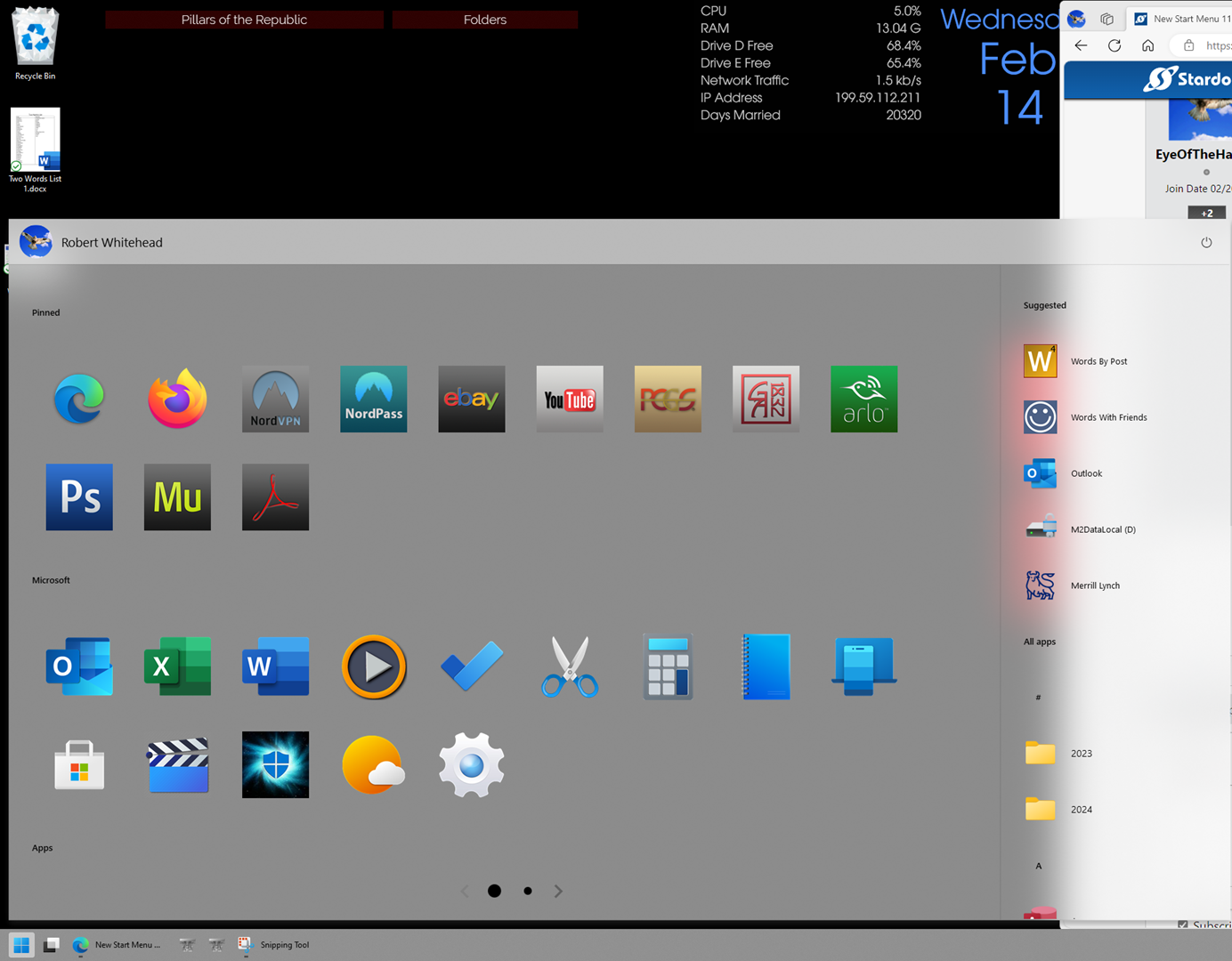
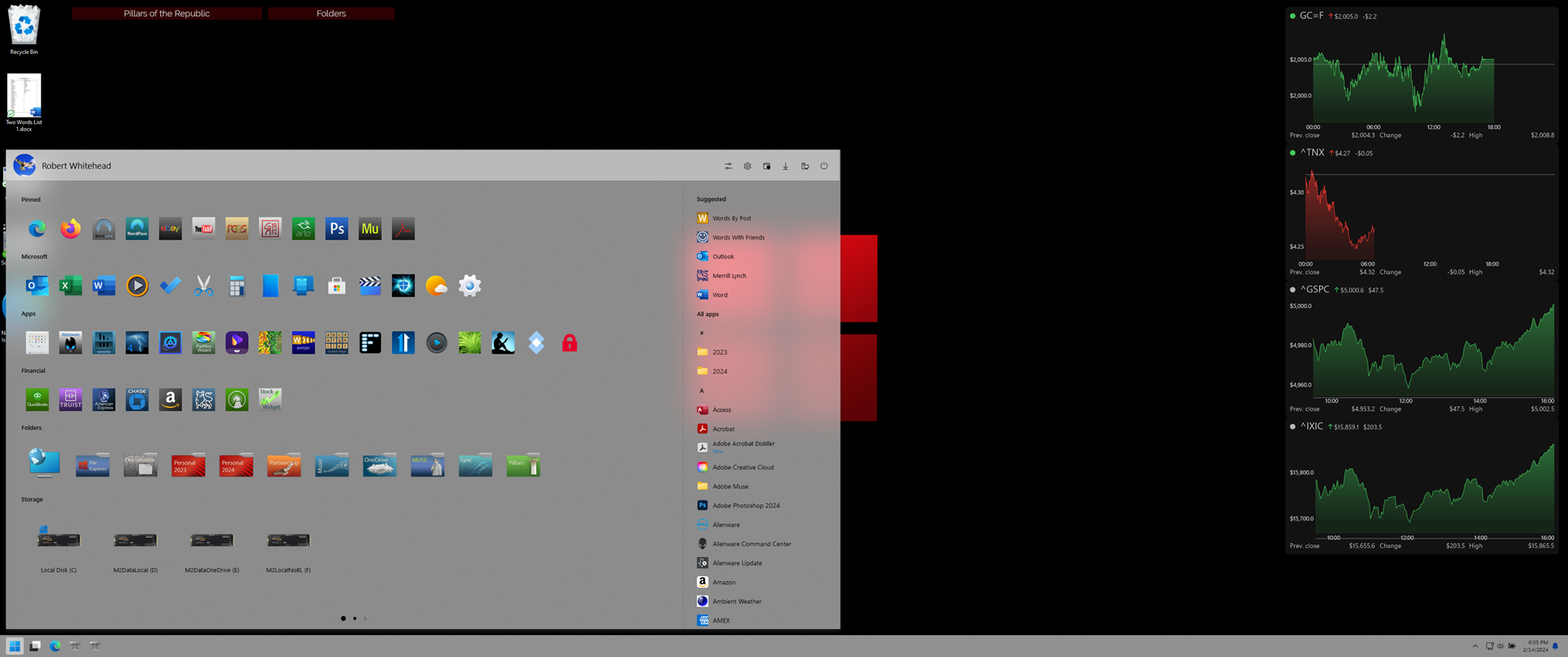
This is typical of just strange resizing.  The first screenshot shows it just resized randomly.  The second screenshot is after a reboot when it is sized correctly.  In both cases, everything else on the screen scales correctly.

Reply #5 Top

First, have you tried the latest version as suggested above. Also you tried those steps I mentioned in my first reply?

Second, how can we compare two screenshot with different sizes? One is half a screen and the another one is full screen.

Thank you,

Basj,
Stardock Community Assistant

Reply #6 Top

Yes, I have updated, and I missed the beta update because I usually wait on the release versions.  But I am giving it a try.  Since the problem occurs randomly, I will just need to run for a few days and see what happens.

As to the screenshots, the first one only shows the area of the screen in question where the menu is, and the icons are obviously enlarged.  Some other confidential information was on the screen, so I just cropped it out.

The full screenshot I did only shows that the issue is isolated to the start menu, and in that shot, you can see when I restarted my PC, it seemed to resize correctly.  These are the correct and normal menu icon sizes.

I will let it run for a couple of days and let's hope this fixes the issue.

Thanks.

Reply #7 Top

Now, after looking and looking. at those screenshots, I just realize, its the icons that change size, not the Start panel, yes? If, so that is strange, might be something else is causing it. Do you have any other application install that change your Startpanel or explorer behavior? For example Startallback, Explorerpatcher, OpenShell etc etc?

Thank you,

Basj,
Stardock Community Assistant

Reply #8 Top

No. The only other thing I run that might come close is rainmeter but I have run it for years without having issues.  Also I have start11 on 2 PCs.  It seems to cause screen flashing and refreshing on both.  This is a new problem on this release because the previous version ran on both with no issues 

A mystery for sure 

Reply #9 Top

Have you tried my suggestion above? Reply#1

Thank you,

Basj,
Stardock Community Assistant

Reply #12 Top

Quoting halcyon6969, reply 11

v2.0.6.1 beta, crashes when searching from start.   (clicking start, and typing query).

 
End of halcyon6969's quote

Which start menu are you using and which mode for search?

Also do you have everything installed or just Start11?

Reply #13 Top

Quoting Neil, reply 12


Quoting halcyon6969,

v2.0.6.1 beta, crashes when searching from start.   (clicking start, and typing query).


Which start menu are you using and which mode for search?

Also do you have everything installed or just Start11?

End of Neil's quote

Windows 10 style, Start 11 search (show search filtering, show edge open tabs, show everything instead of, checked on)

2.0.6 beta didn't have the issue. 

Reply #14 Top

Quoting halcyon6969, reply 13


Quoting Neil Banfield,


Quoting halcyon6969,


v2.0.6.1 beta, crashes when searching from start.   (clicking start, and typing query).


Which start menu are you using and which mode for search?

Also do you have everything installed or just Start11?


Windows 10 style, Start 11 search (show search filtering, show edge open tabs, show everything instead of, checked on)

2.0.6 beta didn't have the issue. 

End of halcyon6969's quote

We think we have found the issue and an update should be out later today, thanks for letting us know.

Reply #15 Top

Quoting Neil, reply 14


Quoting halcyon6969,


Quoting Neil Banfield,


Quoting halcyon6969,


v2.0.6.1 beta, crashes when searching from start.   (clicking start, and typing query).


Which start menu are you using and which mode for search?

Also do you have everything installed or just Start11?


Windows 10 style, Start 11 search (show search filtering, show edge open tabs, show everything instead of, checked on)

2.0.6 beta didn't have the issue. 


We think we have found the issue and an update should be out later today, thanks for letting us know.

End of Neil's quote


Awesome, thanks!