stardock start 11 v2.05 no mouse over hover thumbnails on

Can anyone help here please. I just upgraded to the Start 11 v2, 2.05 and before the upgrade when i would hover over a pinned icon in the taskbar (say firefox) it would show me the FF windows in thumbnail i had open so i can click and go to that window directly.


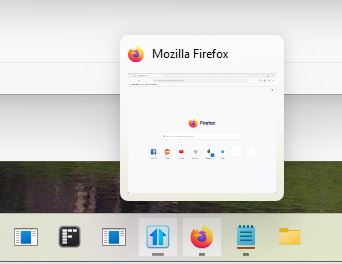
There is NO Hover pop up mouse over on any of my windows 11 task bar icons post upgrade.


Is there a setting i need to activate or is this a bug perhaps?? Or was this removed?

There used top be a mouse over thumbnail of the open documents or browsers, say i had 2 note pads open, of course they stack the icons in the task bar, but mouse over the icon and it used to show you 2 mini thumbsnails of each and now that appears gone


Thank you all

Dean

 

1,191 views 3 replies
Reply #1 Top

Update... i have 2 monitors...and i have outlook running on my secondary monitor and the icon the outlook icon on that monitor on mouse over will pop up a mini outlook thumbnail but the main monitor where all my pinned icons are there is now no hover thumbnails.

So maybe a setting or something here that changed?

Reply #2 Top

Hello,
Sorry to hear you are having issues. But, there should be a preview popup. Something like screenshot below.

Please try uninstall Start11, reboot, redownload Start11, reinstall, reboot again. Retest it and report back.

Thanks
Basj,
Stardock Community Assistant.

Reply #3 Top

Start dock you have a bug, i fixed the issue (or it seems) on mouse over pop ups not showing. Here is what i did to fix it.

in start dock>>>taskbar>>>>taskbarsize>>>>was on medium before upgrade and i was moving to large to test out and restart explorer to large then i moved back to medium and set it back and once i did that the mouse over on pinned icons or open icons in task bar started to work again as before on the main monitor.

Please note.