Icons half gone [SOLVED]
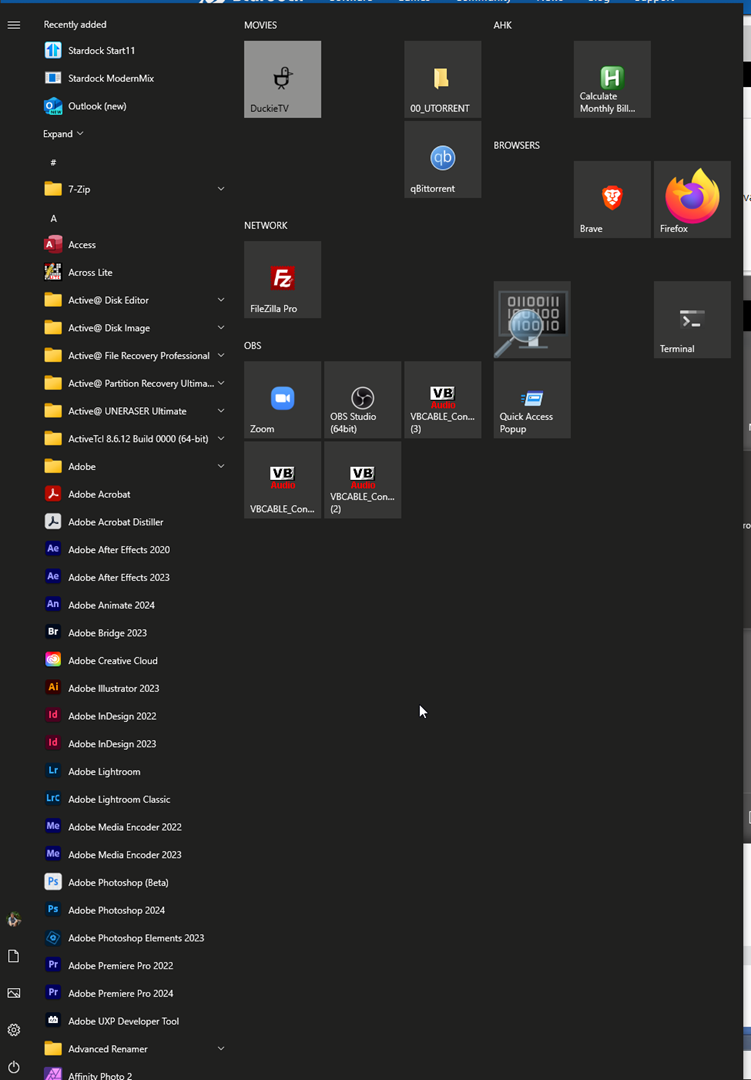
After upgrading from v1 to v2, as seen in the screenshot, 98% of the icons vanished. Clicking “refresh icons” didn't help. What to do?

After upgrading from v1 to v2, as seen in the screenshot, 98% of the icons vanished. Clicking “refresh icons” didn't help. What to do?

Hello,
Sorry to hear you are having issues. Have you turn on this option.

Thanks
Basj,
Stardock Community Assistant.
I have that one turned on, but not the one above it, as you do.

fyi, it's not a Windows issue, because as seen in the screenshot below, when I disable Start11, the icons show fine. Please help, as there is no support email, and I will have to ask for a refund if this is not fixed.

Try uninstall Start11, don't remove setting. Reboot immediately, after uninstall finished. Re-download latest version again from your product page. Install it, reboot again, retest it and report back.
Thank you,
Basj,
Stardock Community Assistant
Thanks, I'll do this tomorrow morning.
Didn't work. This is what happened, and what I tried:
I noticed a ghost version 1.01 that Windows wouldn't uninstall (error with uninstaller):

So I used Revo Uninstaller to completely remove any trace of Start11 (I don't mind rebuilding the folders). Restarted. Reinstalled downloaded version 2. Restarted computer. Programs and features didn't have the ghost Start11 anymore. But surprisingly, my folders were still there! But the icon issue is still exists.

Now I did an uninstallation while removing settings also. Restarted. Uninstalled traces using Revo. Restarted. Installed fresh. It still has the icon issue. It's weird that some icons show, and some don't.

Hello,
I have forwarded your problem/question to Stardock Support Team for their assistance. Please keep an eye on this thread for any updates. We appreciate your feedback and patience.
Basj,
Stardock Community Assistant
My gut is saying you have a corrupt icon cache which is stored per icon size.
If you change the size of a given group (right click on it, pick appearance then icon style and pick a different size, does the icon then load ok?
Being a software engineer myself, the icon cache was the first thing I attempted by deleting the IconCache.db and rebuilding the icon cache. Didn't work. I have weekly Macrium Reflect backups of my C drive. I am creating a backup now, and then I will restore to last week, when the issue wasn't present. I will then uninstall v1, and install v2 as you instructed, and will update if it worked.
UPDATE: Restoring computer to before I installed fixed the issue. Even after updating, the icons are fixed. I don't know what happened, but thank you all for your time.

I think the answer is Windows is a funny beast sometimes. Glad it is working now.
Welcome Guest! Please take the time to register with us.