Start11 2.05 Release Feedback Thread

With the Start11 v2.05 release, we are creating this thread so that users can report any observed issues.  

Obtaining the product

Object Desktop members can get the release from within Object Desktop Manager 

Individual purchases (as well as Object Desktop Members) can also be obtained from your account page: https://store.stardock.com/myaccount/products

For guest check-out purchase (no account), from this link: http://www.stardock.com/support/productkeyretrieval

Reporting an issue

Please include the following for anything found:

  • Exact Windows version \ build (winver.exe)

  • Detailed steps to recreate the issue seen

  • Screenshots and videos are very helpful.  Videos can be uploaded to a cloud drive service (GoogleDrive, DropBox, OneDrive, YouTube), with a shared link included in your post.  Images can be copied and pasted directly into a post.

  • If there are specific apps that the app does not work (well) with, please note what apps and their exact versions.  If any app is not common, a link to a trial version would be appreciated.

Thank you for your interest and any time you put into making Start11 v2 a better product.

Sean Drohan
Stardock Support Manager

75,662 views 70 replies
Reply #1 Top

01/30/2024

Stardock: Released

Steam: Released

1/29/2024

  • Version updated
    UI: 2.05
    Start11Config.exe 2.0.5.4

  • This resolves an issue with jittering on the taskbar when in experimental center mode with certain non-integer scaling factors and depending on how many open windows there were.  

  • Resolves a potential resource leak though highly unlikely to happen.  

  • Fixed a painting issue that the UI had on scaling factors of 283% and higher

1/26/2024

  • Version updated
    UI: 2.05
    Start11Config.exe 2.0.5.3

  • Resolved issue with block behind some taskbar icons in enhanced mode

  • Adjusted overlay icon positions on enhanced taskbar

  • Resolved issue with custom tile images not appearing to save correctly when in a folder (they did but didn't show until a sign-out)

  • Resolved the issue with nvidia GeForce Experience overlay stopping the taskbar autohide working correctly 

01/22/2024

  • Version updated
    UI: 2.05
    Start11Config.exe 2.0.5.2

  • Resolved issue with Win10 center taskbar mode not working on the primary display in 2.0.5.1

  • Resolved issue with tabs jumping around when switching tabs if data in the registry was saved in the wrong order due to an older build of S11

  • Stopped pinned websites being added to suggested lists as not apps

  • Resolved issues with the corruption of text on occasion

01/19/2024

Language Updates

Korean: Credit https://github.com/pb29
Chinese - Simplified: Credit: https://github.com/chyanbo
Spanish: Credit https://github.com/FJMatad
French: Credit https://github.com/d-faure

New text block for 2.05 added to en.lng and the 8 other supported languages. Changes can be seen at the bottom of the en.lng file in \Start11\Lang\en.lng

Translations updated on GH project

Program Changes

  • Version updated
    UI: 2.05
    Start11Config.exe 2.0.5.1

  • Resolved issue with Win10 style folders sometimes painting the icons too far left on multi-column setups

  • Performance improvements for initial startup time on login

  • Resolved Taskbar clipping of system tray icons popup arrow on certain scaling factors

  • Resolved issue with experimental mode centred taskbar buttons getting stuck in a repositioning loop on very odd non-standard scaling factors

  • Resolved a possible issue of a right-click jumplist being stuck at the top of the screen in very rare circumstances

  • Resolved issue with centered taskbar buttons losing one of the buttons on another line incorrectly when the icons have to be shifted along due to insufficient space for center mode

  • Resolved issue with refreshing custom tile images via the refresh icons right-click menu item where sometimes icons remained blank in error

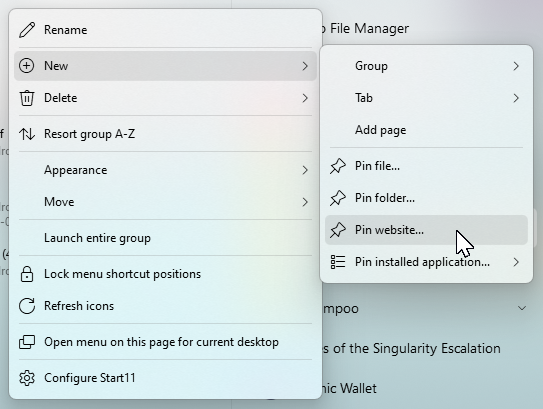
  • Added an option to pin a web URL to Start11 directly

    image-20240119-195648.png
  • Added option to make Start11 obtain the favicon for a given pinned URL automatically (off by default as will make internet connections)

  • Adjustments to potentially help with being unable to drag the top line of the top group around sometimes

  • Resolved issue with Winkey opening the Start11 menu when Winkey set to open the Microsoft Windows Start menu and closing the menu

  • Resolved issue with icons being larger on non-Win10 style menus when synced from OS pins when using Win10 menu

  • Pinned items set to secondary only will now not jump back to primary display if you have only one monitor

  • Added option to make pins show on secondary unless you only have one monitor when they go on the primary instead

  • Further autohide taskbar tweaks to resolve ShareX blocking autohide taskbar from unhiding on Win11

1/10/2024

  • Version Updated
    Start11Config.exe: 2.0.5.0
    Start11 UI \ About: 2.05

  • Support added for swiping up from the bottom of a tablet screen to open the start menu

  • Resolved open file location not working on Steam shortcuts

  • Make all programs list scroll to the top when using search on it to stop things being offscreen on occasion

  • Further autohide adjustments

  • Resolved issue with not being able to use Win11 style folders with the Win10 menu

  • Prevented refresh of recent docs whilst subfolders are open

  • Win11 style folder animations speeded up slightly

  • Resolved issue causing folder animations to run slower than they should on lower-end hardware

  • Resolved memory leak in Explorer on Windows 11

  • Added Pin to Start option for menu mode all programs with Win7/Modern style menus

  • Resolved issue with pinned items set to show on all monitors

  • Small tweaks to autohide mode to see if it helps with it not working right when no windows are open at all

  • Resolved notification center appearing in the wrong place on Win11 in certain circumstances

  • Resolved custom tile PNG loading corrupting the alpha channel

  • Made right-click open animations 20% quicker

  • Resolved autohide + center mode on Win11 having screen dirt sometimes

12/20/2023

  • Version
    Start11Config.exe: 2.0.4.1
    Start11 UI \ About: 2.04

  • Start11 v2 for Business made available

  • Resolved Win10 folder mode when using Win11/Pro/Launcher/App style menus causing icons to be placed on top of each other

  • Resolved unpinning from Start11 not unpinning from OS on some versions of Windows

  • Resolved Start10 style search showing double entries for Universal apps

  • Improved filtering on recent documents menus

  • Resolved issue with sniping tool not showing on taskbar correctly after taking a screenshot with enhanced taskbar enabled

  • Resolved issue with top aligned taskbar and Win+X menu having an offset for mouseover

  • Suggested apps now filters for uninstalled apps / missing shortcuts

  • Suggested apps refresh correctly on app launch now

  • Resolved recent documents list not refreshing as often as it should for Win11/Pro/App/Launcher menu styles

  • 10) Enhanced Start11 style search to factor in filename and path for apps

  • Resolved issue with taskbar combining only pinned items causing extra space to be reserved that is not needed

  • Tweaked everything support to also support 1.5a if installed

  • Resolved memory leak on reloading the all-apps list

  • Resolved issue with right-hand side flicker when closing an app when using experimental center mode for the enhanced taskbar

  • Tweaks to how the taskbar shows over games

  • Updated build again with a fix for double touch input on the enhanced taskbar when tapping very quickly.

  • The new feature this enables is the import of settings on login (or explorer restart).  This will zap all settings and replace them with the data in the file provided.
    The key for this is SettingsImportPath which takes a full path to a settings backup saved from S11.  This is stored here : HKEY_LOCAL_MACHINE\SOFTWARE\WOW6432Node\Stardock\Start8\Start8.ini\Start8

Reply #2 Top

Known issues

While we appreciate all feedback, please remember that we offer no official support for beta \ preview \ developer channel versions of Windows. If you report issues while in any of those early release channels, you should not expect them to be addressed unless it still exists in a retail version of Windows.

  • tbd
Reply #3 Top

02/19/2024

All,

While this release thread will remain pinned until 2.06 is released, it will be locked to see that most all issues in 2.05 have been addressed in 2.06.

If not already, please install the 2.06 beta to see if your 2.05 issues remain.  If so, please report there with all the supporting information to illustrate and reproduce it.

https://forums.stardock.com/525921/start11-v206-beta-feedback-thread

As always, thank you for the time, feedback, and support.

Sean Drohan
Stardock Product Lifecycle Manager

Reply #4 Top

For those of us who used the last beta, do we have to install this version?

Reply #5 Top

Never mind, I installed the non-beta version over the beta version that I had installed before just to be sure.

By the way, if this version was the version 2.0 release, I think it would've been a much smoother release. Version 2.0 very much needed more time in beta.

Reply #6 Top

Can I make a reasonable suggestion for the Start11 versioning discrepancies?

Why can't you simply make the version 2.0.5.4 for everything, instead of having version 2.05 in the GUI, but 2.0.5.4 for the file version and in Installed Apps?

Reply #7 Top

Since Start11 version 2, when I first click on the start button, it takes one or two seconds for the start menu to load the first time I use it after a reboot. This never happened in version 1. I've only noticed it in version 2.

Reply #8 Top

Quoting Stiggg, reply 7

Since Start11 version 2, when I first click on the start button, it takes one or two seconds for the start menu to load the first time I use it after a reboot. This never happened in version 1. I've only noticed it in version 2.
End of Stiggg's quote

No, I just tested, Start11 v1 also need some moments to load those icons first time after boot.

Thank you,

Basj,
Stardock Community Assistant

Reply #9 Top

Hello!  I've messaged Brad on Twitter (X) but thought I should report this here.

Since updating to V2 I no longer have recent documents appearing when I right-click on app icons on the start menu. I was hoping this would be corrected on the latest V2 update, but I haven't seen any changes come through.

For me, this is an essential item - I bought V2, but have only installed it on one machine because of this omission.

I have attached 2 screen shots from V1 and V2 below.  

Mannino Start 11 V1 drop down list

Don Mannino
Cypress, CA

Reply #10 Top

It should be working identically to v1 in that manner.

Are you right clicking on exactly the same shortcut?  Jumplists are funny things and the shortcut in use is critical to getting the information required.

We have found an issue with how certain new shortcuts are created in Start11 when pinned sometimes, but this shouldn't impact any older pins you have.  This will be addressed in 2.06.

Reply #11 Top

Thank you Neil.

I could have shown the same difference using any of the other shortcuts - it's missing with Excel and all other programs.

I appreciate your response very much.

Don Mannino
Cypress, CA 

Reply #12 Top

Quoting DonMannino, reply 9

Since updating to V2 I no longer have recent documents appearing when I right-click on app icons on the start menu. I was hoping this would be corrected on the latest V2 update, but I haven't seen any changes come through.
End of DonMannino's quote

I assume you have Jump Lists turned on in the Windows Start menu settings.

I tested this by turning off Jump Lists, and sure enough, they were all gone. My pinned files were still there, but recent files were missing. I turned it back on and they were still missing. Once I opened a file from the app on the Start11 menu, the recent files reappeared.

Have you opened any apps from the Start11 menu since you installed it?

Also, what Start11 style are you using?

Reply #13 Top

Now periodically all the titles go missing on the taskbar buttons,


Takes a reboot or restarting start11 to fix.

Reply #14 Top

After further troubleshooting the jump list issue has been resolved. I found that my one computer where I still had V.2 on it was still on .03 version (it had started with the beta version). Some apps (MS apps like Excel, Word) showed the jump lists, other ones (like Word Perfect, Goldwave) would not show them.

I updated with to Start 11 V2.05, and now all apps are showing the jump lists correctly.  I have since updated 3 other computers to V2.05, and all are working correctly.

Thanks, I'm glad to report it is already working correctly.  Sorry for the trouble.

Don Mannino
Cypress, CA

Reply #15 Top

I am buying Start11 today because I believe in the product and like its many features.  However, I will still use StartAllBack for now for two features that I think are key:

1) The systray icons do not stack when the taskbar is two rows or more.  I have all tray icons showing and they take up a lot of space on the taskbar because they stay as a single row.  I would love to have the tray icons flow to the same number of rows as the task bar.

2) StartAllBack adds dark theme to Windows like Control Panel and others.  It is so nice to get dark mode using OLED displays.  

*Please* consider implementing these two features.  Like I said, I will buy Start11, but would really like to see these features before switching. 

Thank you.

Reply #16 Top

Quoting snovvman, reply 15

1) The systray icons do not stack when the taskbar is two rows or more.  I have all tray icons showing and they take up a lot of space on the taskbar because they stay as a single row.  I would love to have the tray icons flow to the same number of rows as the task bar.
End of snovvman's quote
Yeah, I'd like that too.

Reply #17 Top

Good evening.

I updated my Start11 v2 to version 2.05, but the option to pin a website doesn't show up. I'm using the windows pro style menu. 

Might I be be doing something wrong? 

Thanks in advance.


Reply #18 Top

Why is it that when you CTRL+right-click an icon to bring up the menu with more options, many items are missing the icon?

Sometimes when you click for a second time some icons get together, then you click again and they get together again?


Can you explain please? I'm talking about the CTRL menu plus the right mouse button on any icon you have at start

first click


Second click as you can see some icons are back

Reply #19 Top

I have recently installed Start11 on Windows 10, and rather like it. However, I can't find the option to ungroup of windows on the taskbar. What happened to it?


Reply #20 Top

Quoting Jamesff, reply 19

I have recently installed Start11 on Windows 10, and rather like it. However, I can't find the option to ungroup of windows on the taskbar. What happened to it?

 
End of Jamesff's quote

Thats not needed to be a feature on Windows 10 in Start11 as it is already a feature of Windows 10.

You can control that from the taskbar settings in Windows.

Reply #21 Top

Can anyone help here please. I just upgraded to the Start 11 v2, 2.05 and before the upgrade when i would hover over a pinned icon in the taskbar (say firefox) it would show me the FF windows in thumbnail i had open so i can click and go to that window directly.


There is NO Hover pop up mouse over on any of my windows 11 task bar icons post upgrade.


Is there a setting i need to activate or is this a bug perhaps??


Thank you all

Dean


Reply #22 Top

Hi

Just got a new PC with Win11, and I despise it. Found your product, and that seems like the answer. I've downloaded the latest version - looks good, but I've found an issue affecting the Start/Right Click menu, which impacts my usage, as I use that right-click a lot.

Start11 v2, Version 2.05 Windows 10 style, taskbar configured Left aligned.

Start11v2-setup.exe version 2.0.5.4


Edition Windows 11 Pro

Version 23H2

Installed on ‎1/‎29/‎2024

OS build 22631.3085

Experience Windows Feature Experience Pack 1000.22684.1000.0


Issue

The highlighted menu item on the Start/Right Click menu does not correspond to the mouse pointer position.


CLICK ON THIS    -     LAUNCHES

Installed Apps      -     Event Viewer

Power Options       -     Settings/System/About

Event Viewer        -     Device Manager

System              -     Settings/Network & Internet

Device Manager      -     Disk Management

Network Connections -     Computer Management

Disc Management     -     Windows PowerShell

Computer Management -     Terminal

Terminal            -     Task Manager

Terminal (Admin)    -     Settings/Home

Task Manager        -     File Explorer/Home

Settings            -     Start Menu

File Explorer       -     Run

Search              -     Shut Down or Sign Out

Run                 -     Desktop

Shut Down/Sign Out  -     Nothing

Desktop             -     Nothing


This is my only reservation. If there's something I'm missing, please let me know. 

Thanks!

Reply #23 Top

Start dock you have a bug, i fixed the issue (or it seems) on mouse over pop ups not showing. Here is what i did to fix it.

in start dock>>>taskbar>>>>taskbarsize>>>>was on medium before upgrade and i was moving to large to test out and restart explorer to large then i moved back to medium and set it back and once i did that the mouse over on pinned icons or open icons in task bar started to work again as before on the main monitor.

Please note.

Reply #24 Top

Quoting deantomes, reply 21

Can anyone help here please. I just upgraded to the Start 11 v2, 2.05 and before the upgrade when i would hover over a pinned icon in the taskbar (say firefox) it would show me the FF windows in thumbnail i had open so i can click and go to that window directly.


There is NO Hover pop up mouse over on any of my windows 11 task bar icons post upgrade.


Is there a setting i need to activate or is this a bug perhaps??


Thank you all

Dean

 
End of deantomes's quote

Hello,
Sorry to hear you are having issues. But, I have answered you on your own thread. Also, do not post multiple post on the same issue.

Thanks
Basj,
Stardock Community Assistant.

Reply #25 Top

I'm running Start [betas] v2.x on a Win10 and Win11 system. I has been running [beta] Start11_2.0.5-j64-Setup_sd.exe for the last few weeks with no problems.


A week or so I noticed the new [beta] Start11_2.0.5.2-j73-Setup_sd.exe version and downloaded it but didn't get around to installing it. A couple of days ago I did so on both system, then quickly saw the new released version while doing a manual "Check now..." so I updated to that.


My Win10 system seems OK so far...


But my Win11 (Enterprise, 22H2, 22621.3007) system immediately become unstable. Windows Explorer would crash & restart every 10min (etc.), messing up my desktop [background color, icons, etc.], icons in the taskbar became generic, lost icons in the Notification area, etc. My Start Menu icon lost my custom icon, and attempts to open the Start Menu were met with a blank panel [so no Lock, Restart, etc.]; right-clicking an area that *should* have brought up Start11 were met with another blank panel. Dbl-clicking on My Computer, my user folder, etc. also gave me a blank Explorer window.


After rebooting several times and suffering on & off for a chunk of the day, I reverted to the Start11_2.0.5.2-j73-Setup_sd.exe version (had to reboot, install, then reboot again). But almost immediately the same behavior returned.


So I then rebooted, reverted to Start11_2.0.5-j64-Setup_sd.exe, and restarted again. *Now* my system is stable, with no constant Explorer crashes and all the other Windows stuff working OK.


I'm just reporting here, not offering to spend hours messing around with un/reinstalls & settings. Not bothering to report my specific settings beyond saying it's Windows 7 style. Good luck.