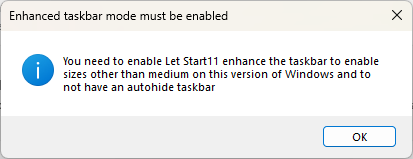
Let Start11 enhance the taskbar

How?

I cannot find an option in the Start11 settings for this. Nor do I see anything that appears to be the appropriate choice in Windows Settings. Where might I find it? Thanks.


4,481 views 7 replies
Reply #1 Top


I cannot find an option in the Start11 settings for this. Nor do I see anything that appears to be the appropriate choice in Windows Settings. Where might I find it? Thanks.
End of quote

The option is at the top of the same page with the big pictures of the taskbar combine modes.

Reply #3 Top

Can you show a screen grab of what it looks like? I just downloaded current version to new computer (Win11) and don't see anything about letting Start11 enhance the taskbar. My ultimate goal is to have two levels of the taskbar. In case it makes any difference, I have the Start Menu set for Win7 style. I can't find anyplace to set two levels of the taskbar.

Reply #4 Top

I finally found the "Let Start11 enhance" so I can finally get the small icons. But I still need to know where I go to get 2 levels of taskbar.

Reply #5 Top

Quoting KathrynBassett, reply 4

I finally found the "Let Start11 enhance" so I can finally get the small icons. But I still need to know where I go to get 2 levels of taskbar.
End of KathrynBassett's quote

Hello,
Sorry to hear you are having issues. If you have turn on Enhance taskbar, you should be able to make your taskbar taller by hovering your mouse on the edge of your taskbar, when your mouse arrow change to resize arrow just click and drag it. That should resize your taskbar to bigger to turn back to normal. Something like short video grab below.

Thank you,
Basj,
Stardock Community Assistant.

Reply #6 Top

Finally got back to computer to try it out. Thanks a bunch, it works great now.

Reply #7 Top

Great, glad to hear that.

Thank you,

Basj,
Stardock Community Assistant