Control Panel Oddity in Start11

Registry key displayed as Control Panel Item

I just installed Start11.  I really like it.  However, I converted the Control Panel to a menu and the first entry is a long registry key (actually, a concatenation of two registry keys ::{<key>}\0\::{2nd key} .  it's annoying because it makes the columns very wide.  Oddly, I tried searching the registry for portions of these keys and came up empty.  

I tried to attach a screenshot but there is no option?   So I put it here (not a scam).  http://kwcpa.com/misc/Start11ControlPanelIssue.JPG

 How do I fix?  Thanks!

/j
2,125 views 9 replies
Reply #1 Top

Hello,
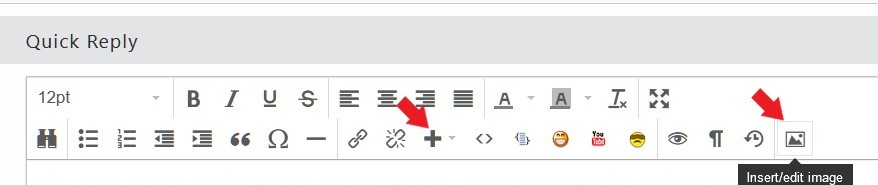
Sorry to hear you are having issues. Here is how you can add a screenshot in the forum.

Thank you.
Basj,
Stardock Community Assistant.

Reply #2 Top

Thank You Basj - but I don't have that icon - the rightmost one I have is the one that looks like an eye.  The 3 to the right of that don't appear for me

Reply #3 Top

Hello,
I can reproduce the issue, I have forwarded your problem/question to Stardock Support Team for their assistance. Please keep an eye on this thread for any updates. We appreciate your feedback and patience.

Basj,
Stardock Community Assistant

Reply #5 Top

This is what I did to solve this issue.

In the Registry, go to

HKLM\SOFTWARE\Microsoft\Windows\CurrentVersion\Explorer\ControlPanel\NameSpace\

Locate the entry; {98F2AB62-0E29-4E4C-8EE7-B542E66740B1} and delete it.

See this post: https://forums.stardock.com/478915/page/1/#3646862

Reply #6 Top

Yes, I notice your post before on that. But, I am not sure why do one need to do that. Was that key introduced by Windows 11. If it was, I worried something else might break if we remove it. Any idea?

Thank you,

Basj,
Stardock Community Assistant

Reply #7 Top

When I export that key I get @="Company Setting Sync".  I am seeing the problem on a machine managed by my compan. Pelaird - is that true for you as well?

Reply #8 Top

I think the "Company Settings sync" control panel was replaced with the "Company Portal app for Windows." Regardless, most of us don't need this feature. Not sure why this shows up in Start11v2. This issue bears investigation by the Stardock development team.

Reply #9 Top

Hello,

Sorry to hear you are having trouble.

We are looking into this.

Internal ref: ODNT-7387

Sean Drohan
Stardock Product Lifecycle Manager