weird Start11 Taskbar icon alignment issues

some taskbar icons are half-hidden/off-screen

On more than one occasion some of the icons on my taskbar get half-hidden off the screen when Windows is starting.


I've tried fiddling with several settings, but I can't find one that fixes it. Rebooting will temporarily fix it more often than not, but sometimes it took two reboots before it starts looking right.

I'm not certain, but it feels like this situation happen more often after a reboot due to windows updates.

6,954 views 10 replies
Reply #1 Top

Hello,
Sorry to hear you are having issues. Need more information on your system. Refer here: https://support.stardock.com/space/SHC/1387003915/Contacting+Stardock+About+Start+Product+Issues

  1. Windows 11 full version number. Use Winver.exe.
  2. Start11 version.
  3. Is this touch capable system?


Basj,
Stardock Community Assistant.

Reply #2 Top


Yes, it is touch capable system; however, it docked with two external monitors attached. I saw the issue on the external monitors, but didn't think to open the lid to see if it was there too. I'll check that next time it happens.

This has happened a handful of times with the most recent being this morning... I rebooted after the windows updates and it was in this weird alignment state. I rebooted again and it corrected itself. 

Reply #3 Top

Recently, there were few similar reports from touch capable system. I have forwarded your problem/question to Stardock Support Team for their assistance. Please keep an eye on this thread for any updates. We appreciate your feedback and patience.

Thanks

Basj,
Stardock Community Assistant

Reply #4 Top

This problem has been there since windows updated a while back   The time it started was around when stardock was on ver 1.41 approximately.  This problem was a result of microsoft's update and stardock has not addressed it for over a year, including with ver 2.  There are only 2 options to date.  1. disable taskbar enhancements in Start11, or 2 after every windows restart, restart explorer again.  


Both options work, but defeats the purpose of start11.


Please fix this ASAP.  If you need debug files or anything else to help fix this, please reachout.

Reply #5 Top

I discovered why this is occurring, quite by accident. 

This occurs on computers that have touchscreens.  That's why in happens more often on tablets then desktops.

When you boot the computer from scratch, It takes a moment to initialize the touchscreen, so for a while, as far as the OS is concerned,  there is no touchscreen present.  So when Start11 starts, in this period, it assumes there is no touchscreen present.

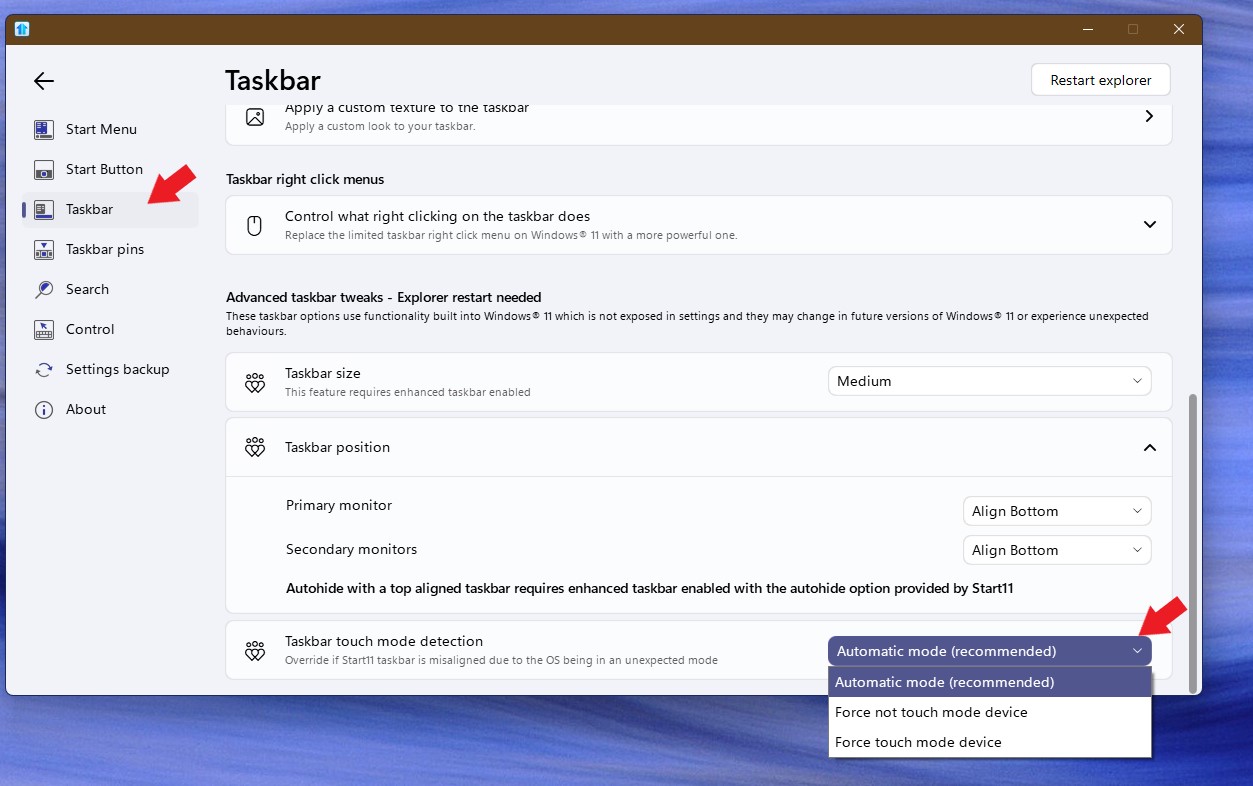
When you have "Taskbar Touch Screen Detection" set to "automatic", Start11 ends up in setting "not touch mode device".  If you set to "Force Touch Mode Device" On computers that have touchscreens, the mis-alignment problem goes away.


Hope this helps.

Reply #6 Top

Face the same problem using Start11 with two screens. Main screen looks like above and second screen is OK. Since the last update two days ago this behaviour remains even if I log off and on, which solved the problem so far since it first appeared half a year ago. But now the problem remains permanently?  

Reply #7 Top

Checked further. Switching off "Allow Start 11 to enhance the task bar" the problem is gone ...  

Reply #8 Top

Quoting KBeu, reply 7

Checked further. Switching off "Allow Start 11 to enhance the task bar" the problem is gone ...  
End of KBeu's quote

Hello,
Sorry to hear you are having issues. Do you have touch capable system? If you do, you should able to turn on "enhance taskbar", but change the setting on touch mode, change it to Force touch or Automatic, which ever that work for your system. Refer screenshot below.

Thanks
Basj,
Stardock Community Assistant.

Reply #9 Top

Hi Basj,

looks like "force touch mode device" helps as well. But this is a little strange to me, since the device (HP Elitebook 1040 X360) is of course touch device but connected to a HP G2 dock (not touch) that controls the screens ...(may help you for analysis)

Anyway, thanks for your quick response!

KB

Reply #10 Top

I have exactly the same problem on a laptop. Interestingly, however, only with one user. When I log in with another account, everything is fine. The problem has been occurring since the beta versions of 2.05.