
Start11
Windows 10-style, full-screen mode
 Stardock Forums
Hi,
Just installed Start11 on one of my Windows tablets running Windows 11, with the specific intent of getting the Windows 8-style full-screen start menu back (which is still the best start menu on a primarily touch device, IMO). Overall fairly pleased except for one thing:
When opening "All Apps" in Start11 set to Windows 10 full-screen mode, I get my apps displayed in a single narrow column on the left side:

Whereas actual Windows 10 fullscreen mode all apps gives a 3 column wide version that makes much better use of the screen real estate:

And Windows 8 used the full width of the screen - and then some, scrolling horizontally instead of vertically: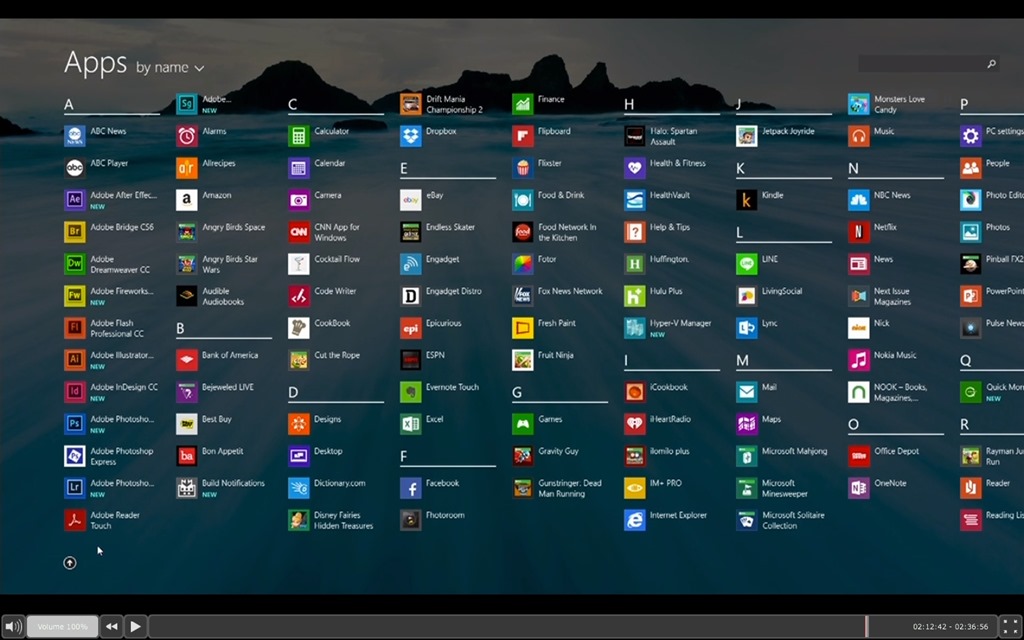
Being fully honest, I think there's an ideal middle-ground between the Windows 10 and Windows 8 versions, with a vertical scroll but using the full width of the screen.
But either way, the current Start11 implementation is the worst of the three. Please fix!
Thanks!

