Sorting issue
from  Stardock Forums
Stardock Forums
What is the problem here? Why can't I edit "go to"?


 Stardock Forums
Top
Stardock Forums
Top
Hello,
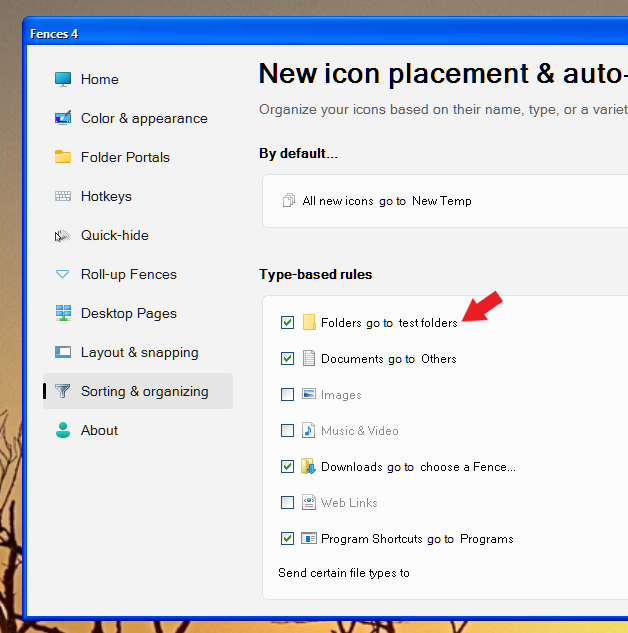
Sorry to hear you are having issues. If you want to set a Fences to move all new folders into it. You will need to link it within the Fence itself. Refer screenshot below. Once that is done, if you reopen Fences config windows it will show up on the sorting and organizing tab. Refer screenshot 2. You can reassign the rules to other Fences from there.

Thanks
Basj,
Stardock Community Assistant.
Stardock Forums
Top
Thanks that helped.
How do I delete custom rules?

Another question,
Is there a way to back up my settings? Even if it's a registry key?
 Stardock Forums
Top
Stardock Forums
Top
Hello,
I have forwarded your questions to Stardock Support Team for their assistance. Please keep an eye on this thread for any updates. We appreciate your feedback and patience.
Basj,
Stardock Community Assistant
Stardock Forums
Top
To delete, click on the folder Fence name in your screenshot above, select "Delete this rule"
For settings backups, see: https://support.stardock.com/space/SHC/1416429609/How+do+I+back+up+Fences+settings%3F
Paul Scroggins
Associate Technical Support Analyst
Welcome Guest! Please take the time to register with us.