
Mouse cursor moves by itself

Hi.

 Check "Automatically move pointer to the default button in a dialog box" in the mouse settings.

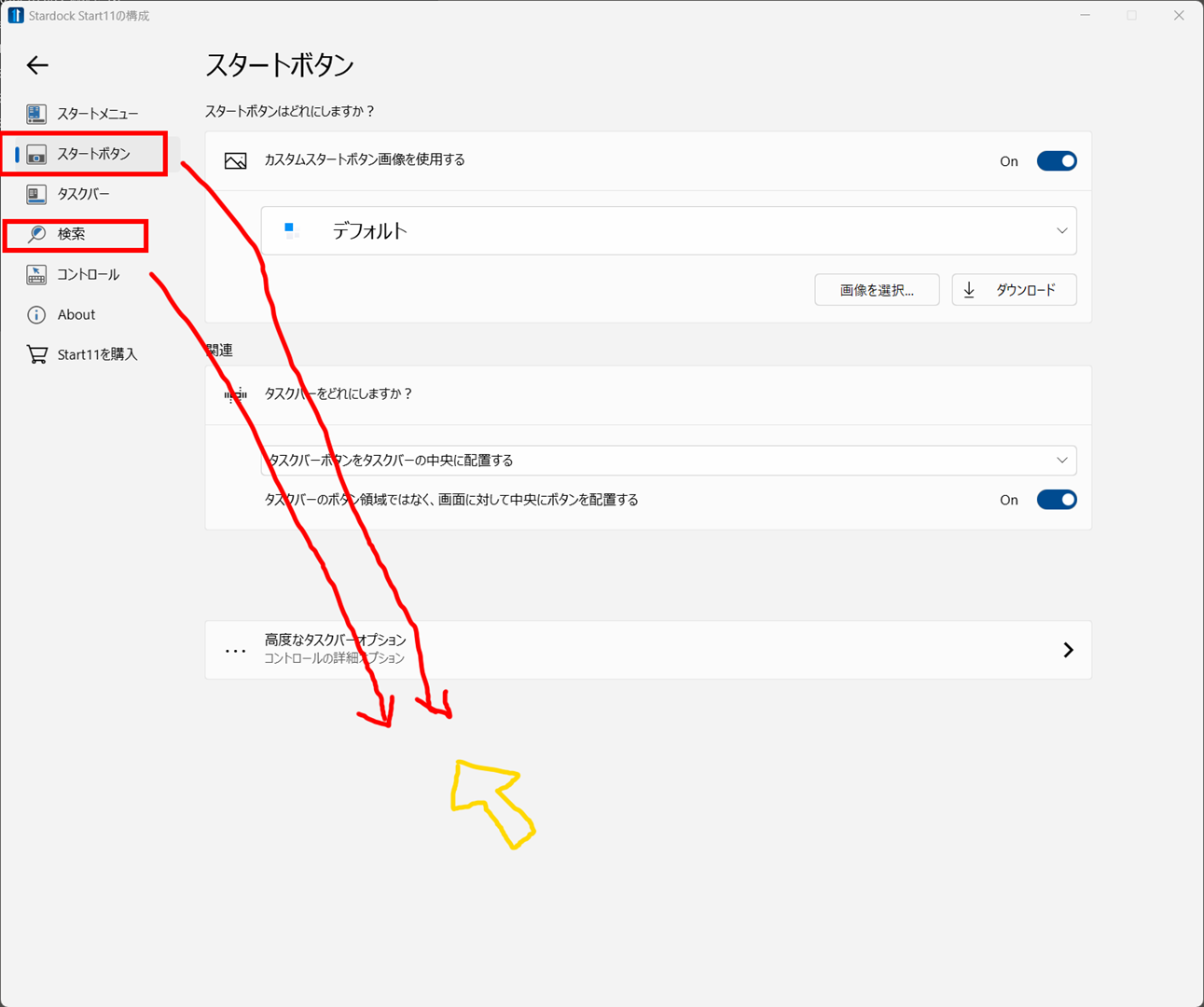
With this setting, the pointer position will move automatically when clicking the "Start button" and "Search" in the Start11 settings screen.

The mouse moves to the position indicated by the attached yellow icon.
2,851 views 8 replies
Reply #1 Top

Hello,
Sorry to hear you are having issues. There is Start11 V1.4.0.2 just released few hours ago please update to that version and retest your issue. Report back here. We appreciate your feedback and patience.

https://forums.stardock.com/517175/get;3880266

Thanks
Basj,
Stardock Community Assistant.

Reply #2 Top

Hello.

I tried "v1.4.02". But the result was the same.

When I clicked on the "Start Button", the mouse cursor moved to the bottom by itself.

Likewise, when I clicked on "Search", the mouse cursor moved to the bottom by itself.

Perhaps there is an invisible dialog at the destination where the mouse cursor moves, and the focus is shifted to that dialog.

Reply #3 Top

Have you tried different mouse? Might be the mouse is having tracking issue.

Thank you,

Basj,
Stardock Community Assistant

Reply #4 Top

What mouse are you using?

It looks like it is jumping to invisible buttons which are not default.

Reply #5 Top

The mice used are Logitech M705 and MX ERGO. Both work the same.

I have done a little research.


If I turn on "Automatically move pointer to the default button in a dialog box" in the mouse properties, the mouse pointer moves by itself.

If it is OFF, it does not move.

When I look at the "Start11Config.exe" resource, there is an invisible OK button and it seems to jump to it.

Reply #6 Top

This is a bug in Windows.  Invisible controls should be ignored.

That said the latest Start11 beta should address this.


Reply #7 Top

I saw that the changelog says it was improved in Ver 1.4.0.3.

I am currently on a Free trial.

I can't get the latest beta version, so I just want to say thanks!

Reply #8 Top

Hello.

"Start button" and "Search" issues have been resolved in v1.41.

However, the same problem occurred when clicking on the dropdown circled in red. 

And, the "Customize menu visual appearance" text has not been converted to Japanese, which is resolved below.

https://1drv.ms/u/s!AtACdaOctgRAgY5-k8vw-zdzHlCyXQ?e=DMzXRM

thank you.
