Latest START11 Update Does Not Work

The latest START11 update software is entirely inoperable and jams the computer in every way possible...

The taskbar is unresponsible; only a portion is seen on the desktop; the right-click doesn't function; the settings menu does not populate, etc. No settings are usable.

Worse, the Dell computer (windows 11) freezes because the Windows Start button freezes so no applications are accessible. Accessing the control panel to remove the START11 software took quite some effort before my Dell (new) could be function normally.

START11 VERSION 1.3.9.0 IS AN ABSOLUTE FAILURE AND STARDOCK NEEDS TO ADDRESS IT IMMEDIATELY!

3,181 views 8 replies
Reply #1 Top

Multiple posts about this will not help.

You are the only person reporting issues like this and support have already replied to you so please work with them.  As far as we are aware there is no issue with the build so there must be some sort of conflict happening on your setup.

Reply #2 Top

Hello,
Sorry to hear you are having issues. But, I tracked down all you posts from before, yet everytime someone try to help you. You simply do not respond to it. Are you actually trying to resolve your issue or just trying to do something else?

https://forums.stardock.com/507796/get;3823762

https://forums.stardock.com/507796/get;3823764

https://forums.stardock.com/508404/get;3878637

If you interested for us to help you. Can we have more details on your system and issue please.

  1. You on Windows 10 or 11? Need its full version number. Use Winver.exe

Also please try uninstall Start11, reboot immediately, download the latest version again, install with it. Reboot again immediately. Retest and report back. If the issue still there. Need more details on the issue would be helpful to help us figure out what is wrong with it.

Thanks
Basj,
Stardock Community Assistant.

Reply #3 Top

I have exactly the same issue.   I have uninstalled Start11 rebooted,  reinstalled,  rebooted and when I check the ObjectDesktop app, it claims I need to update it.  Repeating the process does not resolve it.

Checking the version of "Start11_64.exe" yields:  1.3.2.0  dateModified: 2/6/2023

Windows 11  10.0.22621.1105


Reply #4 Top

Quoting TZerod, reply 3

I have exactly the same issue.   I have uninstalled Start11 rebooted,  reinstalled,  rebooted and when I check the ObjectDesktop app, it claims I need to update it.  Repeating the process does not resolve it.

Checking the version of "Start11_64.exe" yields:  1.3.2.0  dateModified: 2/6/2023

Windows 11  10.0.22621.1105
End of TZerod's quote

How is the OP issue the same as yours? Does the software make your computer stop working "jammed up"? Not working at all after the update? or, your issue is ObjectDesktop keep telling you to update while you already done the update? Yet, your computer still working normally?

Thank you,

Basj,
Stardock Community Assistant

Reply #5 Top

My Apologies,

When I saw the thread about the update not working combined with my lack of caffeine ingestion,  I made assumptions that I shouldn't have.

PC works fine. "Update" doesn't work.  Object Desktop insists I need to update over and over. 

Should I create a new thread?

Reply #6 Top

Quoting TZerod, reply 5

My Apologies,

When I saw the thread about the update not working combined with my lack of caffeine ingestion,  I made assumptions that I shouldn't have.

PC works fine. "Update" doesn't work.  Object Desktop insists I need to update over and over. 

Should I create a new thread?
End of TZerod's quote

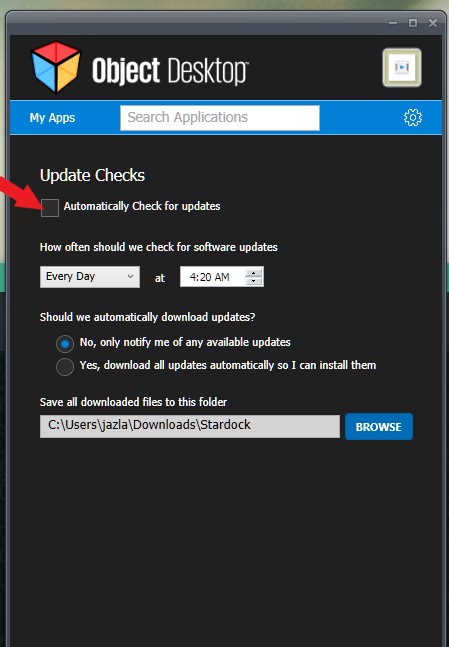
Not need for a new thread. The update issue on ODM keep asking for updating on Start11 is known issue. You could temporary ignore it or you can temporary disable automatic update check on ODM.

Thank you,

Basj,
Stardock Community Assistant

Reply #7 Top

Done,

Thanks for your help :-)

Reply #8 Top

Great, glad to help.

Thank you,

Basj,
Stardock Community Assistant