Created new page, trying to move group to it

Start11 on Win10 ... using Windows 11 Style

I am using Start11 on Windows 10.  I have four(4) groups defined with about 50 shortcuts.  I decided to try out splitting these groups into two(2) different pages.

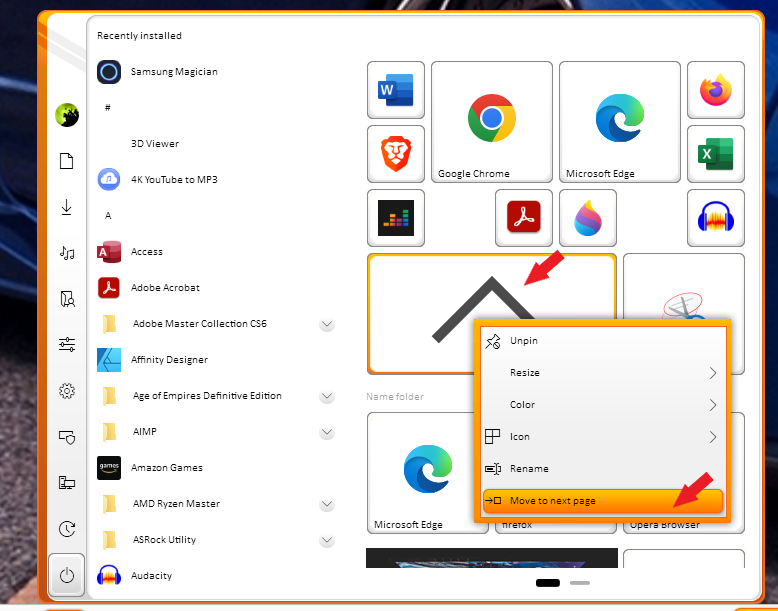
I can right click a shortcut and select "Move to next page".  I can shift drag multiple shortcuts into a ^ group, then right click the group of "small icons" and select "Move to next page". 

The issue is when I right click a group, there is no option to "Move to next page".  If I want to test out splitting my four groups with two on each page, I have to individually move 32 shortcuts, recreate the two groups and reassign the 32 shortcuts.  If I decide I don't like using multiple pages, I have to reverse all this mess.

There really should be an option to right click a group and move it to a page.  If there is a way to do that already, it's well hidden.
3,351 views 6 replies
Reply #1 Top

Hello,
Sorry to hear you are having issues. Not sure what you wanted to do.

There really should be an option to right click a group and move it to a page.
End of quote

Are you looking for this?


Basj,
Stardock Community Assistant.

Reply #2 Top

There are 2 different kind of groups.  The one you are talking about is the "drag 2 icons together" which creates a pop up group.  That's not the kind of group I use or want.

I'll show with pics...  Here is my Start11 menu which includes four groups.  (Pinned, Work, Games and Utilities)  I added a blank page to see if I like it.  I want to move my "Games" group and the "Utilities" group to the new page.


So I right click the "Games" group and there is no "move to page" option.


Reply #3 Top

Which leaves me with having to move each individual shortcut... 32 of them, and then have to recreate each of the groups on the new page.

Would be much more usable if the "Move to next page" was an option on "Groups".

I missed one pic...  groups created on page via right click and select:

Once created, you get "New Group" which you can right click and rename.  The advantage of groups vs dragging apps together is being able to see each of the icons and descriptions.

Reply #4 Top

I put this post in Home/Stardock Software ....

Is there a way to move it all, the entire thread, to the Start11 subfolder?

Reply #5 Top

Quoting moymike, reply 4

I put this post in Home/Stardock Software ....

Is there a way to move it all, the entire thread, to the Start11 subfolder?
End of moymike's quote
Yes. Done.

Reply #6 Top

I have forwarded your request to the Stardock Support Team for their review and recommendations. Please keep an eye on this thread for any updates. We really do appreciate your feedback, Thanks

Basj,
Stardock Community Assistant.