Translucent Background Stops Partway Down

Background on Fences works down to 520 pixels from bottom of screen

OS: Windows 11 21H2 (Build 22000.978)

Fences: 4.0.7.3 from Steam

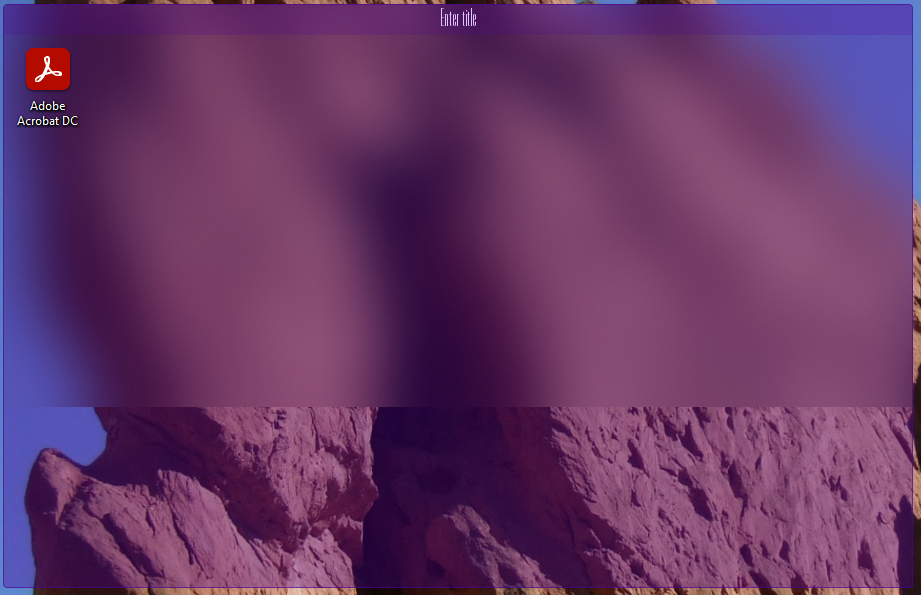
I have two screens, one horizontal (1920x1080) and one vertical (1080x1920). When I create fences on either screen, the "frost" background effect works from the top down to 520 pixels above the bottom edge, where it instead turns transparent. It's a hard line, straight across the screen. Any fences above the line have the frosty effect, fences below are transparent, and fences that cross the line look like this:
9,147 views 11 replies
Reply #1 Top

Hello,

I have forwarded your report to the Stardock support team for their review and recommendations.

Please keep an eye on this thread for any updates.

We really do appreciate your feedback, thanks.

Reply #2 Top

I also have this issue in Fences 4.0.7.2 downloaded from staretdock.com.  I have three screens; the left screen (2560x1440) is fine, the middle screen (2560x1440) has the frost effect from the lower left corner to half way up and three quarters of the way across the screen, and the right screen (1920x1080) has no frost effect at all.

Reply #3 Top

Quoting Jim, reply 2

I also have this issue in Fences 4.0.7.2 downloaded from staretdock.com.  I have three screens; the left screen (2560x1440) is fine, the middle screen (2560x1440) has the frost effect from the lower left corner to half way up and three quarters of the way across the screen, and the right screen (1920x1080) has no frost effect at all.
End of Jim's quote

Hello,
Sorry to hear you are having issues. Can you also include information on.

  1. You on Windows 10 or 11? Also its full version number. Use Winver.exe to get them.
  2. Screen Scaling on all monitors. (100%,125%,150% etc)

Thanks
Basj,
Stardock Community Assistant.

Reply #4 Top

Hello,

1. I'm on Windows 11 Version 22H2 (OS Build 22621.608)

2. Screen scaling is 100% on all monitors.

Let me know if you need any additional information.

Reply #5 Top

First, please try purge and reinstall steps as mentioned here: [Link]. Just make sure to redownload the latest version from your account page. Reboot after the purge. Reinstall and reboot again after the installation. Retest and report back here.

Thank you,
Basj,
Stardock Community Assistant.

Reply #8 Top

I've followed the cleanboot steps with no change in results.  I'm attaching a screenshot that shows the effect across all three screens

After looking at that screenshot, I wondered whether the alignment of the third monitor (rightmost) was causing the issue.  However, after disabling the third monitor, it resulted in the frost effect working on the first monitor, and there being no frost effect on the second monitor.

Reply #10 Top

Can you have multiple displays in a Windows sandbox?  It doesn't appear so.  If not, I can't try to duplicate the issue I'm seeing.

Reply #11 Top

Hello,
I have forward your problem/question to Stardock Support Team for their assistance. Please keep an eye on this thread for any updates. We appreciate your feedback and patience.

Basj,
Stardock Community Assistant