TASKBAR PREVIEW SOMETIMES DOSE NOT WORK

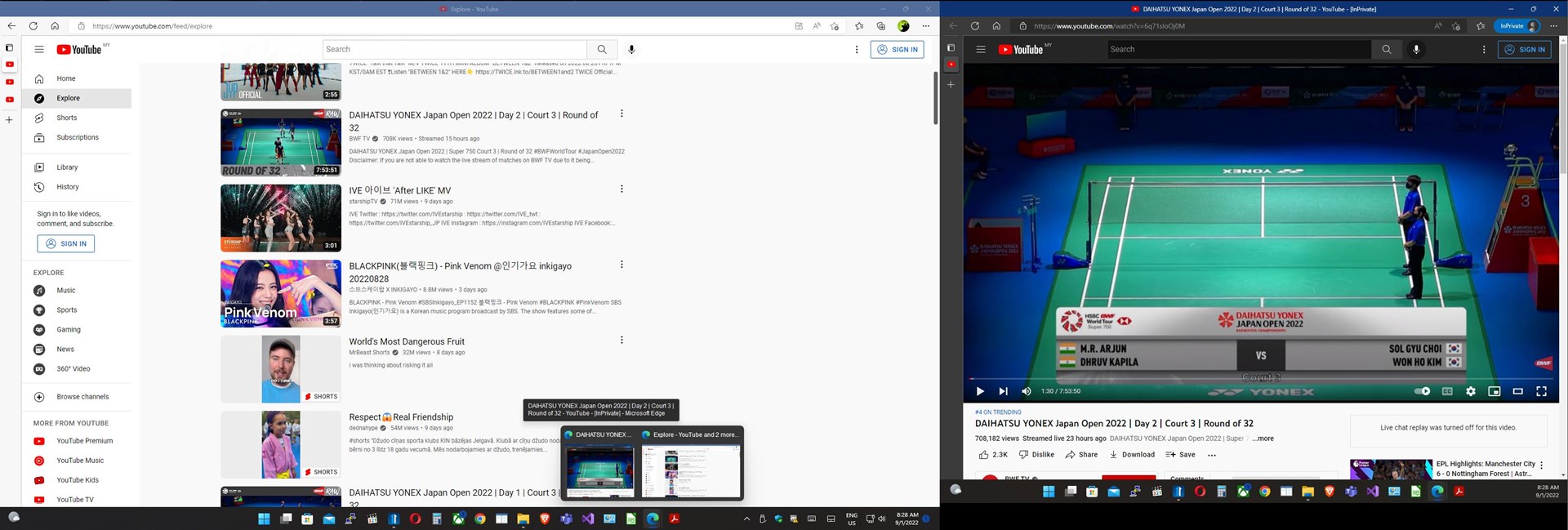
I remember there being a fix for windows 11 when you hover over something on the taskbar and the text was like in the middle of the screen. Currently I am having an issue if I click on the desktop then bring up a full screen window like edge and hover over edge in the taskbar I get the text for the highlighted item, but the thumbnail preview is missing. I can fix this by clicking on the taskbar and the thumbnail preview displays correctly. 

Attached is me doing the process above and you can see the missing preview. Mouse is over edge icon. I think this was fixed in windows 11 but if it's still a global issue and not start11 related do tell me.

Thanks!

-Chief

Sad edit: its windows 11 itself. after removing start11 it still happens. Clean fresh install too. Major sad.

5,949 views 20 replies
Reply #1 Top

Hello,
Sorry to hear you are having issues. But, I can not reproduce your issue on my system. Do you have ObjectDock install in this system?

Thanks
Basj,
Stardock Community Assistant.

Reply #2 Top

No I do not 

I remember this issue happening with all versions but I can't test with version 1.25 extensively due to it being unusable for me as per my other post.

What version did you test with?

A combination of clicking on the desktop then bringing up a maximized window ( non maximized windows don't have this issue, so far file explorer and edge have been able to reproduce this) then clicking either in the maximized window or going to the taskbar dose this for me. Fairly reproducible for me. I also have dual screens which might matter.


-Chief


Reply #3 Top

Here what I get on my Windows 11 on Start11 V1.25

Thank you,

Basj,
Stardock Community Assistant

Reply #4 Top

Try doing that process a few times if you haven't already and see if you consistently have no issues. This was a clean install so if you weren't having the issue I shouldn't unless it was fixed in ver 1.25. Ive had this issue since getting win 11.


Reply #5 Top

Can You please stop to shout all the time? You don't need to use all caps to be noticed. Thank You.

Reply #6 Top

A paragraph in caps is yelling. A title in caps is just a title.

Also, apparently, I do, the first few times I didn't and never got any help, so I learned quick that I need an attention getter to actually get help around here. Caps get people's attention and its proven effective.

This is a paid product, and I will do what i must to get support it's not like this is free... so when there are instances of it becoming totally unusable (explorer crashing on repeat or as of 1.25 start 11 not even opening) naturally, I will become mad AF. Start11 is the best hope we got but it's no match to stock win 10 start menu.

The above is made worse because for some unknown reason old versions of start11 are not archived so if an issue like I'm having comes up I'm just scrued. Good thing I had 1.2 still around but really, they should be archived somewhere.

But thanks.....


-Chief


Reply #7 Top

Do you have the enhance taskbar option enabled in Start11?

I ask as if not this is almost certainly not a Start11 related issue.

Reply #8 Top

Quoting CHIEF6029, reply 6

A paragraph in caps is yelling. A title in caps is just a title.

Also, apparently, I do, the first few times I didn't and never got any help, so I learned quick that I need an attention getter to actually get help around here. Caps get people's attention and its proven effective.

This is a paid product, and I will do what i must to get support it's not like this is free... so when there are instances of it becoming totally unusable (explorer crashing on repeat or as of 1.25 start 11 not even opening) naturally, I will become mad AF. Start11 is the best hope we got but it's no match to stock win 10 start menu.

The above is made worse because for some unknown reason old versions of start11 like website not opening are not archived so if an issue like I'm having comes up I'm just scrued. Good thing I had 1.2 still around but really, they should be archived somewhere.

But thanks.....


-Chief

 
End of CHIEF6029's quote


Did you issues resolved from support? As my messages is still in pending.

Reply #9 Top

No, I do not have enhance taskbar option enabled. Clean install and my old upgraded from windows 10 installation both have this issue. After fresh install this is the last issue, I have with windows 11. So many problems were fixed by clean install.

Also tried with enhanced taskbar same issue.

Yo @Neil Banfield

Do you happen to have Statt11 ver 1.22-1.24 that I can test with? If not dose anybody?

Thanks!

EDIT: well, I guess it is indeed a windows 11 issue. removed start11 and I still have the problem. Major sad. 

Reply #10 Top

@basj how are you not getting this issue? Its win11 itself I've learned after removing start11 temporarily. Display scaling settings? how many screens?

Thanks!

Reply #11 Top

Here a picture I take on dual monitors. Still see no issue on my system. Both monitors on 100% scaling.

Thank you,

Basj,
Stardock Community Assistant

Reply #12 Top

Humm I run dual 1440P screens with 150% scaling so I can see but that really shouldn't be related.... 

Reply #13 Top

Maybe try purge and reinstall steps as mention here : [Link]. Just make sure to redownload the latest version from your account page. Reboot after the purge. Reinstall and reboot again after the installation. Retest and report back here.

Thank you,
Basj,
Stardock Community Assistant.

Reply #14 Top

I have 1.24 not sure if there's any issue with sending it or if you MUST get it from SD. If not just let me know of a dest. and I'll send it

Reply #15 Top

Quoting Narusegawa, reply 14

I have 1.24 not sure if there's any issue with sending it or if you MUST get it from SD. If not just let me know of a dest. and I'll send it
End of Narusegawa's quote

There is an issue.

He must obtain it from Stardock.

Reply #16 Top

Sounds a bit silly to me but if dems da rules I will bow out

Reply #17 Top

Quoting CHIEF6029, reply 12

Humm I run dual 1440P screens with 150% scaling so I can see but that really shouldn't be related.... 
End of CHIEF6029's quote

Did you happen to test that out?    Set to to 100%?

I also cannot reproduce your issue on my Win11 machine


Paul Scroggins
Associate Technical Support Analyst

Reply #18 Top

Already tried the purge option when temporarily removing start11 to see if it was windows and that did not change anything. This was a new install, so I expected that to do nothing. This is also a windows 11 issue at the core as above when removing start 11 it still happens.

Also as expected 100% scaling did literally nothing. 

Not being able to get older verson is the dumbest thing I've herd. So, when an update comes out and breaks everything (explorer crashing on repeat or as of 1.25 the start menu not even opening) the end user is just scrued is that it? Good job devs good job! /S Paid software on top of that which makes this much worse. Host older versions on your site so this can be avoided in the future and people can roll back if needed, it just makes sense. If I didn't have an old 1.2 install, I wouldn't be able to use start 11 and I paied for it!! That not good if you can't tell.

I wanted the older versions to test with another issue but head devs already know about the clicking on the start menu and it not opening bug with ver 1.25 (its why I'm on my old ver 1.2) so I guess I'll hold out till 1.26 which hopefully fixes it.

Thanks!

-Chief


Reply #19 Top

Then You should keep Your old downloads. If You want to read an old book again it is also a good Idea to keep it instead of throwing it away. ;-)

Reply #20 Top

That's no excuse.

The end user should not have to expect major failure and keep backups especially since every verson upgrade dose not download a new installer to keep (at least that I can find). I started with ver 1.2 so I have that installer but that's it. There should at least be a rollback option for when major issue arise but still better would be archived versions. This is nothing new and that's how most software is handled. Hell windows 10/11 with all the backlash over forced updates allow you to revert updates so again not an excuse. Each installer is 40 MB something tells me you people have the server space for that. 

On the verson history/changelog page add download links for each verson, Simple.

- Chief