Unknown

Fences Keeps prompting that a new Download is available to install

Fences Keeps prompting that a new Download is available to install

Hey,  my Fences 4 installation Version 4.0.7.2 keeps popping up on 3 of my computers to download and install the latest version.  I have done this multiple times already.  If I use the "Check for updates" button located in the 'About' page it states I have the latest version.  When I download and install, the next day it will again prompt me to do the same.


How do I stop Fences from continuously prompting to update?

29,507 views 50 replies
Reply #26 Top

Quoting Jburns407, reply 25

I guess I don't have it.
End of Jburns407's quote

Have you tried, uninstall Fences 4 and Groupy 2 one at a time,important to reboot immediately after uninstall finished. Reinstall it again. Reboot again immediately. Retest and report back.

Thank you,

Basj,
Stardock Community Assistant


Reply #27 Top

Quoting miikebross, reply 27

Well, I uninstalled, rebooted, then went to download the latest Fences4 and cannot download from your site.
End of miikebross's quote

Hello,
Sorry to hear you are having issues. What error popup msg appear when the download fail?

Thank you,

Basj,
Stardock Community Assistant


Reply #28 Top

Quoting miikebross, reply 27

Well, I uninstalled, rebooted, then went to download the latest Fences4 and cannot download from your site.
End of miikebross's quote

Under the account you are posting under here, you do not have a purchase for Fences 4 (any purchase actually).  If you purchased under a different email address, its what you would use here

http://www.stardock.com/support/productkeyretrieval

or 

https://store.stardock.com/myaccount/products

Sean Drohan
Stardock Product Lifecycle Manager

Reply #29 Top

Sorry, just saw your post.   Yes, I use Object Desktop Manager.  To be honest, it really seems to have messed up some installations recently, so much so that I have unloaded WindowsBlinds (which works once and then becomes non-responsive to any further setting changes or blinds selections) and most of the rest, and only trying to use Fences and Groupy since they are the most useful to my workflow.   They work, but each of them pops up at least once per day to let me know there is a new version (the same one that is installed apparently).   I have uninstalled all my Stardock software, re-installed, the usual.  It hasn't fixed the issue.    I have just noticed that there is a 'how often to notify me' option in the ODM settings, so I have changed that to see if it affects anything.    The underlying problem of not recognizing a newly installed most recent update as being current though remains.

Reply #30 Top
Quoting sbell, reply 30

Sorry, just saw your post.   Yes, I use Object Desktop Manager.  To be honest, it really seems to have messed up some installations recently, so much so that I have unloaded WindowsBlinds (which works once and then becomes non-responsive to any further setting changes or blinds selections) and most of the rest, and only trying to use Fences and Groupy since they are the most useful to my workflow.   They work, but each of them pops up at least once per day to let me know there is a new version (the same one that is installed apparently).   I have uninstalled all my Stardock software, re-installed, the usual.  It hasn't fixed the issue.    I have just noticed that there is a 'how often to notify me' option in the ODM settings, so I have changed that to see if it affects anything.    The underlying problem of not recognizing a newly installed most recent update as being current though remains.

End of sbell's quote

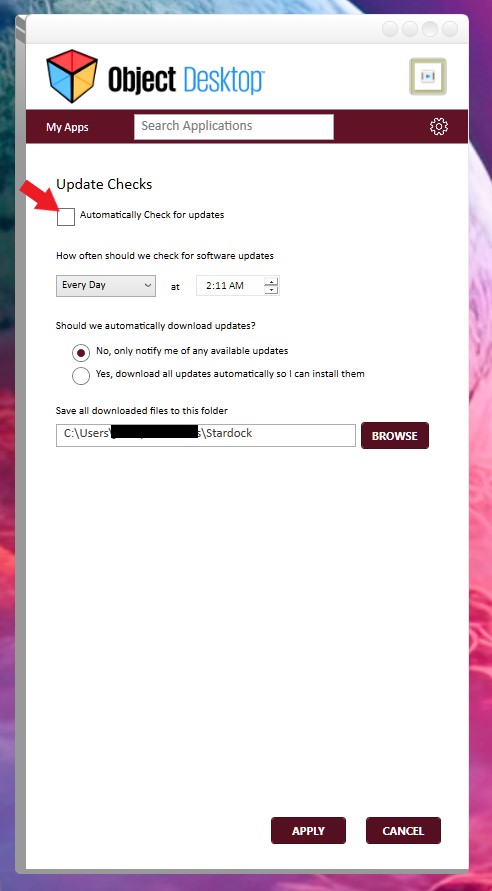
This is known issue with Object Desktop manager. What you can do is disable Object Desktop manager from load on Startup or you disable Object Desktop manager from update checking.

Thank you,

Basj,
Stardock Community Assistant

+1 Loading…
Reply #31 Top

Hmmm, I'll try that, but it seems strange - I have and use Object Desktop, but it is not set to run at startup - are you saying it is involved anyway?

Reply #32 Top

I followed your advice to uninstall, reboot, reinstall, then reboot yesterday. This morning I did not see the pop-up to download the update. If that changes, I will be back to post on this string again.

Thanks!

Reply #33 Top

Well, ODM is not set to run at startup, but unchecked the 'automatically check for updates' box and didn't get the prompt this morning.  Was also able to re-install WindowsBlinds and have it work properly.  Strange, but I'll take it.  :)

Reply #34 Top

Quoting Jburns407, reply 33

I followed your advice to uninstall, reboot, reinstall, then reboot yesterday. This morning I did not see the pop-up to download the update. If that changes, I will be back to post on this string again.

Thanks!
End of Jburns407's quote

Quoting sbell, reply 34

Well, ODM is not set to run at startup, but unchecked the 'automatically check for updates' box and didn't get the prompt this morning.  Was also able to re-install WindowsBlinds and have it work properly.  Strange, but I'll take it.  :)
End of sbell's quote

Great, to hear, please report back if the issue return.

Thank you,

Basj,
Stardock Community Assistant

Reply #35 Top

It returned.  ODM is not set to run at startup, it is set to not check for updates.  I received the old update fences popup this morning, and I  see that ODM has returned to the behavior I experienced previously, where if I open it, I see every installed product is always in 'update' status.

I will now try uninstalling ODM, since it is not doing what its name suggests.  :)

Reply #36 Top

Uninstalling ODM has no effect.   Still continue to get a pop-up to install a 'new' version of Fences.   

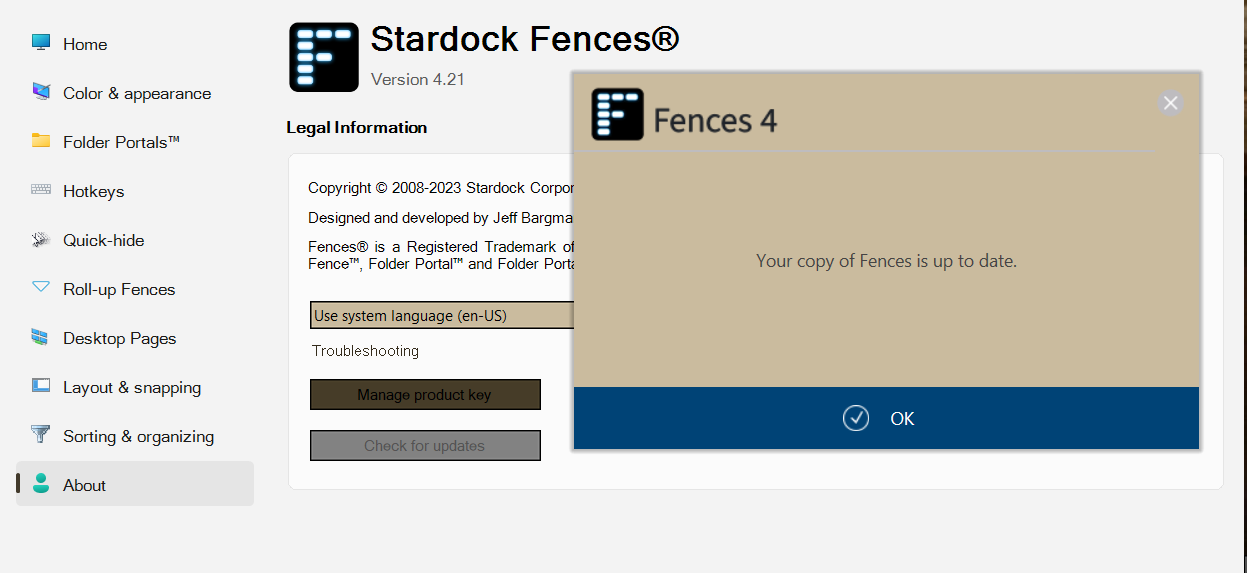
Note that Fences itself, in the 'About' tab of the configuration interface, specifically reports itself as up to date.

Ideas?

Reply #37 Top

As follow-up, I note that, in the registry, current user and local machine both have settings for Fences that reference the current version; however, Computer\HKEY_LOCAL_MACHINE\SOFTWARE\WOW6432Node\Stardock\Misc\has setting for Fences2 and Groupy in addition to Fences4 and Groupy2.   In general, there appears to be a lot of references throughout the registry to Object Desktop products that haven't been running on this machine in years (e.g. WindowsBlinds 5!), rather as if uninstalls and upgrades may have not always been too great at cleaning up after themselves.   Anyway, I will rename these nodes and see what happens. 

Reply #38 Top

Quoting sbell, reply 38

As follow-up, I note that, in the registry, current user and local machine both have settings for Fences that reference the current version; however, Computer\HKEY_LOCAL_MACHINE\SOFTWARE\WOW6432Node\Stardock\Misc\has setting for Fences2 and Groupy in addition to Fences4 and Groupy2.   In general, there appears to be a lot of references throughout the registry to Object Desktop products that haven't been running on this machine in years (e.g. WindowsBlinds 5!), rather as if uninstalls and upgrades may have not always been too great at cleaning up after themselves.   Anyway, I will rename these nodes and see what happens. 
End of sbell's quote

There are relevant registry entries, for various SD products, that would appear to be old but are not.  For example, all of Start10 and 11s registry settings are in Start8.  One reason they are kept that way is so that when upgrading, its not an uninstall (old) \ install new. 

That is not to say that some may be old and unused; just letting you know that not all are.

Sean Drohan
Stardock Product Lifecycle Manager

Reply #39 Top

Yes, I imagined as much - that's why I renamed them instead of simply deleting them and taking my chances.  :)   

However, renaming them has had no apparent effect.   Certainly it hasn't resolved the issue of Fences prompting for re-install.  I think at this point we can say its not ODM doing it since that has been uninstalled - and I see no running processes or services attributed to Stardock that might be accountable other than those for Groupy, Start11, and WindowsBlinds.

Reply #40 Top

Post a screenshot (video is even better) of what is happening, at the very least, what the prompt look like.

Sean Drohan
Stardock Product Lifecycle Manager

Reply #41 Top

Here is the daily (or perhaps more often) prompt:

Prompt

Here is the update status from the Fences configuration dialog:Status

Hope it helps...

Reply #42 Top

To begin

Please ensure you do not have (nor would you reinstall) ODM installed.

  • If you have a 'Stardock' folder present in:
    \Downloads
    Delete it

  • Go to:
    \ProgramData\Stardock  (<-note that is ProgramData, not ProgramFiles)
    Delete any folder that has 'Fences' in the name

  • Reboot \ retry.

Sean Drohan
Stardock Product Lifecycle Manager

Reply #43 Top

Okay, I have done this.   


\Downloads contained installation files for Groupy 2 and WindowsBlinds 11   whereas

\ProgramData\Stardock contained directories for Fences 2 and Fences 4.


Upon reboot, I received a prompt from Fences  to enter a product key, start a trial, or activate with my online account.   I activated with my online account.   We'll see if the upgrade prompt returns.  I will report either way.


Reply #44 Top

That seems to have done the trick - several days and no prompting.  Thank you.

Reply #45 Top

Quoting sbell, reply 45

That seems to have done the trick - several days and no prompting.  Thank you.
End of sbell's quote

Very pleased to hear it, sbell, and thank you for posting and letting us know.

Sean Drohan
Stardock Product Lifecycle Manager

Reply #47 Top

Well, this problem has returned.  First I started getting a periodic prompt to upgrade to Fences 5.   I saw that there was an available upgrade for Fences 4 (4.2.2) and that it was apparently intended to address this particular problem, so I installed that per its directions.  Now I get periodic prompts to update to the same version (4.2.2) that I just installed. 

Reply #48 Top

So it looks like Stardock will have to take the reigns on this even though they said "you are unique".  It's definitely an application issue and not a system issue.  I am having the same issues with Fences 3.  Same scenario, same troubleshooting same problems.

Windows 11, fresh install.  It did this with my Windows 10 install as well.  I followed the reinstall instructions and the folder deletions when present .... which, btw, STILL is a Stardock issue with messy uninstall code.

It doesn't appear to be a versioning issue - it's literally the application that is mis-firing somewhere thinking it needs to update when it doesn't OR it does but its internal overview THINKS it is already up to date.  Either way, Stardock needs to fix this.

Reply #49 Top

Quoting Sp4rxx, reply 48

So it looks like Stardock will have to take the reigns on this even though they said "you are unique".  It's definitely an application issue and not a system issue.  I am having the same issues with Fences 3.  Same scenario, same troubleshooting same problems.

Windows 11, fresh install.  It did this with my Windows 10 install as well.  I followed the reinstall instructions and the folder deletions when present .... which, btw, STILL is a Stardock issue with messy uninstall code.

It doesn't appear to be a versioning issue - it's literally the application that is mis-firing somewhere thinking it needs to update when it doesn't OR it does but its internal overview THINKS it is already up to date.  Either way, Stardock needs to fix this.
End of Sp4rxx's quote

Hello,
I have forwarded your problem/question to Stardock Support Team for their assistance. Please keep an eye on this thread for any updates. We appreciate your feedback and patience.

Basj,
Stardock Community Assistant

Reply #50 Top

Quoting Sp4rxx, reply 48

So it looks like Stardock will have to take the reigns on this even though they said "you are unique".  It's definitely an application issue and not a system issue.  I am having the same issues with Fences 3.  Same scenario, same troubleshooting same problems.

Windows 11, fresh install.  It did this with my Windows 10 install as well.  I followed the reinstall instructions and the folder deletions when present .... which, btw, STILL is a Stardock issue with messy uninstall code.

It doesn't appear to be a versioning issue - it's literally the application that is mis-firing somewhere thinking it needs to update when it doesn't OR it does but its internal overview THINKS it is already up to date.  Either way, Stardock needs to fix this.
End of Sp4rxx's quote

Working your issue in a thread that was created 2 years ago (and solved) is not appropriate. 

Please create your own forum thread with all the information we need to assist: Product version, OS version, what is happening, supporting images, and what you have done.

Sean Drohan
Stardock Product Lifecycle Manager