Start11 will not allow restart on remotely connected pc

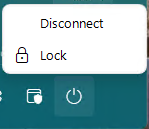
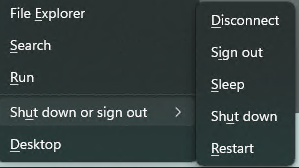
I use remote desktop with two monitors to compare side by settings of two pcs.   before installing Star11, I could completely control the remote PC including the ability to disconnect, put to sleep, shut down or restart the remote pc.  After installing Start11 on the remote PC, I can only disconnect.  This causes me problems as some activities require system restarts.

Before installing Start11.   After installing Start11  
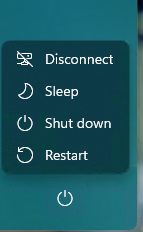
I have tried this on two different remote desktop apps with the same results.  I have uninstalled and re-installed the Stardock apps many times with the same results.

Windows 11 Pro, version 21H2, build 22000.795, is installed on both local and remote pc.

 Start11 is version 1.25
1,553 views 3 replies
Reply #1 Top

Hello,

I have forwarded your report to the Stardock support team for their review and recommendations.

Please keep an eye on this thread for any updates.

We really do appreciate your feedback, thanks.

Reply #2 Top


I use remote desktop with two monitors to compare side by settings of two pcs.   before installing Star11, I could completely control the remote PC including the ability to disconnect, put to sleep, shut down or restart the remote pc.  After installing Start11 on the remote PC, I can only disconnect.  This causes me problems as some activities require system restarts.
End of quote

Hi Marvin,

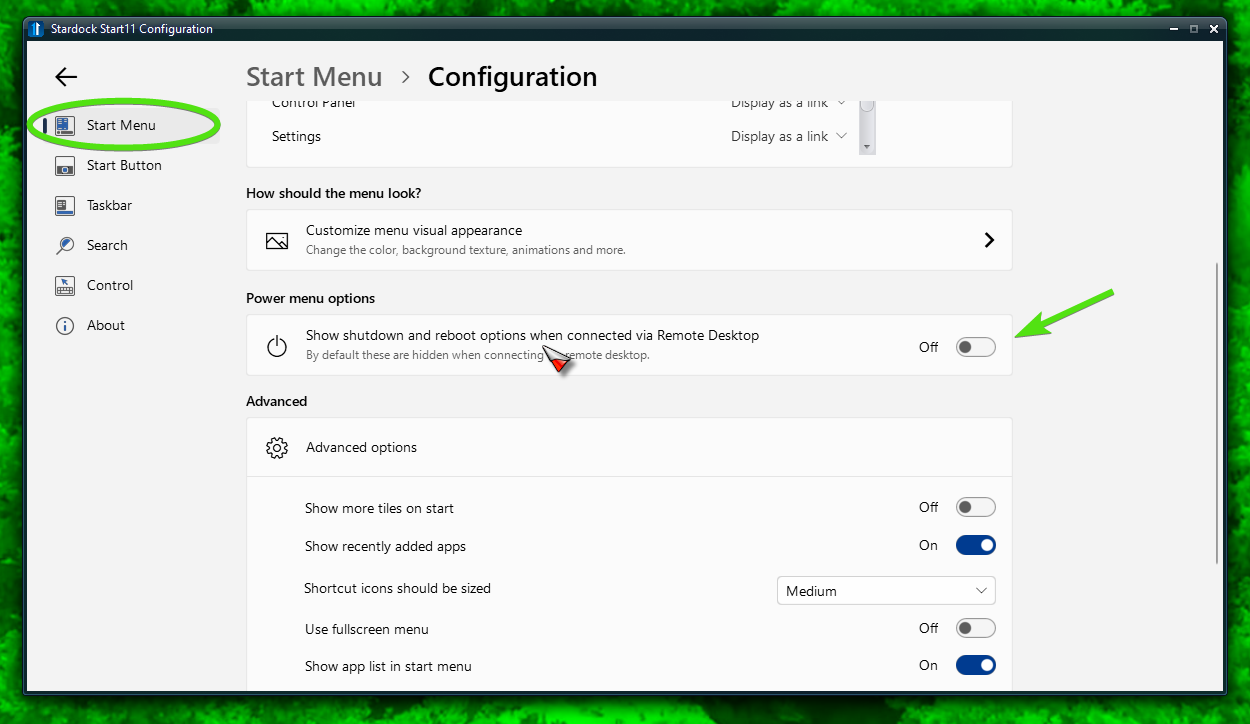
In the Start11 config, go to Start Menu, configure menu, then Power Menu Options, there is an on/off to allow shutdown and reboot on Remote Desktop

Paul Scroggins
Associate Technical Support Analyst

Reply #3 Top

Thank you, Paul, that did the trick.

I also discovered there is also another way.

1. Right click on the fa left side of the task bar and you will see choices.

2. Select "Shut down or sign out" and you will see five other ways to disconnect.