Fences 3 and 4 No Longer can be Configured

Can't open "Open Fences Settings" or "Configure Fences".  When right clicking and dragging the "Create Fence Here" option comes up but a Fence is not created. Tried the purge and re-install. Same issue.

I have tried installing using the latest Fences 3 installer. Fence3 was having this issue. Then I tried installing the latest version of Fences4. Exactly the same results. 

Issue is very similar to what is described in this following topic:

https://forums.stardock.com/512898/page/1/#3855974

... but I do not see any resolution to this topic above. Please help. Thanks!


9,256 views 11 replies
Reply #1 Top

 Hello,

Sorry to hear you are having issues.

Issue  still under review .

 Could you send us the text file located in %appdata%\Stardock\Fences\TroubleshootingLog

Thanks.
The support desk is on vacation till July 11 , so response will be slow .


AzDude
Stardock Community Assistant

Reply #2 Top

Thanks for your reply AzDude. Can you advise on how do I enclose this file? I cannot find a way here in this forum to enclose a file. Please advise and thanks!

Reply #3 Top

Quoting kkneoh, reply 2

Thanks for your reply AzDude. Can you advise on how do I enclose this file? I cannot find a way here in this forum to enclose a file. Please advise and thanks!
End of kkneoh's quote

Reply #4 Top

Quoting AzDude, reply 3


Quoting kkneoh,

Thanks for your reply AzDude. Can you advise on how do I enclose this file? I cannot find a way here in this forum to enclose a file. Please advise and thanks!


Reduced 92%
Original 909 x 336


End of AzDude's quote
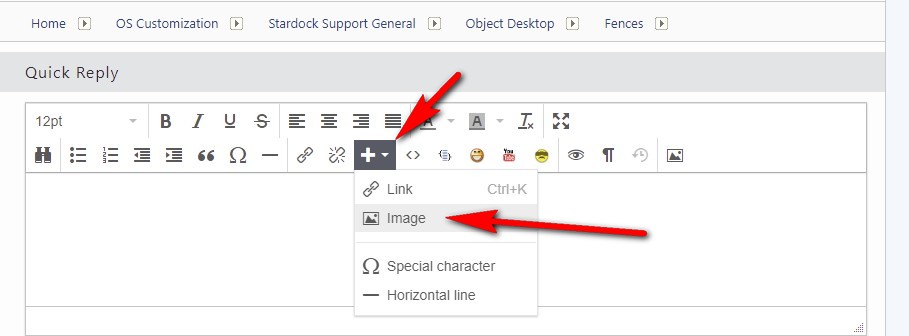
Impossible to upload a text file with that method and to my knowledge, it's not possible to upload text files to the forum other than link to it from an external source.

Reply #5 Top

Yes, JanOscar is right. Impossible to upload a text file with that method pointed out by AzDude.

Reply #6 Top

You can use the Link option . 

By pasting the link right on to the Thread

Yes forget the image link I posted not for a text file just an image file for future use .

Save a copy of the file to a image hosting site like Google drive 

then copy and paste the link here directly onto this thread.

example https://drive.google.com/file/d/1iEtmJlywYdR57npKsMouVfmoYLvUn1rW/view?usp=sharing


Reply #8 Top

Hello,

I have forwarded your report to the Stardock support team for their review and recommendations.

Please keep an eye on this thread for any updates.

We really do appreciate your feedback, thanks.

Reply #9 Top

Thanks very much AzDude... really looking forward to having this issue fixed. I have been a loyal user of Fences for almost 10 years, and this is the first time that I'm seeing such a serious issue.

Reply #10 Top

Quoting kkneoh, reply 7

Fences Debug Info (2022 07 13)

Thanks AzDude. I have enclosed the link to the text file that I have collected into my personal Google Drive in the link above. 
End of kkneoh's quote

Hello,

It looks like you have the file access protected, you should get a notification that we requested access to it

Thanks!

Paul Scroggins
Associate Technical Support Analyst

Reply #11 Top

Hi all, the PC that I was having problem with was reformatted due to some other reasons, and now Fences 4 is working well with this PC (after the reformat).