Start 11 v. 1.24 sometimes opens high

display location

I've reported this in earlier versions.  Still an annoyance.

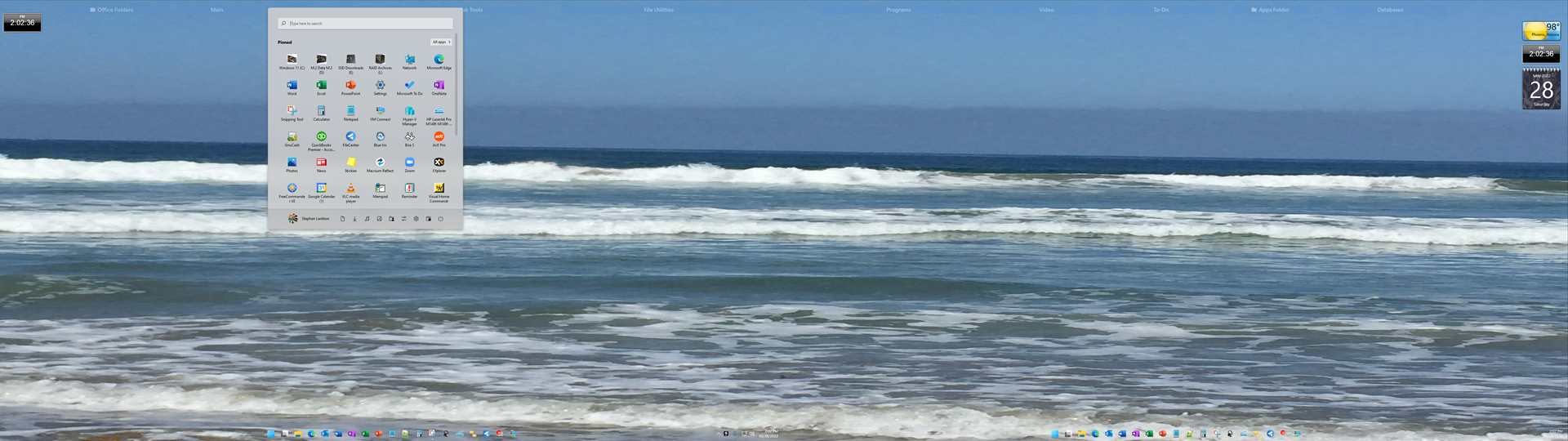
Sometimes the Start menu opens at the top (of Monitor1) of the screen using styles Win11 and modern. It opens at the bottom if the choice is Win7 or win10 (any subset).  So, when it is at the top, like now, I click on configure...choose style options.  The result is that 7 and 10 open at the bottom and modern and win11 style open at the top as in the picture. 
3,245 views 10 replies
Reply #1 Top

Hello,
Sorry to hear you are having issues. Need to know more on your system.

  1. Windows 10 or 11 full version numbers please. Use Winver.exe to get those numbers.
  2. Do you have ObjectDock install in your system.

Thanks
Basj,
Stardock Community Assistant.

Reply #2 Top

System: Gigabyte z390UD; i9 Kaby Lake; 32GBx36MHz jSkill RAM; NVidia RTX 2080 Super (NVidia drvr: Studio 512.96); Two Monitors: HP 32 QHD 2560x1440.

OS: Windows 11 v. 21H2 build: 22000.708.

But note: this problem has happened with earlier builds and with and without ObjectDesk [Edit correction: Stardock's "Object Desktop"] running. Most recently, (per the earlier picture - not running ObjectDesk [Edit correction: Stardock's "Object Desktop"] )...and it happened right after a reboot...nothing was previously opened (other than the 'run' items in the systray.  None were taskbar or start or virtual-desk items.

I have ObjectDesk [Edit correction: Stardock's "Object Desktop"]  running now.  No problem with Start11...but the occurrence is intermittent.  Sometimes it doesn't happen for a day or two.

Reply #3 Top

I am sorry, I don't know ObjectDesk. But I mentioned ObjectDock. ObjectDock have known similar issue as yours (Startpanel open at strange location) reported by lots others while running Start11. Also know that ObjectDock is not compatible on Windows 10 and Windows 11 so there might be some strange/intermittent issue while running it on Windows 10 and 11.

What you can try, is do a cleanboot and see which program is conflicting with Start11 and initiate your issue. https://forums.stardock.com/505872/start11-support-faq#cleanboot

Thank you,

Basj,
Stardock Community Assistant

Reply #4 Top

Oops...I mean Stardock's "ObjectDesktop" (not 'ObjectDesk'). I don't own anything called ObjectDesk nor ObjectDock....  just your "Object Desktop" - I shouldn't have assumed you would think ObjectDesk was Stardock's "ObjectDesktop"...

So, don't chalk the problem up to a program I don't own or run, please. My bad. 

Reply #5 Top

Great, that clear things up. Next, Please try purge and reinstall steps as mention here : [Link]. Just make sure to redownload the latest version from your account page. Reboot after the purge. Reinstall and reboot again after the installation. Retest and report back here.

Thank you,
Basj,
Stardock Community Assistant.

Reply #8 Top

Remember, the problem is intermittent. It may happen once every 2 days or more. Sometimes 2x in one day or even at first bootup.  But I could not do my job if I ran a clean-boot mode every day until (or if) it happens again. That's a 'test' for a problem that is continual. This one is not.

Clean boot?  Yes, I'm sure that if I eliminated all other open programs and there are no services operating other than Stardock's your software would work 100% of the time.  But...that's not the real world, is it?

Clean boot? I have 160 installed programs according to Sumo...and everything is cooperating with everything else.  Except for Start11 (now and then, as I stated) in its last few iterations. 

I have priorities in my work-a-day world and running a in clean boot mode until this happens again is beyond what I can provided.

Reply #9 Top

This looks to be the same issue i've had with Start 11 since it was in beta. I've reported it before but no one seems to think it's an actual problem. What i've found is that any kind of screen resizing seems to cause it to open at the top of the screen. I'm on windows 11 on a 34 inch ultrawide monitor. 

Reply #10 Top

Same here - since an earlier beta release.  I don't change the resolution...maybe some software virtualizes some window.  But, too, on 2 occasions it was near the top of the monitor immediately after rebooting Win11.  So, it's intermittent setback back failure.