Start11 Two Start Menu Icons

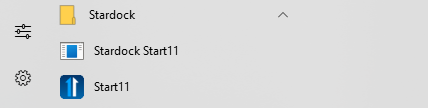
Start11 has had 2 icons since I upgraded from beta to purchase. The no icon one does not do anything but I do not know how to remove it. I even tried to uninstall and reboot but that one remained so removing Start11 does not resolve issue. Any ideas?

Thank you again for your assistance!
2,605 views 4 replies
Reply #1 Top

Hello,
Sorry to hear you are having issues. Please try purge and reinstall steps as mention here : [Link]. Just make sure to redownload the latest version from your account page. Reboot after the purge. Reinstall and reboot again after the installation. Retest and report back here.

Thank you,
Basj,
Stardock Community Assistant.

Reply #2 Top

Quoting basj, reply 1

Hello,
Sorry to hear you are having issues. Please try purge and reinstall steps as mention here : [Link]. Just make sure to redownload the latest version from your account page. Reboot after the purge. Reinstall and reboot again after the installation. Retest and report back here.

Thank you,
Basj,
Stardock Community Assistant.
End of basj's quote

Hold off on that...

The second leftover icon is due to a small bug in the installer.  You can safely ignore it and future updates will ensure it is removed.

Reply #3 Top

Ok thank you I can ignore it for now.

Reply #4 Top

Its fixed in the next version.

Thanks for the feedback.

Sean Drohan
Stardock Product Lifecycle Manager
