start11 fences 4 issue

cant remove desktop fences from start munu

cant remove desktop fences from start menu 

option is not under start menu configuration

if i remove fence from desktop icon remains

in start menu with nothing under it.


thanks in advance
 

1,462 views 4 replies
Reply #1 Top

Hello,
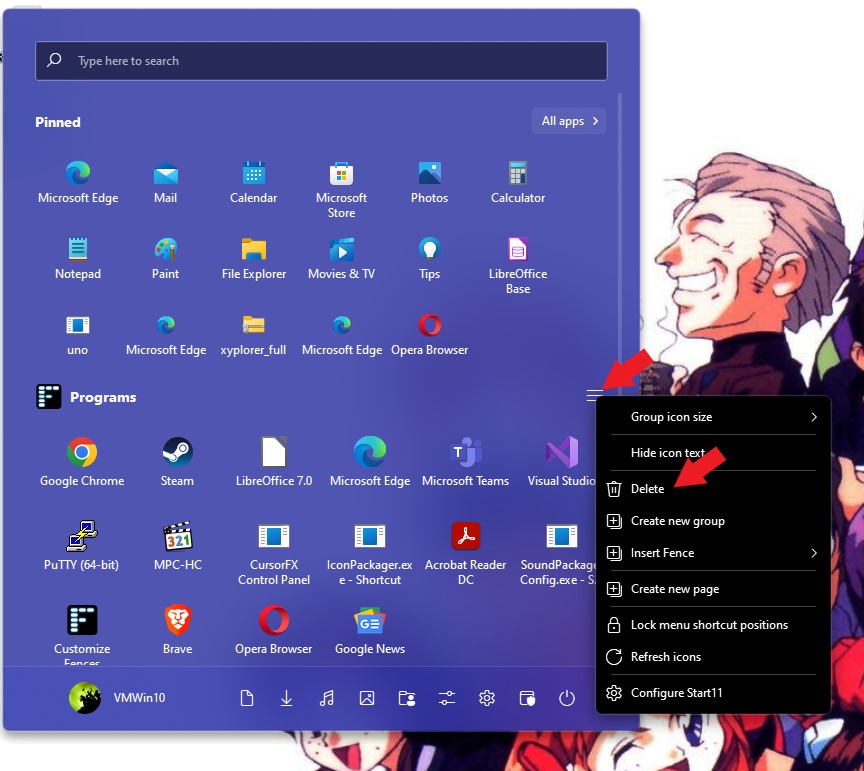
Sorry to hear you are having issues. If you want to remove a Fence from your start panel, you just need to hover over that Fence title bar, 3 line menu button will appear. Right click on it and a menu will come up. Click the delete option. Refer to screenshot below.

Thanks
Basj,
Stardock Community Assistant.

Reply #2 Top

those three lines do not appear

after hovering (left cursor there for over 1 minutre)

i created it by right clicking and

selecting insert fence. didnt get option to 

name it or anything

if i remove the fence from my desktop icons disappear

but the  "F" remains 


Reply #3 Top

You can also just right click on the name of the fence you do not need the 3 lines.

If the fence is at the top of your start menu, maybe try holding the left click on the name and drag it down a row or two then seeing if you can get delete to appear.

Reply #4 Top

tried that already 

so i just uninstalled and re installed

and reset everything

is there a way to save setting so if i make a change i  dont like i can just roll back?

thanks for your help