Greys turn pink

I have a HP Spectre X360 14" laptop running Windows 11. When Start 11 is active for my account greys on the screen are light pink when the computer wakes up from sleep. I can occasionally get them back to normal by shutting down the computer but not always.

The only reliable way to get rid of the problem has been to disable Start 11 for my account by using Start10Tweak.

I can literally see the pink tint applied to the screen just after logging in, apparently at the point where Start 11 activates.

This tint is only visible on the LCD. It does not show up on the external monitor.

Have you seen this issue? Is there a fix in the works? This makes Start 11 nearly unusable as I can't reliably edit images with the color distortion.

2,719 views 9 replies
Reply #1 Top

Hello,
Sorry to hear you are having issues. But, this is the first time I read such issue reported on Start11. First, please try purge and reinstall steps as mentioned here: [link]. Just make sure to redownload the latest version from your account. Reboot after the purged. Reinstall, and Reboot again after the installation. Retest it. Report back here.

Thanks
Basj,
Stardock Community Assistant.

Reply #2 Top

Hello,

I will try that when I get a chance. However, I can tell you for sure that the behavior does NOT happen when Start 11 is disabled for my account using Start10Tweak. I ran for a full two days with it disabled and never had the issue. I reenabled it last night and the greys turned pink after the first wake from sleep. My conclusion is that it has to be related to Start 11. No other changes were made.

I'll try the purge and reinstall but I'm not holding out a lot of hope that it will solve the problem.

When this happens the pink layer drops over the windows login screen about halfway through the login process when the spinner is displayed. It happens to be especially evident at the moment because the login screen (bing?) image is black and white.

Thanks,

Dave Erwin


Reply #3 Top

Hello,

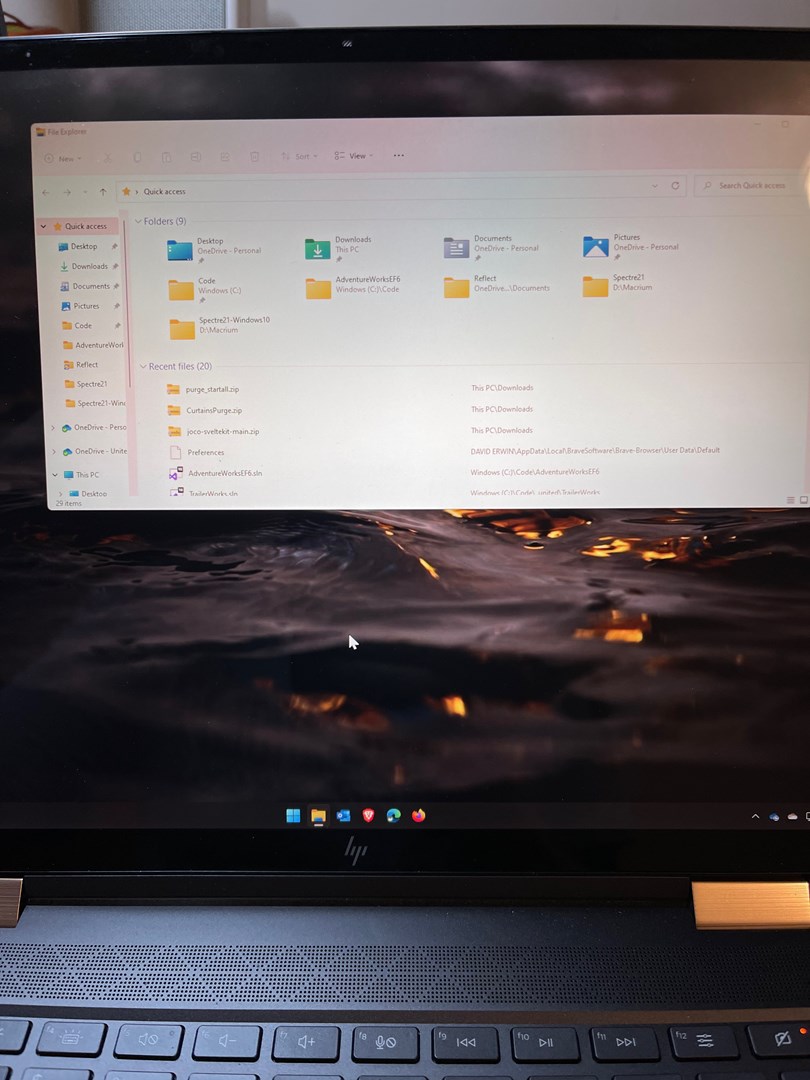
I did the purge and reinstall with reboots. I let the computer go to sleep on battery, and shortly after I woke it up the pinks were back. This does not happen when Start11 is disabled or uninstalled. I tried to attach a screenshot of what it looks like but it must literally be triggering something in the hardware, the screenshot does not show it. Attached is a photo I shot with my iPhone.

I know this is weird but all I can tell you for sure is it does not happen when Start 11 is not active.

Thanks,

Dave Erwin

Reply #4 Top

What is your Windows 11 full version numbers. Use Windows own "Winver.exe" to get that numbers.

Thank you,

Basj,
Stardock Community Assistant

Reply #6 Top

Version 21H2 22000.493

Yes, that was where I started and I posted my own problem there as well. However her problem is slightly different, she is also seeing it on her external monitor. I am not. Similar to the screenshot problem that I pointed out previously it doesn't seem to be something that Windows is doing/is aware of. It doesn't show up in an RDP session either.

So, I started with thinking it was a hardware issue and contacting HP. Then I remembered that Curtains was installed on this computer when it was running Windows 10 and I had uninstalled it when I upgraded to Windows 11. Since the behavior seemed to be curtain-like :) (a pink curtain dropped over the screen) I found the purge batch file for Curtains and ran it. When that didn't take care of the problem I found Start10Tweak and disabled Start 11. Since that seemed to cure the problem that's how I ended up here.

I don't think this is a hardware issue but rather software that is causing weird hardware behavior. Even after uninstalling/disabling Start 11 it takes awhile for the pink haze to go away. I haven't determined the exact sequence of full shutdowns, restarts etc. that gets rid of it. Generally it just seems to be time, I'll look at the screen at some point and it will be gone. But, once it goes away it doesn't come back.

I have Start 11 uninstalled, I'm going to run it that way for a week to make sure the problem doesn't occur. At this point I'm just trying to nail down the issue for you. I can live without Start 11, just can't deal with a pink screen.

Thanks,

Dave Erwin

Reply #8 Top

Son of a... Never mind. Windows 11 night light was on and scheduled. I don't remember turning it on, might be a default in Windows 11. The intensity was set to 50% which also makes me think I didn't set it because that makes the screen very pink.

My bad, sorry for the trouble. But, I thought I'd let you know in case someone else runs across this. I'll also post on the HP thread.

Thanks,

Dave Erwin

Reply #9 Top

Awesome, glad it resolved. And thank for your input back. Surely someone else might need this information too. :thumbsup:  

Thank you,

Basj,
Stardock Community Assistant