Start11 1.1.1.1 Beta Feedback Thread

With the Start11 1.11 beta release today, we are creating this thread so that users can report any observed issues.  

Obtaining the beta:

Object Desktop members can get the beta from within Object Desktop Manager with 'show beta downloads' enabled:

Individual purchases (as well as Object Desktop Members) can also be obtained from your account page:

https://store.stardock.com/myaccount/products

Reporting an issue:

Please include the following for anything found:

  • Exact Windows version \ build (winver.exe)
  • Detailed steps to recreate the issue seen
  • Screenshots and videos are very helpful.  Videos can be uploaded to a cloud drive services (GoogleDrive, DropBox, OneDrive, YouTube) and link included in your post.  Images can be directly added.
  • If there are specific apps that the app does not work (well) with, please note what apps and their exact versions.  If any app is not common, a link to a trial version would be appreciated.

Thank you for your interest and any time you put into making Start11 a better product.

116,234 views 64 replies
Reply #1 Top

Start11 1.11 changelog:

1/31/2022
  • Version change to 1.1.1.1
  • Includes new 64-bit service
  • Tweak which may help incorrect positioning of Win10/11 style menu for some people (unsure as it may hit only one possible cause)
  • Tweak to hopefully help the KM app issue, but this needs some testing for those not using KM to ensure nothing funny is showing up with clicking on centered start button on Win11:
    https://forums.stardock.com/508761/start11---barrier-kvm-screen-switching
  • Tweak for always on top taskbar in Win11 dev
  • Tweak to stop secondary taskbar getting 'stuck' too big and also too big when put into small mode
    • Users may have to change the size to another size and back again for it to take effect
  • Tweak to fix time/date positioning on Win11 secondary taskbar in insider builds when small taskbar mode​
  • Tweak so unpinning an item from S11 doesn't trigger it to remove all shortcuts with that target from all S11 menu types
  • Clicking above/below a scrollbar in the menu now scrolls
  • Fix for square image painting on jumplist for Win7/modern style when on Win10 when you could pin / unpin an item instead of the correct icon
1/14/2022
  • The option to always make the menu center aligned regardless of where the start button was positioned (as long as it was set to center) wasn't working when you clicked on it.
1/13/2022
Reply #2 Top

Known Issues

  • For 1.1.1.1, Object Desktop Manager (ODM), will keep showing there is an update even after you do - its a false positive and something we need to address. It also shows incorrectly as 1.11 on the About tab of Start11.

    If you wanted to confirm that your update did indeed complete:
    • In the install directory for Start11
    • Start11Config.exe, properties
    • Details will show the extended version
  • This beta has only minimally been tested to ensure it did not blow anything up and that it did indeed fix the issue reported for the Windows 11 Insider Dev branch.
  • We have a fix for some software KVM issues for the below report but it needs more testing:
    https://forums.stardock.com/508761/start11---barrier-kvm-screen-switching
  • Taskbar on top does not work on Windows insider dev build. This is known and we have an internal fix for this but again needs more testing.


Reply #3 Top

With the release of Start11 1.11, we are closing this thread.  Thanks to all that particiapted.

Sean Drohan
Stardock Support Manager

Reply #4 Top

The Beta is not listed in the my account section for single start 11 purchases

Edit - it is now showing, thanks.

Reply #5 Top

I have only experienced a very mild issue. Any icons that have been changed (via the custom tile/icon feature) that are no longer saved on the computer disappear once updated. I will chalk it up to partially my fault for not leaving the icons saved in a folder..

Otherwise, no new issues even on the newly released Windows 11 update version 22000.466

+1 Loading…
Reply #6 Top

Hi, I have downloaded and follow the steps you mentioned but still nowhere to see the beta update.

May I know where exactly it is? Do I need to purchase Object Desktop to install Start11 beta?

Thank you.

Reply #8 Top

I’m having a problem in windows 11 and start11.

The taskbar on my second display doesn’t appear when I place the cursor over it (I have autohide enabled). If I press the win key on my keyboard, then it shows, but it’s appearance is different from the one on the main display, it appears transparent, the other one is blue.

So, I have two issues: the taskbar doesn’t show and when it does, it is different from the main taskbar. 

Reply #9 Top

I'm also experiencing Explorer reboot loops. While configuring Start11, or installing something, or opening Task Manager, etc.

Quoting willynanita, reply 8

I’m having a problem in windows 11 and start11.

The taskbar on my second display doesn’t appear when I place the cursor over it (I have autohide enabled). If I press the win key on my keyboard, then it shows, but it’s appearance is different from the one on the main display, it appears transparent, the other one is blue.

So, I have two issues: the taskbar doesn’t show and when it does, it is different from the main taskbar. 

End of willynanita's quote

I should say that I also have Fences and Groupy installed.

Reply #10 Top

Quoting willynanita, reply 9

I'm also experiencing Explorer reboot loops. While configuring Start11, or installing something, or opening Task Manager, etc.


Quoting willynanita,


I’m having a problem in windows 11 and start11.

The taskbar on my second display doesn’t appear when I place the cursor over it (I have autohide enabled). If I press the win key on my keyboard, then it shows, but it’s appearance is different from the one on the main display, it appears transparent, the other one is blue.

So, I have two issues: the taskbar doesn’t show and when it does, it is different from the main taskbar. 


I should say that I also have Fences and Groupy installed.

End of willynanita's quote

Is this specifically with this 1.11 beta build or with the release builds too?

The taskbar on a secondary display in autohide mode has a known issue in Windows 11 where it will not appear when the mouse is over all areas.  This is a OS issue not Start11.

Reply #11 Top

Yes, I just found out about the taskbar autohide issue in Windows 11. I didn't know about it, because this is my first windows 11 install, and since it was installed, Start11 was loaded. It was happening with the release version, I was told to install this beta because of my issues.

But, still, when the taskbar appears, it is transparent.

Reply #12 Top

Downloaded and installed the beta on Win11 build 22533. So far everything is working as expected for me.

Reply #14 Top

Quoting Sto3IV2849, reply 13

Start menu on top still not working. Beta 11.1 and latest windows build.

Reduced 23%
Original 1215 x 378


End of Sto3IV2849's quote

This is a noted known issue in this thread.

"Taskbar on top does not work on Windows insider dev build. This is known and we have an internal fix for this but again needs more testing."

One of the perils of using dev builds of Windows I am afraid.

+2 Loading…
Reply #15 Top

Can I test this 'internal fix'. I have taskbar on top since 2004 (my first windows) so its very important for me. My work on PC now is slow and annoying. 


Quoting Neil, reply 14


Quoting Sto3IV2849,

Start menu on top still not working. Beta 11.1 and latest windows build.


Reduced 23%


Original 1215 x 378


This is a noted known issue in this thread.

"Taskbar on top does not work on Windows insider dev build. This is known and we have an internal fix for this but again needs more testing."

One of the perils of using dev builds of Windows I am afraid.

End of Neil's quote

+1 Loading…
Reply #16 Top

Sto3IV - With these DEV builds you may want to start making sure you have a roll back point saved before you install any new updates. It seem's like MS is getting a little more experimental with their stuff, so there may be a few more instances where things stop working. I have seen a lot of apps, not just in start 11.

Reply #17 Top

I am experiencing the explorer reboot issue.  It seems to manifest itself when I change volume up/down/mute with my keyboard.  Every time I make any of those changes explorer will reboot.

Absolutely LOVE the product but this is a bit tough to deal with many times a day.

Win 11 ver 22533.1001

Let me know if there is any other system info you need from me.

Many thanks and keep up the great work !


Reply #18 Top

Quoting jeremymbwilson, reply 17

I am experiencing the explorer reboot issue.  It seems to manifest itself when I change volume up/down/mute with my keyboard.  Every time I make any of those changes explorer will reboot.

Absolutely LOVE the product but this is a bit tough to deal with many times a day.

Win 11 ver 22533.1001

Let me know if there is any other system info you need from me.

Many thanks and keep up the great work !

 
End of jeremymbwilson's quote

Are you sure thats to do with Start11?

If you uninstall Start11 does the problem continue?

If so does event log show anything about the problem?

Reply #19 Top

Quoting Sto3IV, reply 15

Can I test this 'internal fix'. I have taskbar on top since 2004 (my first windows) so its very important for me. My work on PC now is slow and annoying. 
End of Sto3IV's quote

I am afraid that will only be made available when it is ready.

I would strongly advise people using dev channel builds to be sure they really need to as I would expect a lot of OS issues (unrelated to S11, just broken things in the OS) in the coming months as Microsoft works on new features.  Microsoft in fact warned of that a few months ago.

Reply #20 Top

As you can see - microsoft trying to say me: "use dev builds or windows 10. other options is not allowed."

Quoting Neil, reply 19


Quoting Sto3IV,

Can I test this 'internal fix'. I have taskbar on top since 2004 (my first windows) so its very important for me. My work on PC now is slow and annoying. 


I am afraid that will only be made available when it is ready.

I would strongly advise people using dev channel builds to be sure they really need to as I would expect a lot of OS issues (unrelated to S11, just broken things in the OS) in the coming months as Microsoft works on new features.  Microsoft in fact warned of that a few months ago.

End of Neil's quote

Reply #21 Top

Quoting Sto3IV, reply 20

As you can see - microsoft trying to say me: "use dev builds or windows 10. other options is not allowed."

Reduced 65%
Original 1277 x 1063


Quoting Neil Banfield,


Quoting Sto3IV,


Can I test this 'internal fix'. I have taskbar on top since 2004 (my first windows) so its very important for me. My work on PC now is slow and annoying. 


I am afraid that will only be made available when it is ready.

I would strongly advise people using dev channel builds to be sure they really need to as I would expect a lot of OS issues (unrelated to S11, just broken things in the OS) in the coming months as Microsoft works on new features.  Microsoft in fact warned of that a few months ago.


End of Sto3IV's quote

Once on a dev build I have a feeling the only way out is a reinstall, or at least that was apparently the case on Windows 10.

Reply #22 Top

Quoting Neil, reply 21

Once on a dev build I have a feeling the only way out is a reinstall, or at least that was apparently the case on Windows 10.
End of Neil's quote

That or you have to opt-out of the dev build, wait for the next general release to install, and only then can you opt-in to the other branches.

It's quite the mess.

Sean Drohan
Stardock Support Manager

Reply #23 Top

As I said in the 1.1 thread the Windows 10 "Taskbar Centering" issues still exists in 1.11 Beta.

I have multiple monitors turned on, it "flip-flops" which one is centered (one always works, but the second one is left justified).  Which monitor is effected by the incorrect setting alternates.

This is on a corporate laptop so it's Windows Enterprise, and if it helps, my non-laptop screen is the one which is my primary monitor.


Reply #24 Top

Quoting jeremymbwilson, reply 17

I am experiencing the explorer reboot issue.  It seems to manifest itself when I change volume up/down/mute with my keyboard.  Every time I make any of those changes explorer will reboot.

Absolutely LOVE the product but this is a bit tough to deal with many times a day.

Win 11 ver 22533.1001

Let me know if there is any other system info you need from me.

Many thanks and keep up the great work !

 
End of jeremymbwilson's quote


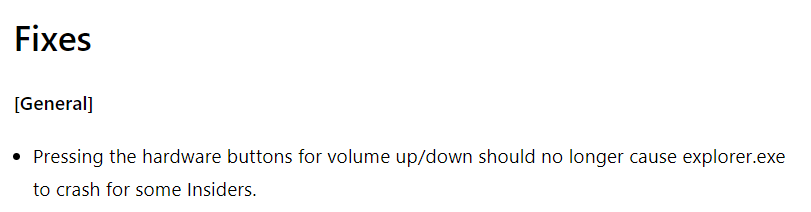
I just saw in the new dev release 22538 that there was an issue with hardware buttons for volume up/down that was resolved in the new build. So it doesn't look like it's a Start11 issue and actually a Win11 issue.

Reply #25 Top

Quoting jim75, reply 24


Quoting jeremymbwilson,

I am experiencing the explorer reboot issue.  It seems to manifest itself when I change volume up/down/mute with my keyboard.  Every time I make any of those changes explorer will reboot.

Absolutely LOVE the product but this is a bit tough to deal with many times a day.

Win 11 ver 22533.1001

Let me know if there is any other system info you need from me.

Many thanks and keep up the great work !


I just saw in the new dev release 22538 that there was an issue with hardware buttons for volume up/down that was resolved in the new build. So it doesn't look like it's a Start11 issue and actually a Win11 issue.


End of jim75's quote

This is why I would personally suggest most people should avoid the dev builds.