is Start 11 provide a way to show all my taskbar shortcuts

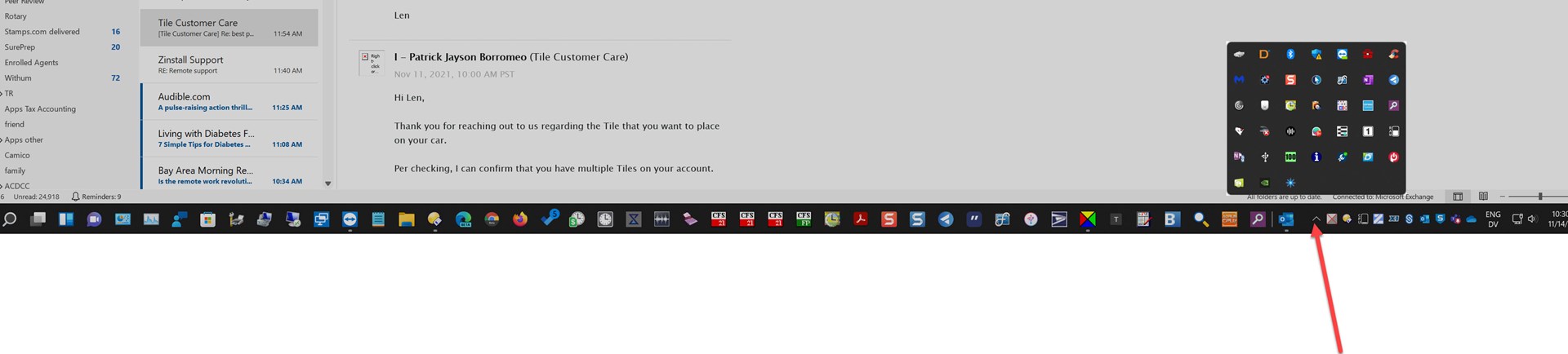
1. on all my 4 Win 11 machines, i can't find the overflow area for shortcuts not shown on the taskbar. end up searching for them most of the time. sometimes the tool tray icons work as a substitute.

2. and how does one enable the feature to display full list of choices instead of hittingh more+?
1,555 views 3 replies
Reply #1 Top

Hello,
Sorry to hear you are having issues. But, I am not really sure what you trying to look for. A screenshot on what you expecting to see might help.

Thanks
Basj,
Stardock Community Assistant.

Reply #2 Top

example: MS Teams supposedly is pinned to the bottom taskbar, but like a bunch other apps such as OneNote, Word, Excel etc. there is no icon for them on the taskbar. if one clicks on the up carrot to the left of the tool tray, there are a bunch of apps showing there, but not Teams, Word, Excel etc.

Used to be w Win 10 that if I "unpinned" and then "pinned" i could see the shortcut icon. But not with Win 11.


Reply #3 Top

Hello,
I have forward your request to the Stardock Support Team for their review and recommendations. Please keep an eye on this thread for any updates. We really do appreciate your feedback, Thanks

Basj,
Stardock Community Assistant.