Fences 4 BETA on Windows 10

Upgrade from fences 3 to 4 destroyed desktop.

I have just [foolishly] upgraded to Fences 4 from v3 on Win10. This not only cost cash but now leaves me with a virtually impossible to use system. I have no desktop display at all. I'm operating and launching programs using a [excellent] search program which allows me to search out and find Apps and dot-exe progs. Otherwise the complete desktop is black - no task bar or anything. I can get to task manager by using ctrl-alt-del but otherwise the rest is blank. Apps will run if I can find them and launch thru file manager but this is hardly convenient. I have tried uninstalling fences - with no improvement. I have even tried reinstalling Fences 3 which worked fine - still no success.

Any help or advice much appreciated. TIA. Peter.

3,396 views 13 replies
Reply #1 Top

Hello,

Sorry to hear you are having issues. Please try purge and reinstall steps as mentioned here: [Link] Just make sure to redownload the latest version from your account. Reboot after the purged. Reinstall, and Reboot again immediately after the installation. Retest it. Report back here.

Thanks

Basj,

Stardock Community Assistant.

Reply #2 Top

Hi Basj - Purge dld and run successfully. Fences 3 dld and reinstalled. System rebooted = exactly the same issue - completely blank [black] screen [no task bar or anything]. Very difficult to run all this stuff from Task Manager !!! But thanks for help so far. Any more suggestions, please?

Reply #3 Top

BTW - found a suggestion it might be an iCloud conflict so I've already removed all that. Also several reset points tried - all without success.


Reply #4 Top

The Purge suppose to purge both Fences 3 and 4, what error did you get when you ran the purge?

Thank you,

Basj,
Stardock Community Assistant

Reply #5 Top

Here is the log:

[2021-11-14T10:49:44] Info    : Initialize: Product ID '2628', Product Name 'Fences3', Version '3.1.3.3', Company Name 'Stardock', Process Name 'C:\Program Files (x86)\Stardock\Fences\Fences.exe'.

[2021-11-14T10:49:44] Info    : Loaded package file 'C:\Program Files (x86)\Stardock\Fences\Default.spak', Version '5'.


When trying to run it I get the error message Fences is not loaded BNut this pops up the Welcome to Fences interface. Basic options - Enable fences is checked.


Reply #6 Top

After the purge and reboot. Did you reinstall Fences? If you did, what error pop up when you reinstall it?

Thank you,

Basj,
Stardock Community Assistant

Reply #7 Top

When trying to run it I get the error message Fences is not loaded

But this pops up the Welcome to Fences interface. Basic options - Enable fences is checked.


Best wishes, Peter
Sent: 11h 51m on 14-Nov-2021

Reply #8 Top

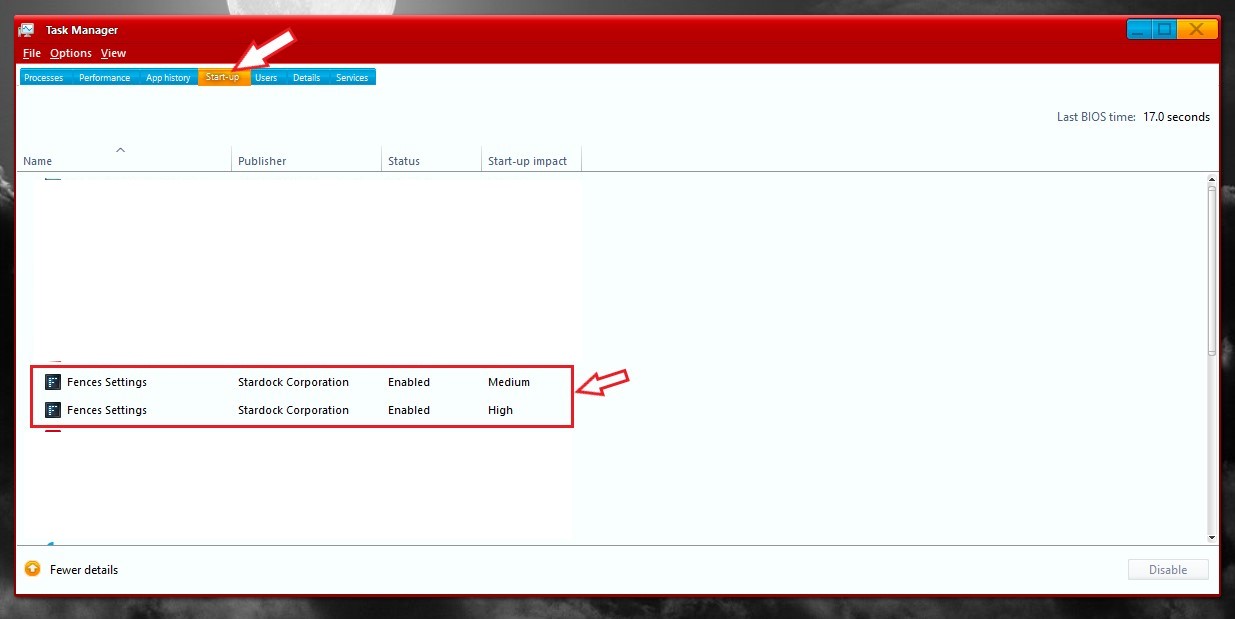
Please check if fences is loaded twice in Startup.

Thank you,

Basj,
Stardock Community Assistant

Reply #10 Top

Please check if it listed in the Task manager startup twice. If not than might need to run the purge and reinstall again.

Thank you,

Basj,
Stardock Community Assistant

Reply #11 Top

I have given upon this!!! This so-called upgrade has ruined both my day and my whole [complex] Win10 setup. I shall be making a claim to PayPal. 


Best wishes, Peter
Sent: 19h 14m on 14-Nov-2021

Reply #12 Top

Quoting peterdep, reply 11

I have given upon this!!! This so-called upgrade has ruined both my day and my whole [complex] Win10 setup. I shall be making a claim to PayPal. 


End of peterdep's quote


You can submit a ticket here to get a refund https://stardock.atlassian.net/servicedesk/customer/portal/4


Reply #13 Top

Quoting peterdep, reply 11

I have given upon this!!! This so-called upgrade has ruined both my day and my whole [complex] Win10 setup. I shall be making a claim to PayPal. 


Best wishes, Peter
Sent: 19h 14m on 14-Nov-2021
End of peterdep's quote

Just to be clear, after you run the purge and DO NOT reinstall Fences, do you still have the issue?

Sean Drohan
Stardock Support Manager