When changing the taskbar position to the top, the quick actions menu isn't displayed correctly

hi,

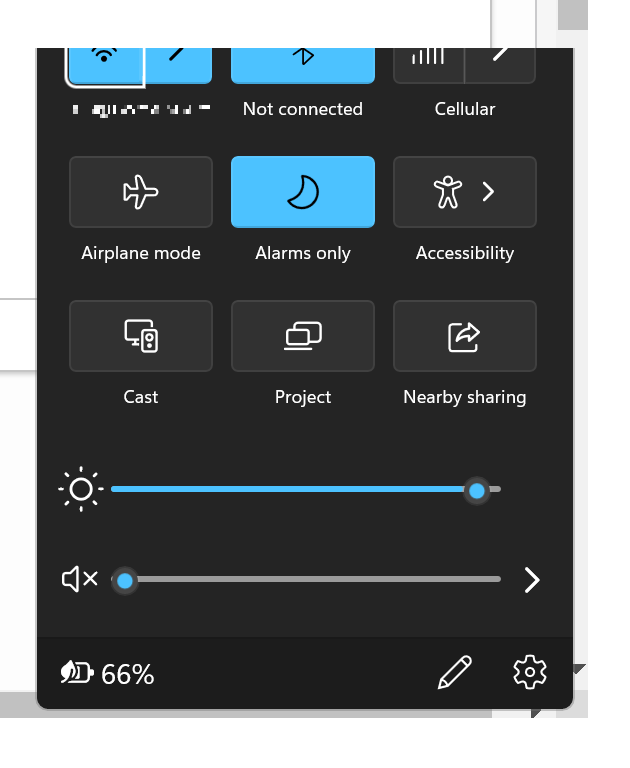
When I change the taskbar position to the top - the quick actions menu display gets partially broken.  The displayed quick action panel that opens on the bottom right of the screen is clipped (top is cut-off).  To reproduce - click the network / speaker icons in the system tray. 

Thanks!
7,918 views 19 replies
Reply #2 Top

Hello,
Sorry to hear you are having issues. But, I can't reproduce it on my system. What is your display scaling factor? 100%, 125%, 150%?

Thanks
Basj,
Stardock Community Assistant.

Reply #3 Top

Hi,

Thanks for the prompt response.  This happens regardless of the configured scale.  Right now I'm at my device's recommended value (150%) - but I've also tried changing to 100%, 125%, etc. - and even logging off and on, and rebooting with different values  - but it still looks cut-off (only in different relative size each time).

Reply #4 Top

What is your monitor resolution?

Thank you,

Basj,
Stardock Community Assistant

Reply #5 Top

1920x1280.

I see the same issue even when I connect my external display (2560x1440) - and set it as the primary (and only active) display - again, regardless of the chosen scale used (100%, 125%, 150%).

Thanks!

Reply #6 Top

Hello,
I have forward your problem/question to Stardock Support Team for their assistance. Please keep an eye on this thread for any updates. We appreciate your feedback and patience.

Basj,
Stardock Community Assistant

Reply #7 Top

Hello,

I have the exact same problem, the quick settings menu is cut off at the top, only if taskbar is on Top.
1920x1080p on 100% scaling.

Anything new related to this? It bugs me out alot.

Kind regards,
Kami

Reply #8 Top

Quoting DerKami, reply 7

Hello,

I have the exact same problem, the quick settings menu is cut off at the top, only if taskbar is on Top.
1920x1080p on 100% scaling.

Anything new related to this? It bugs me out alot.

Kind regards,
Kami

What version of Start11 you have on? There is a new version release very recently. V1.11 Beta, give it a try, please. For reference : https://forums.stardock.com/509537

Thank you,

Basj,
Stardock Community Assistant

Reply #9 Top

Hi Basj,

just installed the beta, did a restart and it turns out, the error is still there.

One interesting aspect to note here:
I figured out, if you resize the taskbar (small, medium, large) the error gets worse the bigger the taskbar is.
Soooo i thought i'll try auto hide. Gues what, error is gone. (disable auto hide and the error is back again)

My best guess is, windows thinks if the taskbar is on top, that it's actually hidden. Because the position of the quick settings menu is significantly lower than it would be if the taskbar is on the bottom.
So it calculates, based on a hidden taskbar, but actually get's a smaller working area because it's on the top.

Maybe this helps the devs somehow.

Kind regards,
Kami

Reply #10 Top

Hello,

Sorry to hear you are having issues.

But some taskbar issues will be resolved in an upcoming update.

which might help your issue .


AzDude
Stardock Community Assistant

Reply #11 Top

To those who still have the issue, are you using release version of Windows 11 or insider?

Also English or other language install?

I ask as the issue was resolved some time ago so there is something else involved here that differs from our testing.

Reply #12 Top

https://youtu.be/uWTE920ZA6o


I made a Video of the Problem.
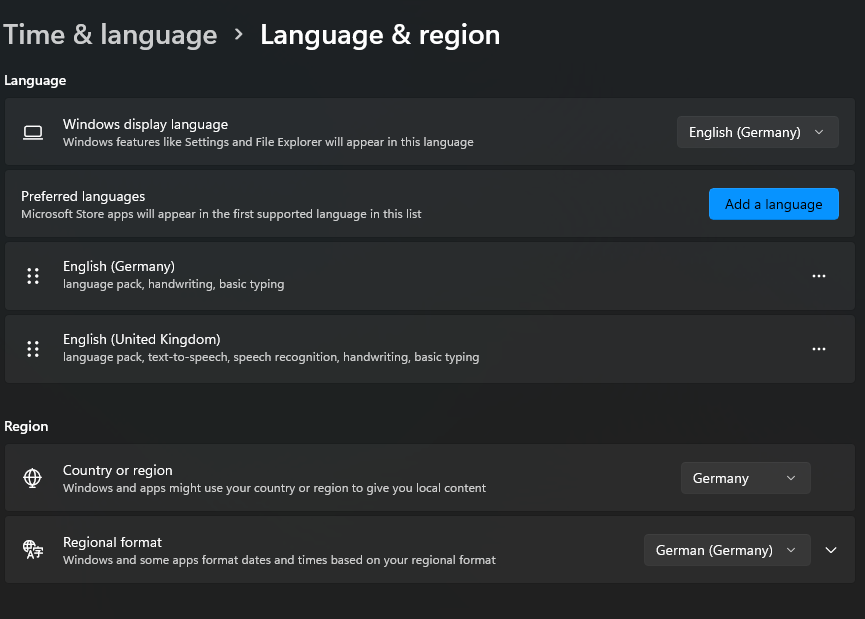
In my case, it's English as System language, but German as regional Language (Keyboard / Date-Time / Number Formats).

Edition Windows 11 Pro

Version 21H2

Installed on ‎05.‎12.‎2021

OS build 22000.434

Experience Windows Feature Experience Pack 1000.22000.434.0


It was, however, a manual upgrade from Win10 via media creation tool.

Kind regards,

Kami

Reply #15 Top

So I've got a new Computer for work, and this issue still persists. It still cut's it of if you have your Taskbar at the top.
Is this going to be addressed or abandoned and we just have to live with it?

Reply #16 Top

Quoting DerKami, reply 15

So I've got a new Computer for work, and this issue still persists. It still cut's it of if you have your Taskbar at the top.
Is this going to be addressed or abandoned and we just have to live with it?

Hello,
Sorry to hear you are having issues. Need to know more on your system and setting.

  1. You on Windows 10 or 11? Also need its full version numbers. Use Winver.exe to get those.
  2. Which version of Start11 you have installed?

Thanks
Basj,
Stardock Community Assistant.


Reply #17 Top

Hello Basj,

too bad everything I mentioned above is apparently now invalid.
Well it's the same as i've already stated, although the version numbers are now higher of course.

It's still Windows 11.
On my Personal PC it's 21H2, Build 22000.795
Start11 Version 1.25 (Program says it's up to date).

It's pretty much the same for the other Laptop.
The Video i've posted is currently still reproduceable.

https://youtu.be/uWTE920ZA6o


If you need any more information, feel free to ask whatever you need.
I'm also willing to install alpha / debugging versions of Start11 if necessary to find the bug.

Kind regards,
K

Reply #18 Top

Hello K,

I can't reproduce your issue on my system. But, I notice you and the OP have brightness slider on that QA menu. I can't seem to make mine to have that slider. Anyway, I have forward your problem/question to Stardock Support Team for their assistance. Please keep an eye on this thread for any updates. We appreciate your feedback and patience.

Basj,
Stardock Community Assistant

Reply #19 Top

Hi basj,

the brightness slider is only available if you have a monitor which allows windows to adjust the brightness. I believe that there are very little or basically none to do so, other than laptop displays which so not have an extra OSD menu for that.

If it's possible for you to get your hands on a laptop maybe you can reproduce that.

Kind regards,

K