Repurchased and installed on new pc - on reboot, Fences is gone as are all my desktop icons

I have a new pc and could not find my original product key so re-purchased today.  I installed, all looked great.  Had to reboot and not only is Fences no longer showing in my programs list, but all my desktop icons are gone.


Please assist.

2,581 views 7 replies
Reply #1 Top

Hello,

Sorry to hear you are having issues.

Try this link https://forums.stardock.com/486084/fences-support-faq#iconsmissing

and report back if that worked for your issue .

and for future Keys go here https://forums.stardock.com/484254/getting-your-products-and-keys

and your account here https://store.stardock.com/myaccount/products/


AzDude
Stardock Community Assistant

Reply #2 Top

Thank you for the prompt response AZ.  Unfortunately, Fences is not even in my list of programs.  No Stardock folder, nada.  Just to make sure it was not running in some phantom mode, I changed my display settings to Duplicate rather than Extend, still cannot see my fences or any of my icons.


Reply #3 Top

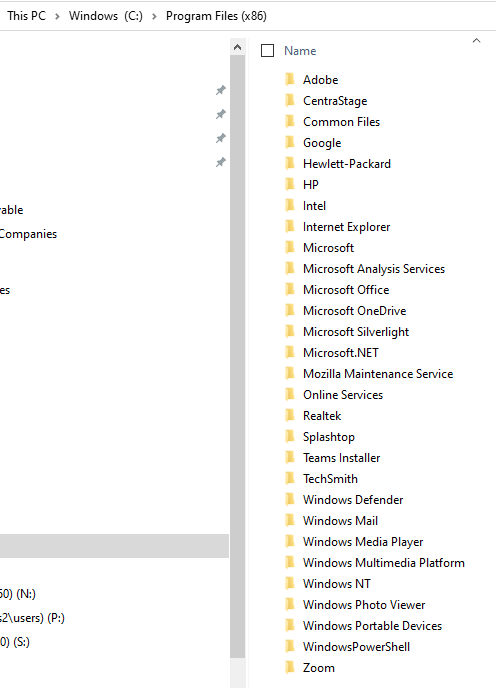
Can you check this location C:\Program Files (x86)\Stardock\Fences

Default location .


Reply #5 Top

Hello,
Sorry to hear you are having issues. Please try purge and reinstall steps as mentioned here: [Link] Just make sure to re-download the latest version from your account. Reboot after the purged. Reinstall, and Reboot immediately after the installation. Retest it. Report back here.

Thank you,

Basj,
Stardock Community Assistant

Reply #7 Top

Great, glad it worked out.

Thank you,

Basj,
Stardock Community Assistant