Fences won't work or install properly after trial period expired

Hi,

I recently reinstalled Windows 8 on my computer, and as part of that I put Fences on. However at the time of installation, I couldn't get to my email and find my product key, so I left it as the trial period intending to use my key when the trial ended.

However, rather than the program letting me know that the trial period was ending, Fences just...stopped working. The fences on my desktop continued to work, but I couldn't add or remove icons, and nothing happened when I tried to open 'configure Fences'. I tried uninstalling and reinstalling a couple of times, even using Total Uninstall, and even though everything appears to go smoothly with the installation, and 'create Fence' and 'configure Fences' appear, nothing happens when I select them.

Please let me know if there's any further information that I can provide to help with troubleshooting.

Thank you.

21,416 views 18 replies
Reply #1 Top

Hello, please use the purge tool and reinstall: https://forums.stardock.com/486084/fences-support-faq#reinstalling

Reply #2 Top

Hi again,

I ran the .bat as directed - I did notice some lines that said error/failure while it ran, though. I shut down and restarted the computer today and attempted to install again, and unfortunately it's still acting the same way as before.

Reply #3 Top

Hello,
Sorry to hear you are having issues. Please check if Fences startup twice on your taskmanager. Use this guide for it : https://forums.stardock.com/486084/fences-support-faq#FencesStartUP. Check that and report back.

Thanks
Basj,
Stardock Community Assistant.

Reply #5 Top

Hello,
I have forward your problem/question to Stardock Support Team for their assistance. Please keep an eye on this thread for any updates. We appreciate your feedback and patience.

Basj,
Stardock Community Assistant

Reply #6 Top

Hello,

Sorry to hear you are having trouble.

If the trial has expired, none of that will work.

Under the account you posted this thread under, you do not own a Fences license.  You can use this link to find the account you have it under:

http://www.stardock.com/support/productkeyretrieval

If you cant find it, you would need to place a ticket to research it:

https://stardock.atlassian.net/servicedesk/customer/portal/4

Sean Drohan
Stardock Support Manager

Reply #7 Top

I do have a licence, just not attached to this account. I can't even get to the point where I could use the product key, as that would require opening the program, and nothing happens when I try.

Reply #8 Top

Hello,

Sorry to hear you are having trouble.

If you are certain that you have completed the purge:

https://forums.stardock.com/486084/fences-support-faq#reinstalling

And rebooted, reinstalled 3.12 from your account page:

https://store.stardock.com/myaccount/products

If that fails, try a clean boot:

https://forums.stardock.com/486084/fences-support-faq#cleanboot

Sean Drohan
Stardock Support Manager

Reply #9 Top

I don't think the purge is able to complete properly. I've copied the console text below. Also, once that finishes running, it brings up the 'welcome to Fences' window asking if I want to use a template or create my own Fences.

SUCCESS: The process "explorer.exe" with PID 1760 has been terminated.

HKEY_CURRENT_USER\Software\Microsoft\Windows\CurrentVersion\Run
    Fences    REG_SZ    e:\programs\fences\Fences.exe /startup

The operation completed successfully.

HKEY_CURRENT_USER\Software\Stardock\Fences
    LastLangID    REG_SZ    en-GB
    ProVersionEverInstalled    REG_DWORD    0x1
    LastConfigSyncAttempt    REG_SZ    4/08/2021 1:52:59 PM
    LastConfigDate    REG_SZ    4/08/2021 1:53:00 PM
    LastConfig    REG_SZ    <Configuration>

<BugSplat>
CrashReporting-BuildEnabled-3.1.0
CrashReporting-BuildEnabled-3.1.1
CrashReporting-BuildEnabled-3.1.2
CrashReporting-BuildEnabled-3.1.3
CrashReporting-BuildEnabled-3.1.4
CrashReporting-BuildEnabled-3.1.5
CrashReporting-BuildEnabled-3.1.6
CrashReporting-BuildEnabled-3.1.7
CrashReporting-BuildEnabled-3.1.8
CrashReporting-BuildEnabled-3.1.9
CrashReporting-BuildEnabled-3.1.10
CrashReporting-BuildEnabled-3.1.*
</BugSplat>

<Telemetry>
TrialTelemetry-BuildEnabled-3.0.5
TrialTelemetry-BuildEnabled-3.0.6
TrialTelemetry-BuildEnabled-3.0.7
TrialTelemetry-BuildEnabled-3.0.8
TrialTelemetry-BuildEnabled-3.0.9
TrialTelemetry-BuildEnabled-3.0.10
TrialTelemetry-BuildEnabled-3.0.11
TrialTelemetry-BuildEnabled-3.0.*
TrialTelemetry-BuildEnabled-3.1.0
TrialTelemetry-BuildEnabled-3.1.1
TrialTelemetry-BuildEnabled-3.1.2
TrialTelemetry-BuildEnabled-3.1.3
TrialTelemetry-BuildEnabled-3.1.4
TrialTelemetry-BuildEnabled-3.1.5
TrialTelemetry-BuildEnabled-3.1.6
TrialTelemetry-BuildEnabled-3.1.7
TrialTelemetry-BuildEnabled-3.1.8
TrialTelemetry-BuildEnabled-3.1.9
TrialTelemetry-BuildEnabled-3.1.10
TrialTelemetry-BuildEnabled-3.1.*
</Telemetry>


<Pulse>
Pulse-BuildEnabled-3.0.5
Pulse-BuildEnabled-3.0.6
Pulse-BuildEnabled-3.0.7
Pulse-BuildEnabled-3.0.8
Pulse-BuildEnabled-3.0.9
Pulse-BuildEnabled-3.0.10
Pulse-BuildEnabled-3.0.11
Pulse-BuildEnabled-3.0.*
Pulse-BuildEnabled-3.1.0
Pulse-BuildEnabled-3.1.1
Pulse-BuildEnabled-3.1.2
Pulse-BuildEnabled-3.1.3
Pulse-BuildEnabled-3.1.4
Pulse-BuildEnabled-3.1.5
Pulse-BuildEnabled-3.1.6
Pulse-BuildEnabled-3.1.7
Pulse-BuildEnabled-3.1.8
Pulse-BuildEnabled-3.1.9
Pulse-BuildEnabled-3.1.10
Pulse-BuildEnabled-3.1.*
</Pulse>


</Configuration>
    LastDebugHeader    REG_SZ    3.0.9.11 4854200 - 26/05/2018 5:16:42 AM 180114
4 - 26/05/2018 5:16:42 AM 3324856 - 26/05/2018 5:16:42 AMNone
    StartingUp    REG_DWORD    0x1

HKEY_CURRENT_USER\Software\Stardock\Fences\Groups
HKEY_CURRENT_USER\Software\Stardock\Fences\Icons
HKEY_CURRENT_USER\Software\Stardock\Fences\InitialSnapshot
HKEY_CURRENT_USER\Software\Stardock\Fences\Rules
HKEY_CURRENT_USER\Software\Stardock\Fences\Settings
HKEY_CURRENT_USER\Software\Stardock\Fences\Stats
HKEY_CURRENT_USER\Software\Stardock\Fences\Tips
The operation completed successfully.
ERROR: The system was unable to find the specified registry key or value.

ERROR: The system was unable to find the specified registry key or value.

ERROR: The system was unable to find the specified registry key or value.

ERROR: The system was unable to find the specified registry key or value.

ERROR: The system was unable to find the specified registry key or value.

ERROR: The system was unable to find the specified registry key or value.

ERROR: The system was unable to find the specified registry key or value.

ERROR: The system was unable to find the specified registry key or value.

ERROR: The system was unable to find the specified registry key or value.

ERROR: The system was unable to find the specified registry key or value.

SUCCESS: Sent termination signal to the process "Fences.exe" with PID 7004.
SUCCESS: Sent termination signal to the process "Fences.exe" with PID 6800.
SUCCESS: Sent termination signal to the process "rundll32.exe" with PID 2924.
SUCCESS: Sent termination signal to the process "rundll32.exe" with PID 6468.
Access is denied.
The directory is not empty.

Reply #10 Top

And if you do the rest... the clean boot?

Sean Drohan
Stardock Support Manager

Reply #11 Top

Tried the clean boot on a clean user as instructed, and it acts the same way. No difference that I can see.

Reply #12 Top

Quoting ToastyMallows, reply 11

Tried the clean boot on a clean user as instructed, and it acts the same way. No difference that I can see.
End of ToastyMallows's quote

Do you have a License.sig file here:

C:\ProgramData\Stardock\Fences3

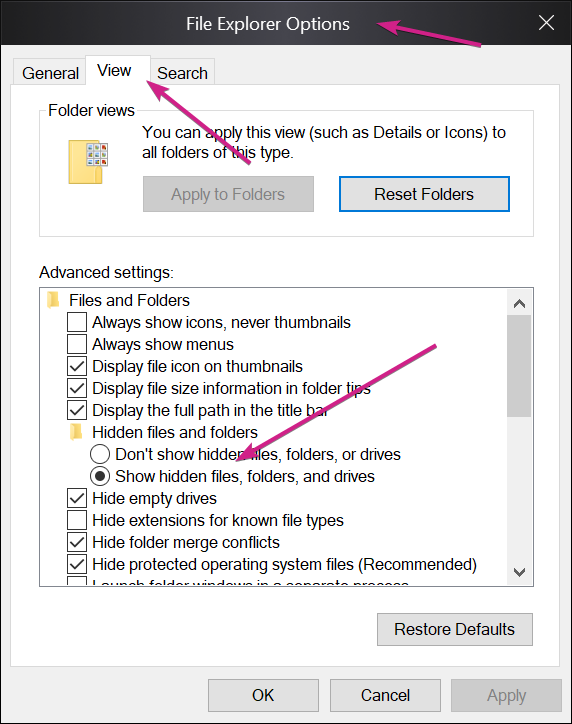
Not that is ProgramData, not Program Files(x86).  If you dont see ProgamData, enable the viewing of hidden files:

Sean Drohan
Stardock Support Manager

Reply #14 Top

Quoting ToastyMallows, reply 13

No, the only file in that folder is Cache.dat.
End of ToastyMallows's quote

Then it's not licensed \ activted.  

Quoting ToastyMallows, reply 7

I do have a licence, just not attached to this account. I can't even get to the point where I could use the product key, as that would require opening the program, and nothing happens when I try.
End of ToastyMallows's quote

I need to you to PM me the key you own (do not put it in a reply to this thread).

Sean Drohan
Stardock Support Manager

Reply #16 Top

Please try the following:

-For Win8/10 Users: Open the Start Screen, and type 'cmd'. Right-click on the search result and select 'Run as administrator' from below.

-Type: sfc /scannow

-Wait for the scan to complete (this can take several minutes)

Some help on how this looks should you need it:

https://support.microsoft.com/en-us/help/929833/use-the-system-file-checker-tool-to-repair-missing-or-corrupted-system

If the SFC finds errors, but cannot fix them, please also run the following command in the same command prompt window:

dism.exe /online /Cleanup-Image /RestoreHealth

Some help on how this looks should you need it:

https://www.windowscentral.com/how-use-dism-command-line-utility-repair-windows-10-image

The above command should assist with replacing any damaged or problematic system files. Please note, however, since it may require restoring certain files, this process can take some time and you will need to be patient until it has completed.

Please let me know whether this resolves your problem or if you have any additional questions.


Thank you,

Basj,
Stardock Community Assistant

Reply #18 Top

Quoting ToastyMallows, reply 17

Ran as requested, found no integrity violations on any of my drives.
End of ToastyMallows's quote

I have answered your PM.

Sean Drohan
Stardock Support Manager